Accounting Overview
A busy clinic can still lose money without noticing: cash comes in at several desks, money goes out in several places, and customer (patient) debt quietly ages into bad debt. Accounting brings that whole flow into one place — from the receipt at the desk, through the cash fund and the e-invoice, to the journal entries in the ledger and the financial statements at period end.
The module is for accountants, cashiers, managers and the clinic owner.
How to open Accounting
On the purple bar at the very top, click the grid icon (four small squares). A board of modules appears, each one an area of the clinic's work.
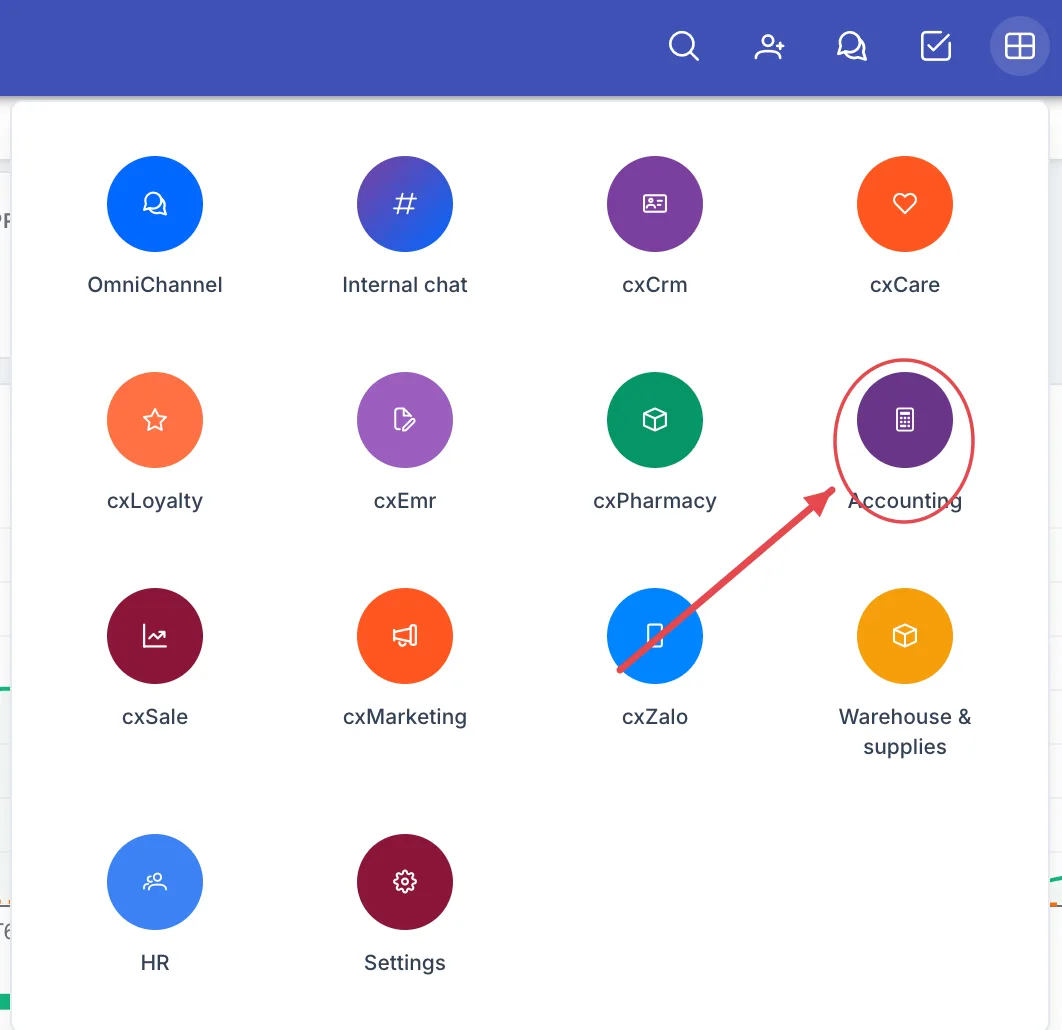
Illustration of the module board
Look for the Accounting tile — a calculator icon on a round deep-purple background. Click it to open the module.
The board only shows the modules your account is allowed to use. Financial data usually opens only for accounting staff and the owner — ask your administrator if you need it.
What's on the working screen
Opening the module lands you on the Dashboard — this month's money in one picture.
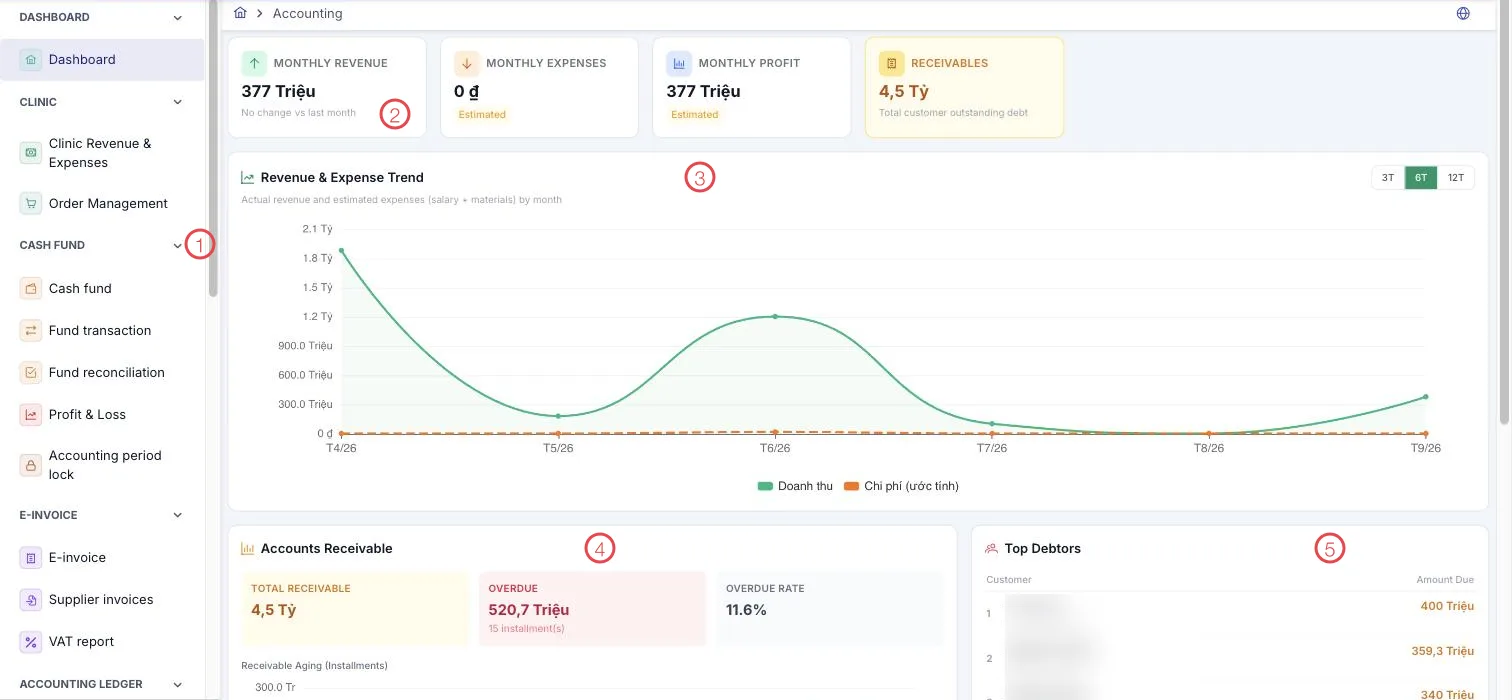
Illustration of the Accounting working screen
| Area | What it is |
|---|---|
| 1. Left menu | The module's items, grouped: Clinic, Cash fund, E-invoice, Accounting ledger, Vouchers, Report. |
| 2. Figure cards | Monthly revenue (against last month), Monthly expenses, Monthly profit and Receivables — total customer (patient) debt outstanding. |
| 3. Revenue & expense trend | Actual revenue and expenses month by month, over 3, 6 or 12 months. |
| 4. Accounts receivable | Total receivable, Overdue (with the number of instalments), Overdue rate, and a receivable aging chart for instalments. |
| 5. Top debtors | The customers owing most, with the amount — the list to work through when chasing payment. |
Monthly expenses and Monthly profit are marked estimated: they are based on the salaries and materials recorded so far, so the final figures come from the financial statements once the books are closed.
Where the money goes
The module follows one coin through the clinic:
- Take payment at the desk. The customer pays and a payment voucher or a receipt/expense voucher is created; deposits, consignments, deposit refunds and service refunds each have their own voucher.
- Into the fund. The money lands in the branch's cash fund; every movement is a fund transaction.
- Reconcile. At the end of a shift or a day, fund reconciliation makes the software's figure match the cash in the drawer.
- Invoice. Issue the customer's e-invoice, file supplier invoices, and produce the VAT report.
- Post to the ledger. Transactions are posted to the accounting ledger by the posting rules; review them in the general ledger and the trial balance.
- Close. Carry forward & close, lock the accounting period, then produce the financial statements and the corporate income tax return.
What the module covers
Clinic
| Menu | What it does |
|---|---|
| Clinic revenue & expenses | The clinic's day-to-day income and spending. |
| Add a receipt or expense | Record one amount in or out that belongs to no customer. |
| Order management | Orders from the money side: how much is paid and how much is left. |
Cash fund
| Menu | What it does |
|---|---|
| Cash fund | The clinic's cash boxes and accounts. |
| Fund transaction | Every movement in and out of a fund. |
| Fund reconciliation | Counting the cash and matching it to the software. |
| Profit & Loss | The period's trading result. |
| Accounting period lock | Freezing a period so its figures stop changing. |
E-invoice
| Menu | What it does |
|---|---|
| E-invoice | Issuing, looking up and replacing customer (patient) invoices, followed until the tax authority confirms them. |
| Supplier invoices | Filing the invoices received from suppliers. |
| VAT report | Value-added tax for the period. |
Accounting ledger
| Menu | What it does |
|---|---|
| Chart of accounts | The clinic's account list. |
| Journal entries | Manual entries for anything out of the ordinary. |
| Opening balance | Balances when starting with the software or opening a new period. |
| Posting rules | Which transaction posts to which account, so posting happens automatically. |
| Exception queue | Transactions no rule matched, waiting for an accountant. |
| Ledger reconciliation | Checking transactions against the entries recorded. |
| General ledger | All entries, account by account. |
| Trial balance | Debits, credits and balances for every account in the period. |
| Closing & period-end | Period-end carry forward and closing. |
| Financial statements | The period's financial reports. |
| CIT tax return | The corporate income tax return. |
| MISA conversion | Loading balances and receivables across from MISA, and checking both systems side by side. |
Vouchers
| Menu | What it does |
|---|---|
| Payment voucher | The customer paying for services or an order. |
| Receipt / expense voucher | The clinic's other money in and out. |
| Advance payment | A customer paying up front before treatment. |
| Consignment voucher | Money left with the clinic to draw down. |
| Advance payment refund | Returning money paid up front. |
| Service refund | Refunding a service already paid for. |
Report
| Menu | What it does |
|---|---|
| Report list | More than forty financial reports — see below. |
The reports available
The module's reports answer three kinds of question:
- Where revenue comes from — by day, by service and service group, by customer source, by Facebook page, by province and country, by customer group, by pathology, by branch.
- Who brings the money in — revenue and commission for consulting doctors, telesales, technicians, assistants and direct sales staff, with summary versions.
- How money moves — receipts and payments by branch and by payment method.
Why use it
- Money and records in one place. Receipts come from the orders and treatments themselves, so there are no two systems to reconcile.
- Debt is on the dashboard. Total receivable, the overdue part, the overdue rate and the biggest debtors — enough to start making calls on Monday morning.
- Automatic posting by rule. Write the rules once and daily transactions post themselves; whatever does not match waits in the exceptions queue.
- Books that can be closed and locked. Carry forward, close, lock — once settled, figures stop moving, so a report printed today matches the one printed next month.
- A clean move from MISA. Account balances and per-counterparty receivables load straight from file, with a parallel check of both systems while you switch over.
Related
- Billing (Medical Records) — collecting fees visit by visit.
- CRM Overview — the orders and treatments that create the debt.
- The Accounting module — the short introduction in Getting started.