Financial Statements
The clinic's financial statements are built straight from the ledger — pick a statement, pick a period, click View. Nothing is keyed in twice.
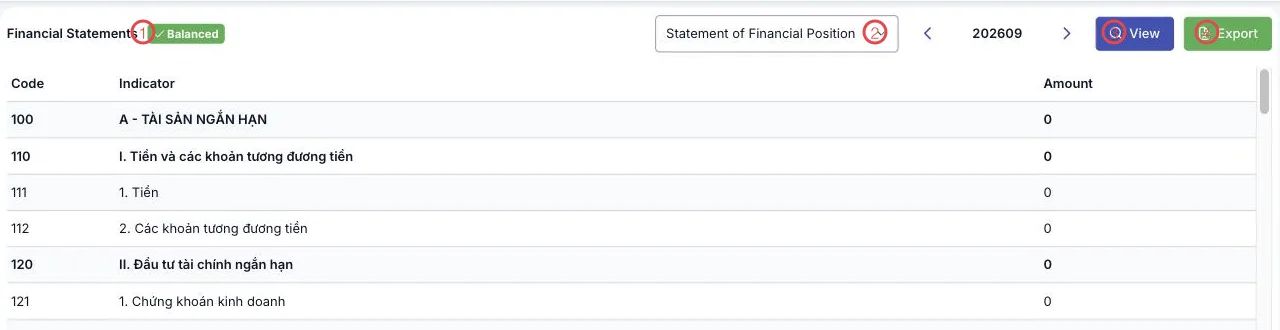
Illustration of the Financial statements screen
| Function | What it does |
|---|---|
| 1. The Balanced tag | The software checks for you: a balanced statement shows this tag. |
| 2. Statement picker | Statement of Financial Position, Income Statement, Cash Flow Statement. |
| 3. View | Builds the statement for the chosen period (the period box is YYYYMM, with arrows). |
| 4. Export | Downloads the statement to file, ready to file or send to your tax accountant. |
The result follows the statutory layout: Code, Indicator, Amount — for example
100 A - CURRENT ASSETS, 110 I. Cash and cash equivalents.
Which statement, when
| Statement | Question it answers |
|---|---|
| Statement of Financial Position | What the clinic owns and owes at the end of the period. |
| Income Statement | Whether the period made a profit, and from what revenue and costs. |
| Cash Flow Statement | How cash actually moved in and out during the period. |
Carry forward first, read after
Run closing for the period before reading the Income Statement — by then revenue and expense are fully carried forward, so the profit figure is the final one.
Related
- Trial Balance — the figures behind the statements.
- Closing & Period-end — the step before reporting.
- CIT Tax Return — tax worked out from the result.