VAT Report
At the end of each period, accounting needs one number: how much VAT is payable. This screen adds it up, with two schedules for checking invoice by invoice.
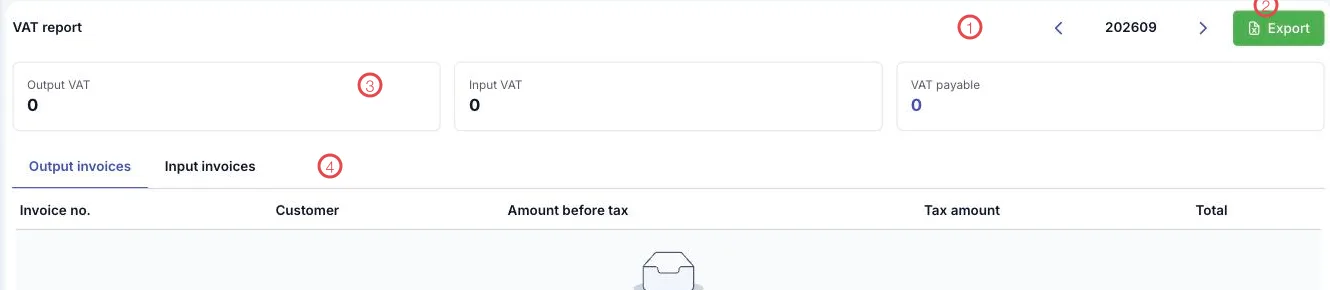
Illustration of the VAT report screen
| Area | What it is |
|---|---|
| 1. Period picker | The period on screen, shown as 202609 — the arrows move between periods. |
| 2. Export | Save the period's report to a file. |
| 3. The three figure cards | Output VAT · Input VAT · VAT payable. |
| 4. The two schedules | Output invoices and Input invoices — the invoices behind the three figures. |
The three figures and how they relate
| Card | Where it comes from |
|---|---|
| Output VAT | Tax on the e-invoices issued to customers (patients) in the period. |
| Input VAT | Tax on the supplier invoices declared in this period. |
| VAT payable | Output minus input — what is actually paid to the tax office. |
The schedules list each invoice with its Invoice no., Customer, Amount before tax, Tax amount and Total, so when a total looks odd, opening the schedule shows which invoice caused it.
Check the input schedule before filing
Supplier invoices arriving late are the most common reason VAT payable looks higher than it should. Before filing, open Input invoices and check it against the period's spending.
Related
- E-invoices — the source of output VAT.
- Supplier Invoices — the source of input VAT.
- Accounting Period Lock — closing once filing is done.