Report List
This is the way in to every financial report. Each one has a line of description under its name, so picking the right one takes no time.
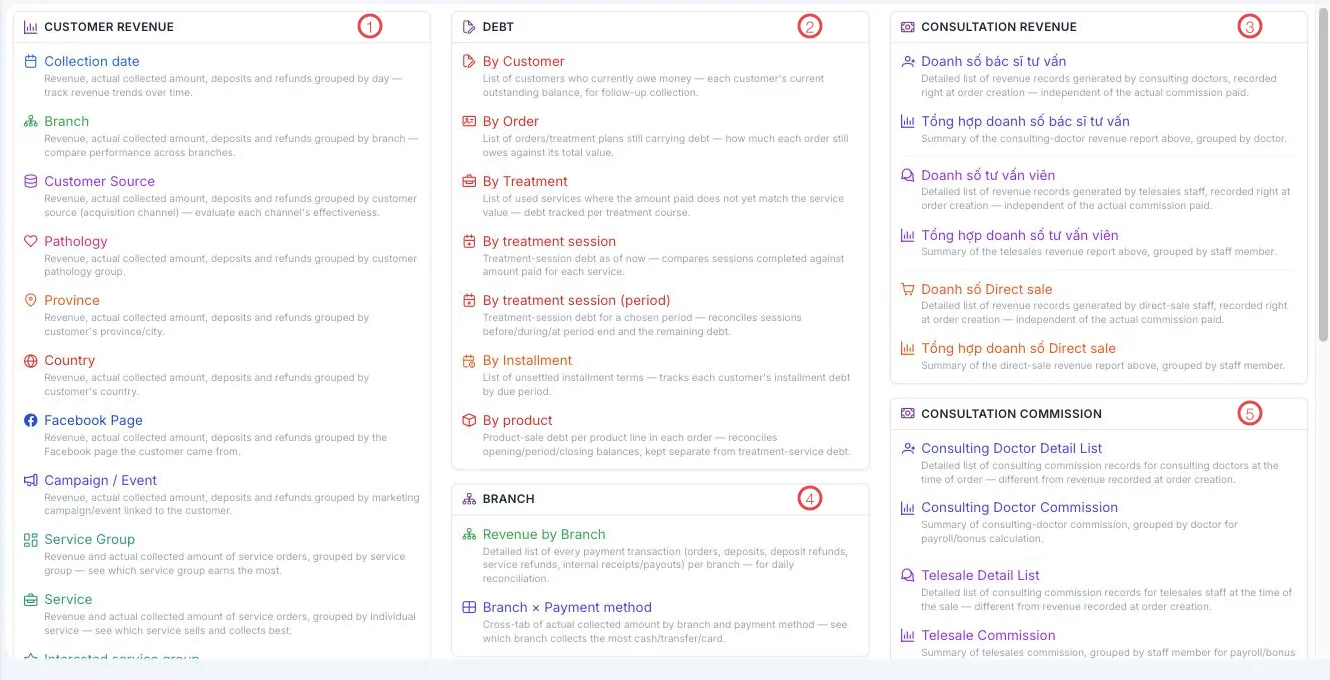
Illustration of the Report list screen
| Area | Report group |
|---|---|
| 1. Customer revenue | Revenue broken down many ways: by day, branch, customer source, pathology, province, country, Facebook page, campaign, service group and service. |
| 2. Debt | Customers (Patients) owing, orders owing, debt by treatment, by treatment session, by instalment, by product. |
| 3. Consultation revenue | Revenue credited to consulting doctors, telesales and direct-sale staff, with summary versions. |
| 4. Branch | Revenue by branch, and a branch × payment method cross-tab. |
| 5. Consultation commission | Detailed and summarised commission per role, for payroll and bonuses. |
Three questions and the reports that answer them
"Where does the money come from?" — the Customer revenue group. Customer Source shows which channel brings actual revenue rather than just enquiries; Branch compares sites.
"Who still owes us?" — the Debt group. By Customer is the call list; By Installment tracks unsettled terms; By treatment session compares sessions delivered against money taken.
"Who brings the money in?" — Consultation revenue and Consultation commission. The two differ in when they are recorded: revenue is credited at order creation, while commission is calculated at the time of the consultation or sale — so the two figures need not match, and each report's description says so.
Several reports have near-identical names (Consulting Doctor Detail List and Consulting Doctor Commission). The grey line under the name says which is row-by-row detail and which is grouped per person — one second of reading saves opening the wrong one.
Related
- Profit & Loss — the period's overall result.
- Order Management — debt per order.
- Accounting Overview — the dashboard with receivables and top debtors.