Ledger Reconciliation
One screen that answers the question a chief accountant asks before closing: "is everything from this period in the ledger?"
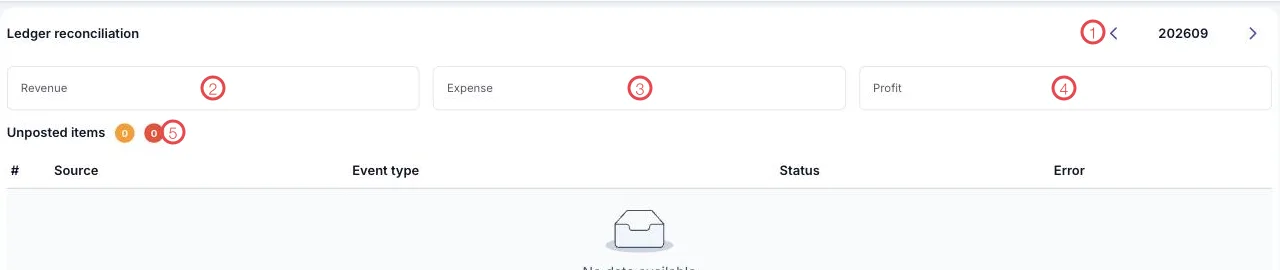
Illustration of the Ledger reconciliation screen
| Area | What it is |
|---|---|
| 1. Period picker | The accounting period under review, written YYYYMM. The arrows step back and forward. |
| 2. Revenue | Total revenue for the period per the ledger. |
| 3. Expense | Total expense for the period per the ledger. |
| 4. Profit | The difference between the two. |
| 5. Unposted items | Two counters: items still pending (amber) and items in error (red). |
The table below lists each unposted item by Source, Event type, Status and Error.
How to read it
| What you see | What it means |
|---|---|
| Both Unposted items counters at 0 | The period is clean, the ledger holds everything — ready to close. |
| The amber number above 0 | Items are queued; Run processing in the exception queue clears them. |
| The red number above 0 | Something is blocked by a rule or an account; sort it out before closing. |
Check here before you carry forward
Open this screen before closing and period-end. A clean period here means the statements you print will not need redoing.
Related
- Exception Queue — clear each waiting item.
- Trial Balance — movements per account.
- Closing & Period-end — the step after the period is clean.