Supplier Invoices
The clinic buys supplies and services and receives invoices for them — those have to be filed so the tax can be deducted. Supplier invoices is that file.

Illustration of the Supplier invoices screen
| Area | What it is |
|---|---|
| 1. Create | Enter an invoice that has just arrived. |
| 2. Search box | Find by supplier or invoice number. |
| 3. Declare period column | Which tax period the invoice is declared in. |
The other columns: Supplier, Invoice no., Invoice date and Total.
Entering an invoice
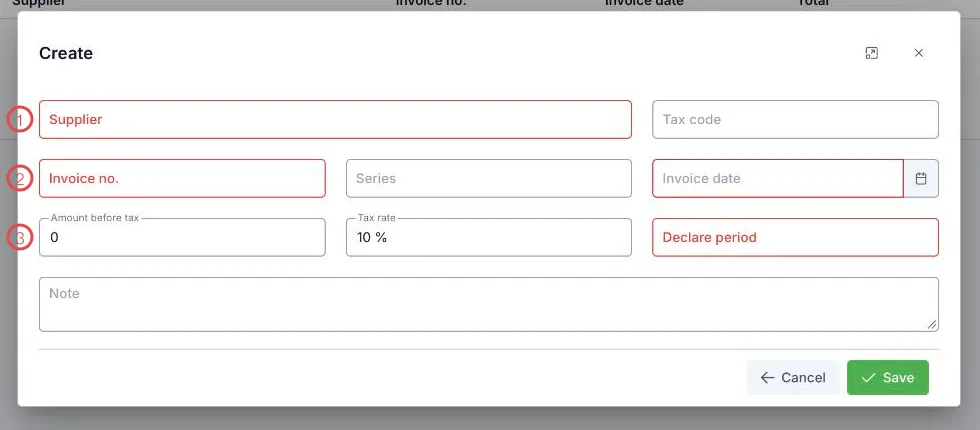
Illustration of the supplier invoice form
| Area | What to enter |
|---|---|
| 1. Supplier (required) and Tax code | Who sold it and their tax number. |
| 2. Invoice no. (required), Series, Invoice date (required) | The three identifiers, copied exactly from the document. |
| 3. Amount before tax, Tax rate, Declare period (required) | The net value, the rate (10% by default) and the period it will be declared in. |
The Note box is for what was bought and under which contract.
The declare period decides which report it lands in
An invoice dated at month end but received the following month can still be declared in the later period — fill Declare period correctly and the VAT report files it in the right place.
Related
- E-invoices — invoices issued to customers (patients).
- VAT Report — where input tax is deducted.
- Clinic Revenue & Expenses — the spending behind the invoice.