Accounting Period Lock
August's report printed today and reprinted next month has to be the same report. For that, the period has to be locked when the books close: from then on nobody adds or edits a document in that month.
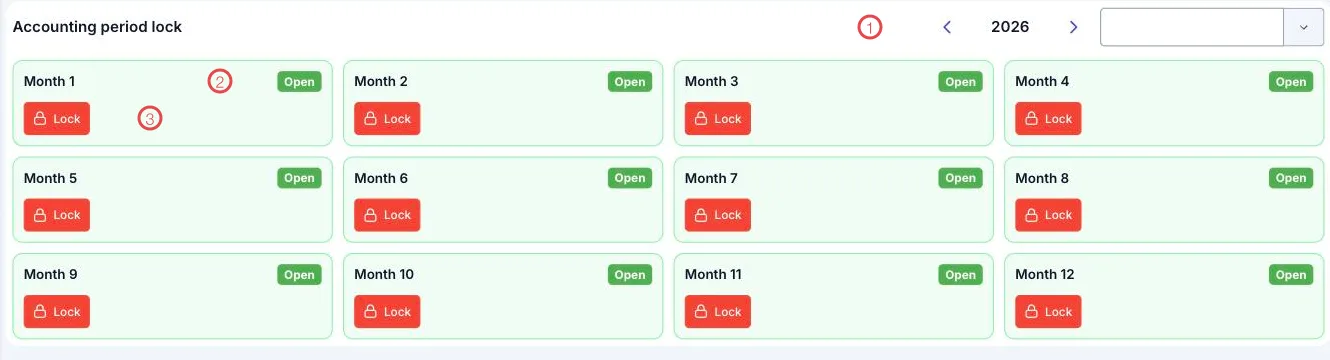
Illustration of the Accounting period lock screen
| Area | What it is |
|---|---|
| 1. Year and branch pickers | Which year's periods to show, and for which branch. |
| 2. Each month's status label | Open (green) means entries are still allowed. |
| 3. The Lock button | Settles that month. |
The year's twelve months appear as twelve cards, so one glance tells you how far the closing has got.
When to lock
What to do before pressing Lock:
- Reconcile every fund for the month, with a zero difference.
- Review orders still owing and any refunds raised late in the month.
- Read the period's profit and loss and satisfy yourself it makes sense.
- Lock the period.
Once locked, that period's documents cannot be edited
That is exactly what locking buys you — figures that stand still. If an adjustment is needed afterwards, reopen the period, make it, and lock again; every reopening leaves a trace.
Why lock regularly
- Reports stop shifting. The numbers sent to an investor last month still read the same today.
- It prevents mistakes. Nobody accidentally posts a receipt into a settled month.
- You can see where you are. The twelve-month board shows which months are still open.
Related
- Fund Reconciliation — the job to finish before locking.
- Profit & Loss — the figures being settled.
- Accounting Overview — the whole path of the money.