Journal Entries
Most day-to-day transactions post themselves through posting rules. This screen is for the entries you want to write yourself: cost allocations, month-end adjustments, the clinic's own transfers.
The entry list
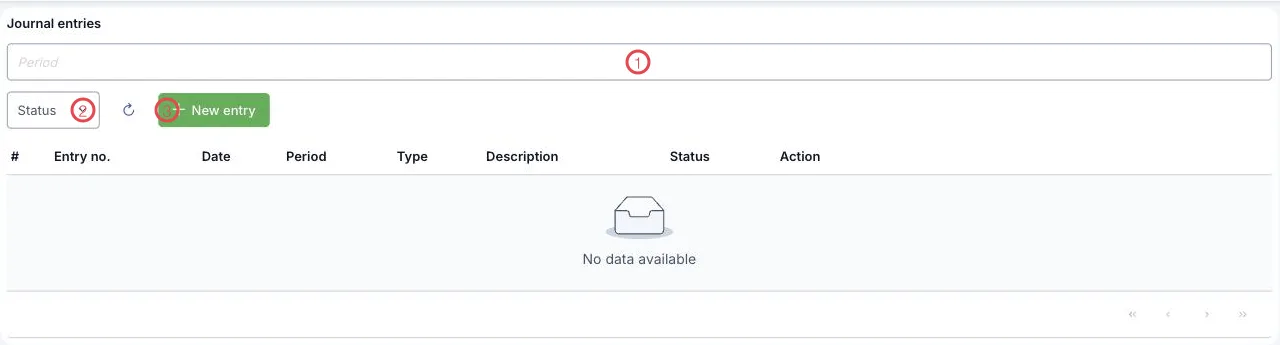
Illustration of the Journal entries screen
| Function | What it does |
|---|---|
| 1. The Period box | Filters entries by accounting period, written YYYYMM — e.g. 202609. |
| 2. Status | Shows drafts or posted entries only. |
| 3. New entry | Opens the form for a new entry. |
The table below holds Entry no., Date, Period, Type, Description and Status — enough to find an old entry without opening each one.
Writing an entry
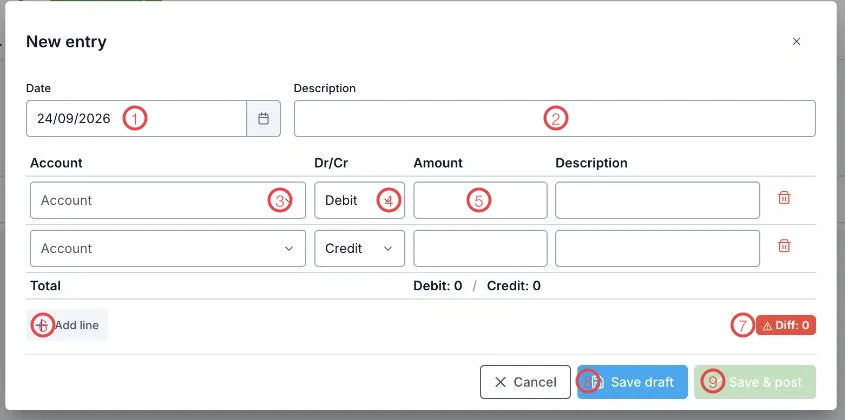
Illustration of the New entry form
| Area | What goes in |
|---|---|
| 1. Date | The posting date — it decides which period the entry belongs to. |
| 2. Description | What the entry is about; write enough that it still makes sense next month. |
| 3. Account | The line's account, picked from the chart of accounts. |
| 4. Dr/Cr | Whether the line is a debit or a credit. |
| 5. Amount | The line amount. Each line also has its own Description box. |
| 6. Add line | Multi-leg entries are fine — you are not limited to two lines. |
| 7. Diff | The gap between total debit and total credit. The entry balances when this reads 0. |
| 8. Save draft | Park it and finish later; the ledger is untouched. |
| 9. Save & post | Writes it straight to the general ledger. Active only once the entry balances. |
The Total line just above Add line shows total Debit and total Credit for a quick check before you save.
Total debit must equal total credit. While Diff is anything but 0, the software keeps Save & post switched off — so no unbalanced entry ever reaches the ledger.
Not sure of an amount? Save draft, check, then reopen and post. Drafts stay out of the ledger, so they cannot skew a report.
Related
- Chart of Accounts — the accounts you pick from.
- General Ledger — entries once posted.
- Closing & Period-end — closing the period when entries are complete.