Payment Vouchers
Every time a customer pays for a service, a payment voucher is created. This is the full list of those — the first place to open when you have to answer "what has this customer paid for".
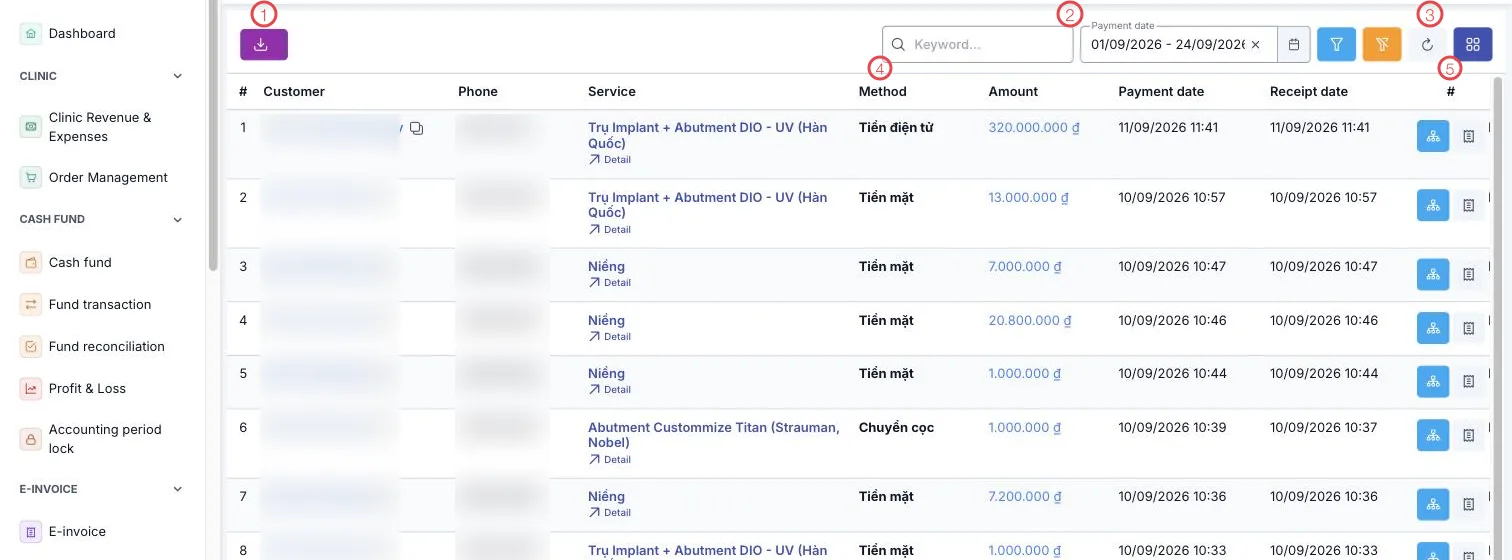
Illustration of the Payment screen
| Area | What it is |
|---|---|
| 1. Export button | Save the voucher list to a file. |
| 2. Search and Payment date | Search by customer or service; change the range for another period. |
| 3. Filter, clear, refresh, columns | Filter by branch, method and payment type. |
| 4. Method column | How the customer paid — see below. |
| 5. Row buttons | View the voucher's money flow and print it. |
The other columns: Customer, Phone, Service (with a Detail link), Amount, Payment date and Receipt date. The last line is the total for the range on screen.
Payment date versus receipt date
The two usually match, but not always:
- Payment date — when the payment was recorded against the order.
- Receipt date — when the money actually reached the fund.
An end-of-day transfer, a card settlement arriving the next day, or applying a deposit all separate the two. When reconciling the fund, the figure that has to match is the receipt date.
Payment methods
The Method column records how the customer paid: cash, electronic (transfer, QR), or deposit applied — using money already paid as a deposit to settle this service.
Filtering by method is the quickest way to tie out against the bank statement at the end of the day.
The second row button prints the payment voucher on the clinic's template — a customer who needs proof gets it there and then, without waiting for accounting.
Related
- Receipts — the same payments seen as accounting documents.
- Order Management — paid and outstanding per order.
- Billing (Medical Records) — collecting fees visit by visit.