Order Management
For the same order, the consulting team sees services and accounting sees three figures: what the order is worth, what the customer has paid, and what is still owed. This screen is the second view.
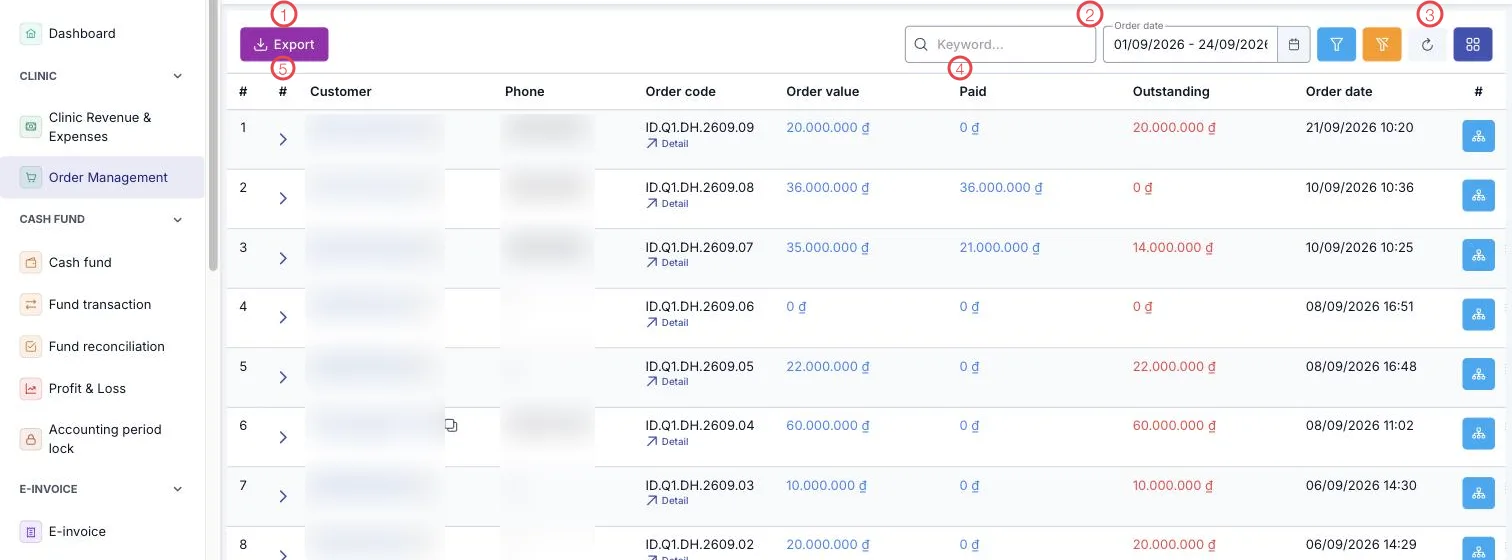
Illustration of the Order Plans screen
| Area | What it is |
|---|---|
| 1. Export | Save the order list to a file for reconciliation. |
| 2. Search and Order date | Search by customer or order code; change the range for another period. |
| 3. Filter, clear, refresh, columns | Narrow further and choose which columns show. |
| 4. The three money columns | Order value · Paid · Outstanding. |
| 5. The ▸ arrow | Expand a row to see the services in the order. |
Each row also has a Detail link under the order code, which opens the full order record.
The three figures and how to use them
| Column | Meaning |
|---|---|
| Order value | The order total after discounts. |
| Paid | What the customer has paid, including deposits already applied. |
| Outstanding | What is left. It shows in red when above zero. |
Filter by date range and read the Outstanding column: that is the call list — the same customers (patients) that appear in Accounts receivable on the dashboard.
Reconcile before closing the period
Before locking the accounting period, export the period's orders and check the Paid column against the cash fund. A mismatch here is usually a missing receipt, and it is still fixable at this point.
Related
- Payment Vouchers — each time a customer pays.
- Advance payments — money paid ahead of treatment.
- CRM Overview — where orders are created.