Posting Rules
This is the screen that takes the weight off a clinic's accountant: state once that "money in debits 111 and credits 511", and every receipt raised from then on posts itself — nobody codes vouchers by hand.
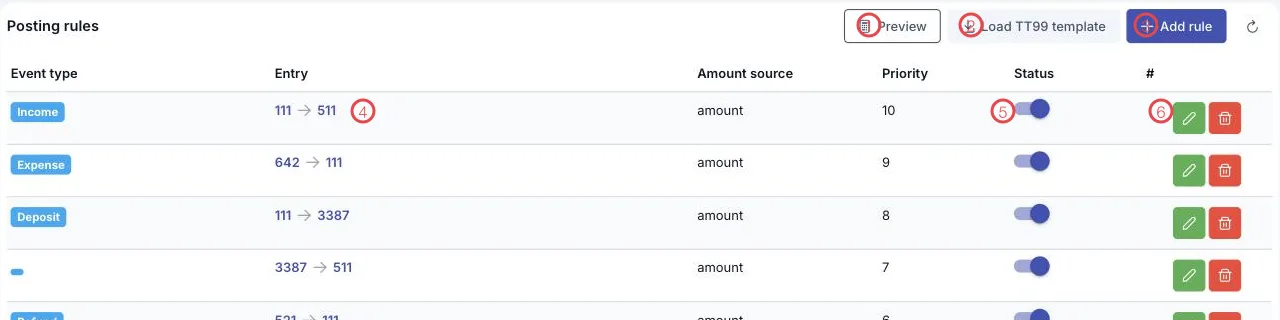
Illustration of the Posting rules screen
| Area | What it does |
|---|---|
| 1. Preview | Shows what the current rules would post, before you let them run for real. |
| 2. Load TT99 template | Loads a standard rule set covering the clinic's usual transactions. |
| 3. Add rule | Writes a rule of your own. |
| 4. The Entry column | The rule's account pair, read as debit → credit. |
| 5. The Status switch | Turns a rule on or off without deleting it. |
| 6. The pencil | Edits the rule. |
The template rule set
The template covers what a clinic does every day:
| Event type | Entry | Meaning |
|---|---|---|
| Income | 111 → 511 | A customer pays for a service: cash and revenue both rise. |
| Expense | 642 → 111 | Operating costs paid in cash. |
| Deposit | 111 → 3387 | A deposit is not revenue yet; it sits in unearned revenue. |
| (deposit release) | 3387 → 511 | Once the service is delivered, the deposit becomes revenue. |
| Refund | 521 → 111 | Money given back, booked as a revenue deduction. |
| Fund in | 111 → 711 | Other income paid into the fund. |
| Fund out | 642 → 111 | Other spending out of the fund. |
| Invoice issued | 131 → 511 | An invoice raises a receivable and revenue. |
| Supplier invoice | 156 → 331 | Goods bought on account from a supplier. |
| Payroll | 642 → 334 | Salary cost owed to staff. |
Two more columns decide how a rule behaves:
- Amount source — use
amount(the voucher total) oramount_before_tax(net of tax, for invoice events). - Priority — when several rules match one transaction, the higher priority runs first.
How to use it
- Click Load TT99 template for the standard set.
- Adjust the account pairs to match your chart of accounts — for instance separate sub-accounts for service revenue and medicine revenue.
- Click Preview to see the entries that would be produced.
- Switch Status on for the rules you want live.
Give special cases a higher priority
To send one service's income to a different account, add a rule of its own with a Priority above the general one — everything else keeps following the template.
Related
- Exception Queue — transactions no rule matched.
- Ledger Reconciliation — what is still unposted.
- General Ledger — the entries the rules produced.