Cash Fund
A clinic's money is not in one place: the cash box at the desk, the bank account, an e-wallet. Each is a fund. Setting them all up is what lets every later receipt and payment know where to land.

Illustration of the Cash fund screen
| Area | What it is |
|---|---|
| 1. Create | Add a fund. |
| 2. Search box | Find a fund by name. |
| 3. Columns button | Choose which columns the table shows. |
| 4. Balance column | What is currently in that fund. |
The other columns: Name, Fund type, Payment method, Branch and Status.
Creating a fund
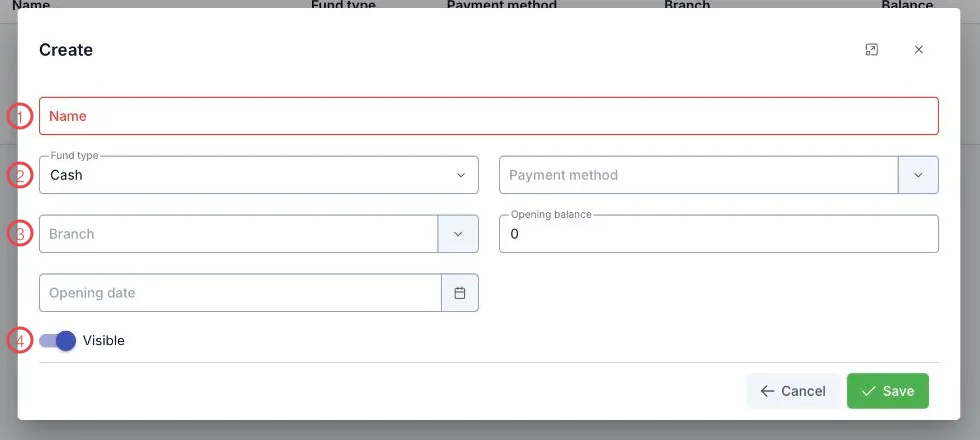
Illustration of the create fund form
| Area | What to enter |
|---|---|
| 1. Name (required) | Something recognisable: "Q1 front desk cash box", "Vietcombank 0123". |
| 2. Fund type and Payment method | Cash or account; the matching payment method so receipts land in the right fund by themselves. |
| 3. Branch and Opening balance | Which branch it belongs to, and what was in it when you started using the software. |
| 4. The Visible switch | On means in use; off retires a fund while keeping its history. |
The Opening date field marks when tracking starts — the opening balance counts from there.
One fund per payment method
Cash into the box, transfers into the bank account, cards into the card-settlement account. Get the payment method — fund pairing right and fund reconciliation at the end of the day becomes counting rather than guessing.
Related
- Fund Transactions — each movement in and out.
- Fund Reconciliation — counting against the software.
- Receipts — the documents behind fund movements.