Clinic Revenue & Expenses
Not every coin passes through an order. Electricity, stationery, fixing a chair, parking fees collected — those go here, so that the month's profit and loss is not missing anything.

Illustration of the Receipt / Expense screen
| Area | What it is |
|---|---|
| 1. Create | Record one item of income or spending. |
| 2. Search and Income/Expense date | Search by content, or look at a date range. |
| 3. Filter, clear, refresh, columns | Narrow further and choose which columns show. |
The table shows Date, Amount, Receipt/Expense type, Content, Payment method and Branch. The last line is the total for the range on screen.
Recording an item
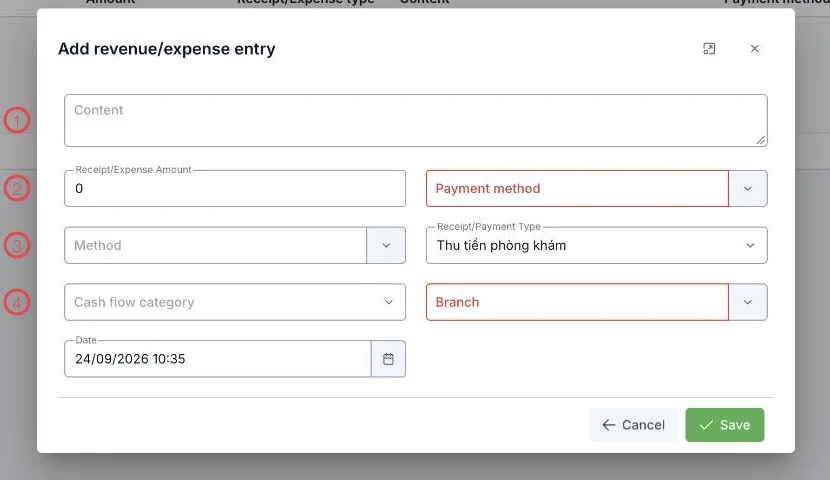
Illustration of the revenue/expense form
| Area | What to enter |
|---|---|
| 1. Content | Say what it is: "September electricity", "printer paper". |
| 2. Amount and Payment method (required) | How much, and how it was paid: cash, transfer, card. |
| 3. Receipt/Payment type | Whether this is money in or money out. |
| 4. Cash flow category and Branch (required) | The category it reports under, and which branch it belongs to. |
The Date field defaults to now; change it when entering something after the fact.
The category decides how useful the report is
Clear categories — utilities, stationery, repairs, marketing — let the period's profit and loss say where the money went. Leave them empty and all you get at month end is one total, which decides nothing.
Related
- Add a Receipt or Expense — the form field by field.
- Receipts — money in and out tied to a customer.
- Accounting Overview — the path of a coin through the clinic.