Incomplete Treatment Services
Incomplete Treatment Services lists customers (patients) who still have an unfinished treatment course or service. The care team uses this page to proactively call and invite customers (patients) back to complete it, instead of waiting for them to remember on their own.
This is an automatically calculated table, not something entered by hand — the software builds this list from services that are still in progress, so there is no create button, and no row can be edited or deleted.
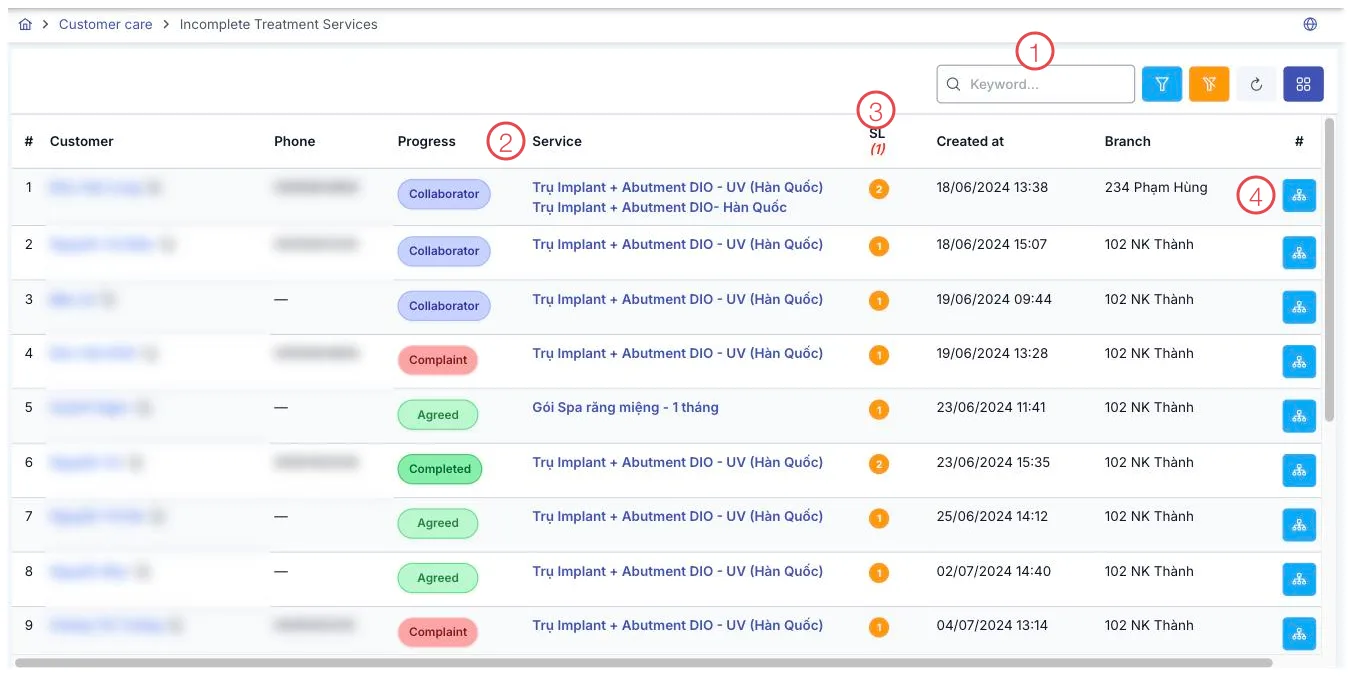
Illustration of the Incomplete Treatment Services screen
| Area | What it is |
|---|---|
| 1. Search box and branch filter | Narrow the list by keyword or by a specific branch. |
| 2. Stage column | The customer's status (the same as the status on their profile), shown in different colors. |
| 3. Qty column | The number of unfinished service orders for that customer. |
| 4. View Customer Timeline button | At the end of each row — reopens the customer's full interaction history. |
Who appears in this list
A customer appears in this list when at least one of their service orders meets all of the following:
- the order is still valid, not locked, and not past its usage deadline, and
- it is still being treated, or the number of sessions done is fewer than the total, or the completion level is under 100%.
The list is sorted with the longest-waiting customer first, so you prioritize customers (patients) who have been stalled the longest.
What the columns mean
| Column | Meaning |
|---|---|
| Qty | The number of unfinished service orders for that customer — a count, not a percentage. |
| Created date | The date of the oldest order among that customer's unfinished orders. |
| Service | The names of all the unfinished services, combined into one cell. |
| Stage | The customer's status, exactly the same as the status shown on their profile — not a status of the service order itself. |
After you reach a customer, create a follow-up right away in the Care List to record the outcome of the call — so whoever is on shift next can pick up exactly where you left off.
Related
- Care List — log the outcome after contacting a customer (patient).
- Record a Treatment — where treatment sessions that feed this list are logged.
- Customer Details — view a customer's full profile from this list.