Customer Reviews (Patient)
Customer Reviews is where you read the star ratings and comments customers submit themselves after using a service, through the customer app or the clinic's Zalo mini app. Each review is tied to a specific service order, so you know exactly what the customer is praising or criticizing about their most recent visit.
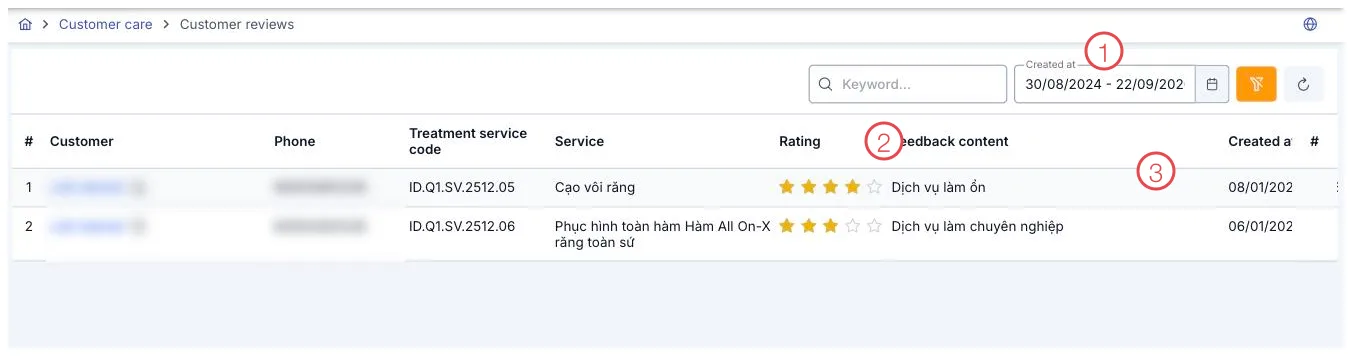
Illustration of the Customer Reviews list
| Area | What it is |
|---|---|
| 1. Created Date range picker | Defaults to the start of the month through today. |
| 2. Rating column | The number of stars the customer gave, from 1 to 5. |
| 3. Feedback Content column | The written comment the customer wrote themselves. |
Filters
Filter by keyword (customer name, comment content) and the Created Date range (area 1), which defaults to showing reviews from the start of the month through today.
Which service order a review belongs to
Each row in the list is tied to a specific service order the customer used, along with a star rating (the Rating column, area 2) and a written comment the customer wrote themselves (the Feedback Content column, area 3) — so you know exactly which service the review is about, not just a general impression of the clinic.
A view-only screen
This is where you read the customer's genuine voice: clinic staff don't create, edit, or delete reviews here. That's what keeps the star ratings and comments on this screen always reflecting what customers (patients) actually experienced, so they can be trusted as a real measure of service quality.
When you see a 1–2 star review, don't let it slide — go to Complaints and create a ticket so someone is accountable for following up and resolving it with the customer.
Related
- Complaints — create a ticket when you see a low review.
- Birthdays — another occasion to proactively reach out to customers (patients).
- Customer Details — review the customer's full history.