Birthdays
Birthdays lists customers (patients) whose birthday falls within a date range you choose, so the clinic can proactively call to congratulate them or send timely offers. The list defaults to customers (patients) with a birthday today — to prepare a whole month ahead, widen the date range.
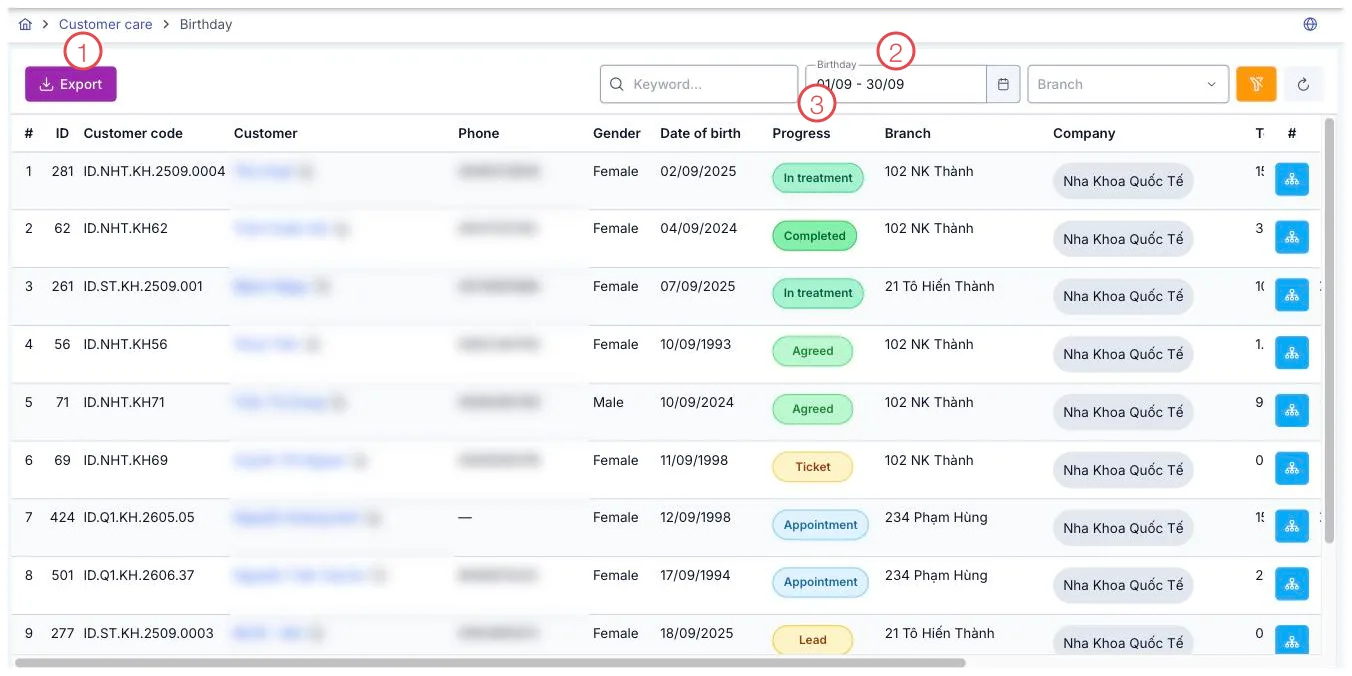
Illustration of the Birthdays list
| Area | What it is |
|---|---|
| 1. Export button | Exports the list currently shown to Excel. |
| 2. Birthday range picker | Change the date range to look further than today. |
| 3. Progress column | The customer's current status, same as shown in their profile. |
Filters
Besides the Birthday date range, you can also filter by keyword (name, phone number) and Branch to see only customers (patients) of one location.
Export to Excel
Press the Export button (area 1) to export exactly the currently filtered list to an Excel file — handy for sending to the gift team to prepare in advance, without having to copy names by hand.
Progress column and financial columns
The Progress column shows what stage the customer is currently at (same information shown in the customer profile). The revenue, outstanding balance and Advance payment columns on the same row are pulled directly from the customer's profile, helping you know whether this is a long-time regular or a new customer, so you can pick a fitting greeting or gift.
This is a list filtered from existing customer profiles, not a manually entered record — so there's no create button. Each row has a View customer timeline button to review the customer's full interaction history before calling.
In non-leap years, the software automatically groups customers (patients) born on February 29 into the March 1 list, so every year they still get congratulated exactly once, even though their actual birth date doesn't exist that year.
Related
- Customer Details — see the customer's full profile before calling.
- Care List — track other care tasks besides birthdays.
- Customer Reviews — read feedback customers (patients) have sent.