Raising a Complaint
Customers (Patients) complain — that happens in every clinic. What differs is whether the complaint gets written down and given an owner. CluvixHealth turns every piece of feedback into a record with a clear status, moving from reception, through the doctor handling it, to being closed — no more "I think someone complained the other day".
Opening the complaint form
Go to Complaints and click the blue Create button in the top left.
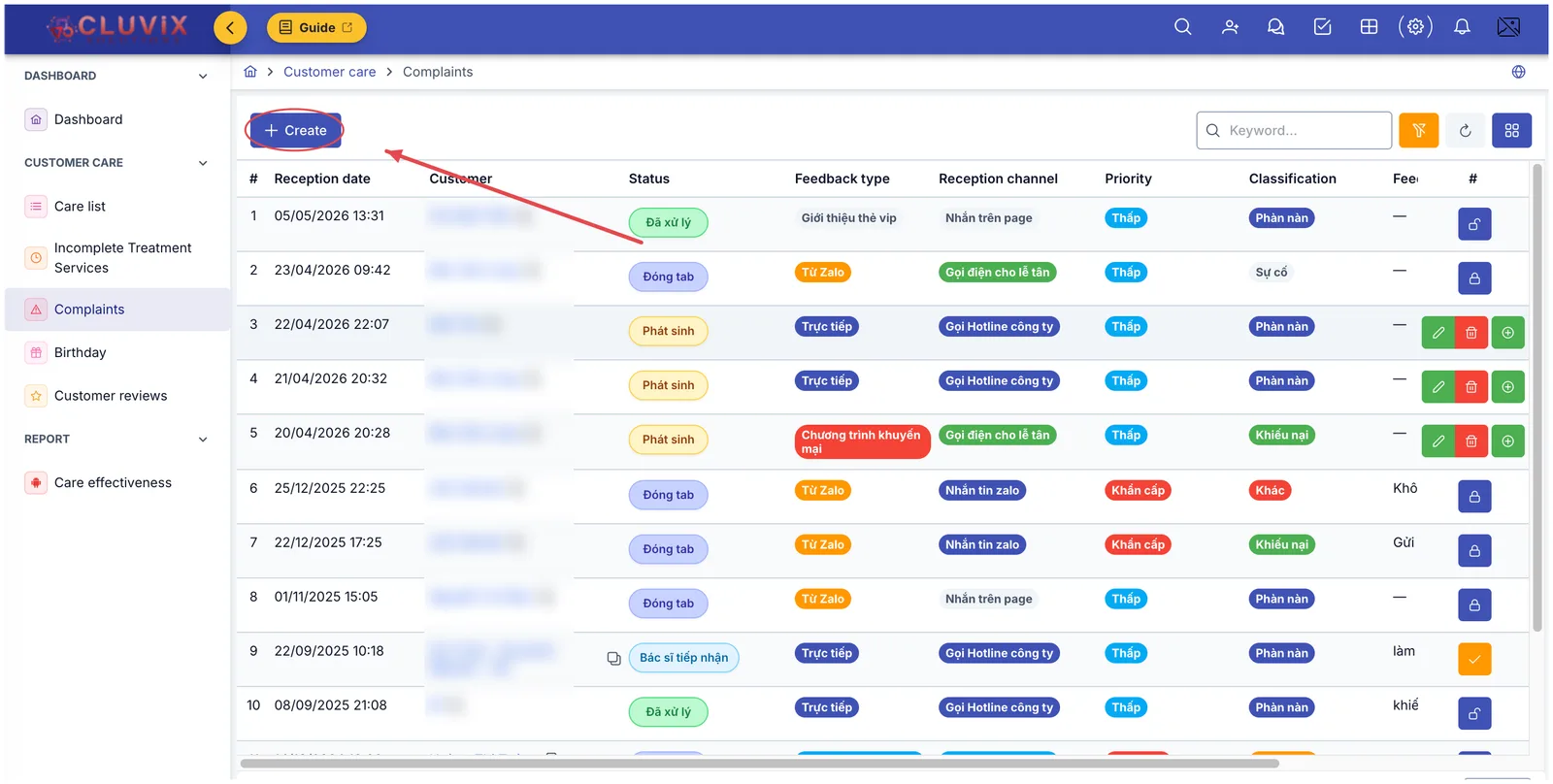
Illustration of the Create button on the Complaints screen
In Care List, the middle button of the three at the end of each row opens the complaint form with the customer already filled in — no need to look the name up again.
Filling in the form
The Create complaint window is split into three groups of information plus two notes boxes:
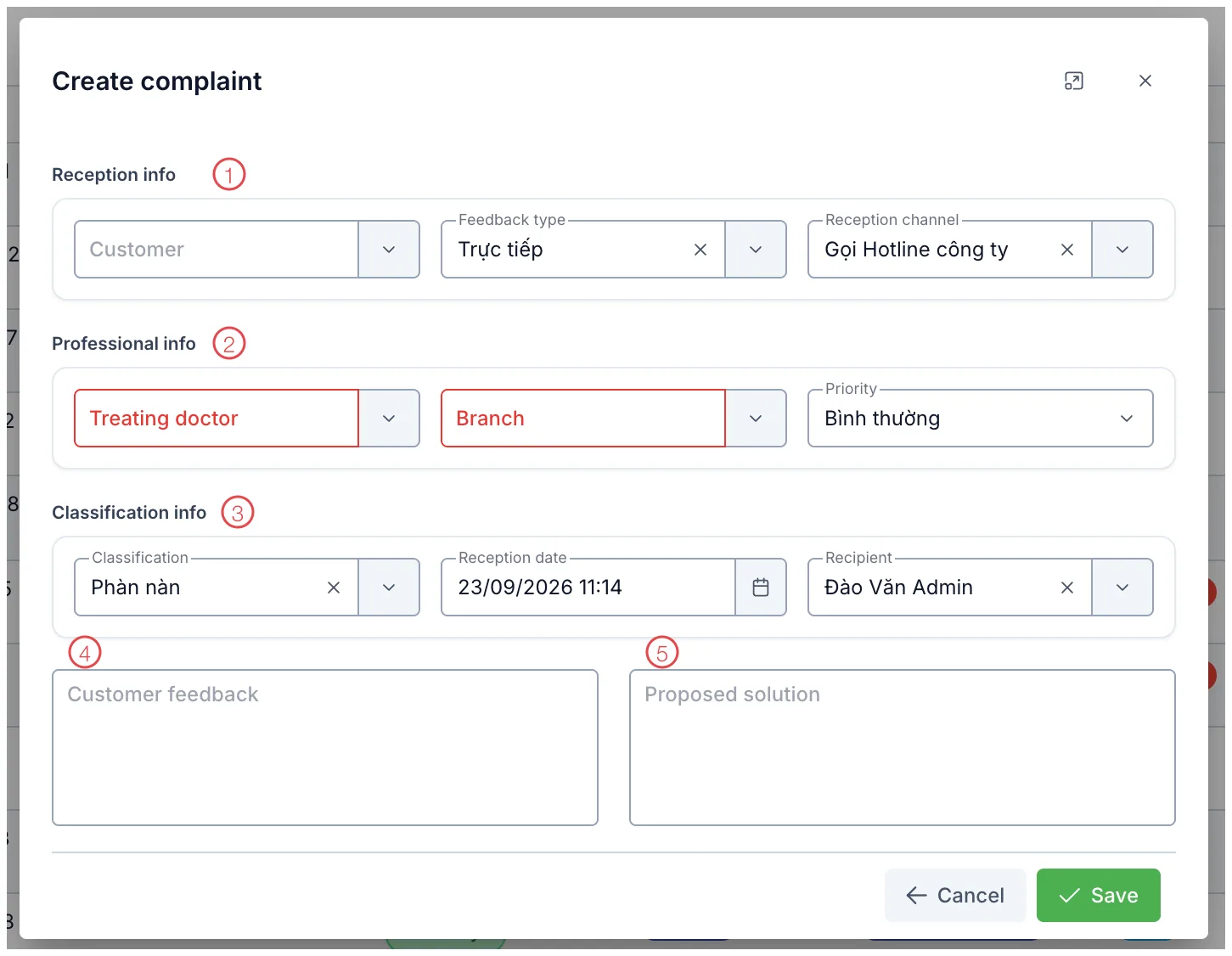
Illustration of the Create complaint form
| Area | What to enter |
|---|---|
| 1. Reception info | Who the Customer is, the Feedback type (where the feedback came from) and the Reception channel (hotline, Zalo, in person…). |
| 2. Professional info | Treating doctor and Branch — both outlined in red and required, because they decide who the complaint goes to. Plus Priority. |
| 3. Classification info | Classification (grumble, query, complaint, incident…), Reception date and Recipient — the software pre-fills the current time and you. |
| 4. Customer feedback | What the customer actually said, in their words. Write it down rather than summarising it as "customer (patient) unhappy". |
| 5. Proposed solution | What you think should be done, so the receiving doctor has a starting point. |
Click Save. The complaint joins the list at status Phát sinh (raised), and the customer (patient)'s profile is flagged as having an open complaint — anyone opening that profile sees it straight away.
Retold a few hours later, the details fall away. The Customer feedback box is what the doctor and the management read to understand what happened — write enough that someone who never heard the call can picture it.
Customers (Patients) sending complaints from the Zalo Mini App (Patient)
Not everyone phones. Plenty of people would rather not say it to your face but will happily type a few lines on their phone. CluvixHealth keeps that door open: customers (patients) send feedback straight from the clinic's Zalo Mini App, and the complaint lands in the list without anyone re-typing it.
When a complaint arrives this way, the software takes care of several things:
- Creates a customer profile if the sender is not in your data yet, so the feedback is attached to a real person rather than floating loose.
- Sets the priority to Urgent — someone who goes to the trouble of typing a complaint deserves an early answer.
- Tags the feedback type and reception channel reserved for online feedback, which makes it easy later to see what share of complaints arrives through the online channel.
- Blocks duplicates: while a customer has a complaint still being handled, another one is not created, so a single issue never gets counted three times.
For this route to work, Settings needs one feedback type and one reception channel marked as the online ones — set up once, and everything arriving afterwards is tagged correctly.
A complaint moves through four steps
The best part of this workflow: nobody picks a status by hand. Fill in the form for a step and the status moves itself, while the buttons at the end of the row change to match — the buttons tell you what the next job is.
Step 1 — Hand it to a doctor
A complaint sitting at Phát sinh has three buttons: edit, delete, and a round green + button to hand it to a doctor.
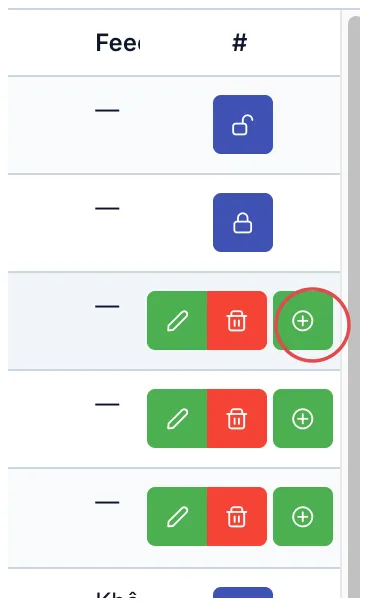
Illustration of the button that assigns a receiving doctor
The Recipient doctor window opens, with the customer's details on the left for reference:
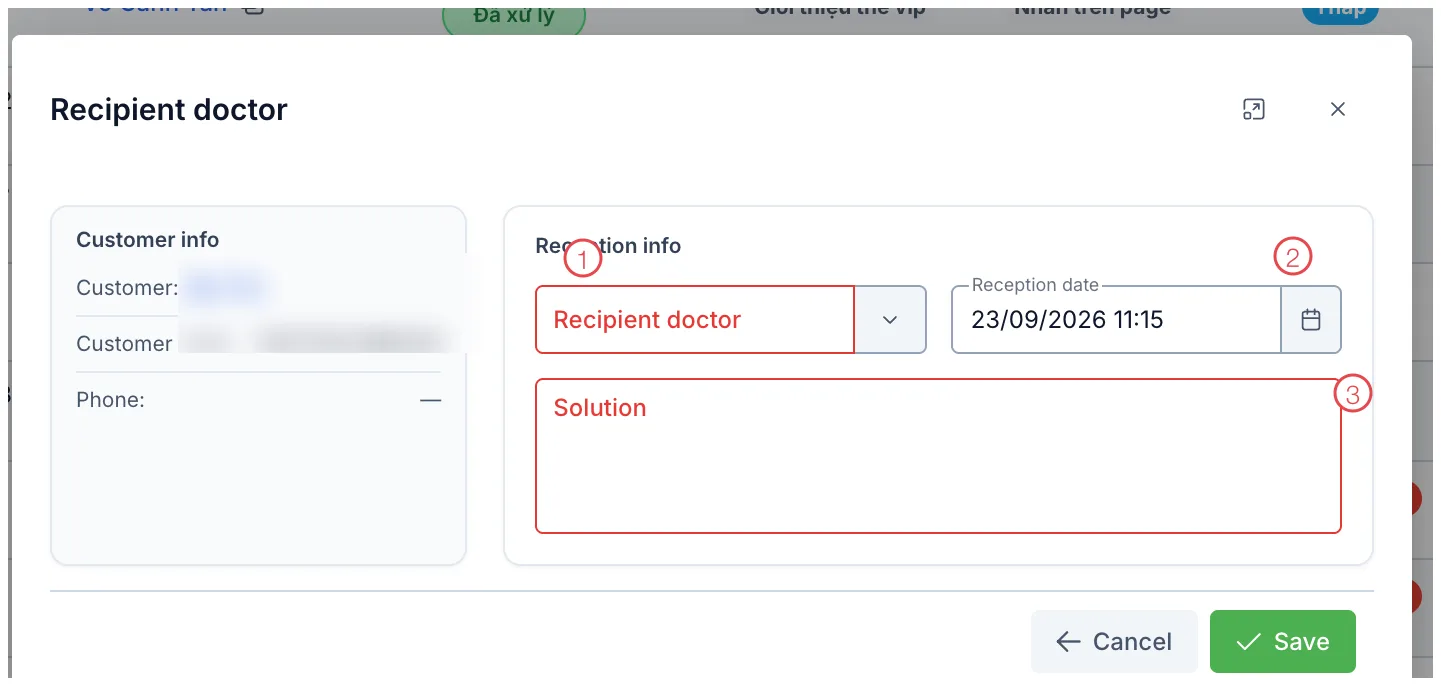
Illustration of the Recipient doctor window
| Field | What to enter |
|---|---|
| 1. Recipient doctor (required) | Who takes responsibility for this complaint. |
| 2. Reception date | When it was picked up; pre-filled with now. |
| 3. Solution (required) | What you intend to do for the customer. This is an internal commitment, so be specific. |
Save, and the status becomes Bác sĩ tiếp nhận (doctor assigned) while the buttons change to a tick.
Step 2 — Record the outcome
Once it is dealt with, click the round amber tick button on that row.
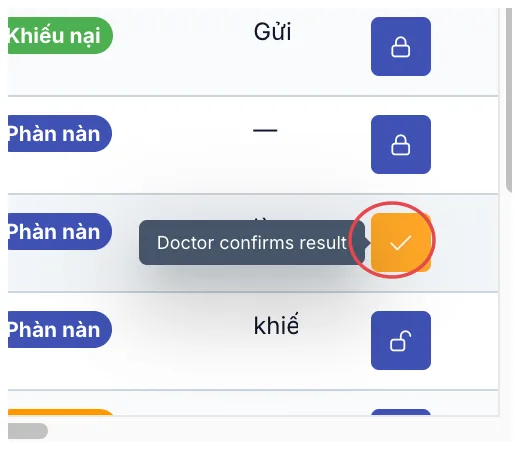
Illustration of the button for recording the outcome
The Resolution result window opens:
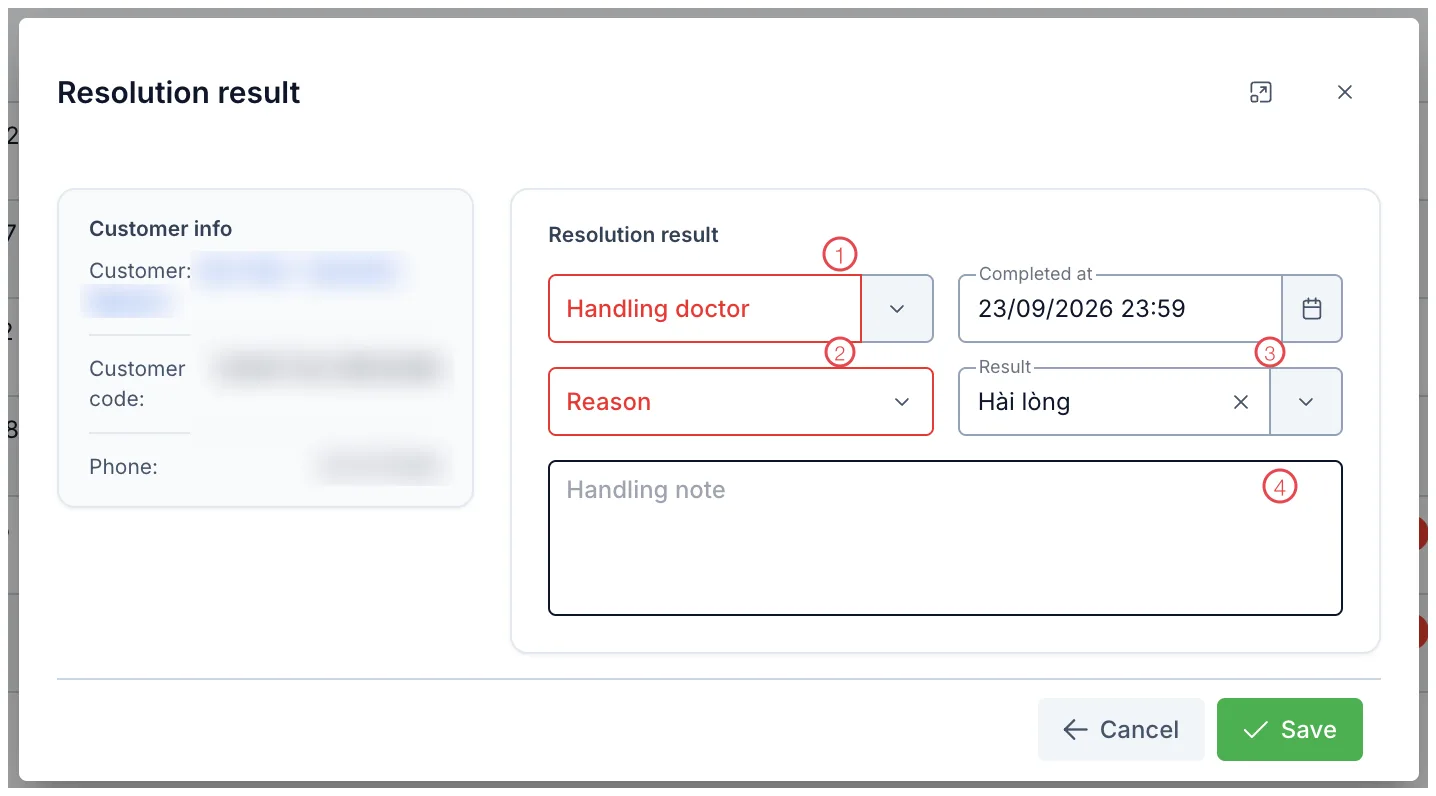
Illustration of the Resolution result window
| Field | What to enter |
|---|---|
| 1. Handling doctor (required) | Who actually resolved it, with Completed at in the field beside it. |
| 2. Reason (required) | Down to the customer, down to the doctor, or down to the supplier. Pick the true one, not the convenient one. |
| 3. Result | How satisfied the customer was once it was sorted. |
| 4. Handling note | What was actually done. Not required, but the most valuable part to read back later. |
Save, and the status becomes Đã xử lý (resolved).
Three months on, the clinic can see what share of incidents came down to technique, what share to materials, and what share to a customer misunderstanding the consultation. Without that number, every improvement meeting runs on gut feeling.
Step 3 — Close it, or reopen it
A resolved complaint is closed with the padlock button, and reopened with the same button.
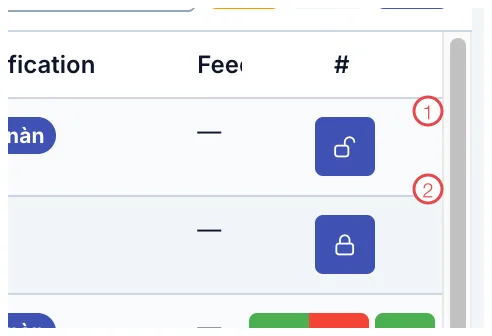
Illustration of the close and reopen buttons
| Button | What it means |
|---|---|
| 1. Open padlock | The complaint is resolved but not yet closed. Click to close it — the software asks you to confirm first. |
| 2. Closed padlock | The complaint is closed. Click to reopen it, and it returns to resolved. |
This button only appears for accounts in management. The person who did the work records the outcome; deciding that the matter can be put to rest belongs to a manager — a light check, but enough that nobody signs off their own work.
Why every grumble belongs in here
- Nothing said out loud gets lost. Even the small remark made at the payment desk: written down, it gets followed up. Most customers (patients) who drift away do not leave over one big incident, but over a small thing nobody dealt with.
- Every step has an owner. Who took it in, which doctor handled it, who closed it — all stored, with timestamps.
- Customers feel taken seriously. Ringing back to say "your issue has been sorted" turns an annoyed customer (patient) into one who speaks well of the clinic.
- The clinic learns from its own mistakes. Classification and reason together reveal the patterns that repeat, instead of each case being handled and then forgotten.
Related
- Complaints — the list and what each status means.
- Handling a Complaint — the four statuses and who may do what.
- Care List — raising a complaint straight from a care record.