Medicine list
Medicine list is the shared medicine catalog for the whole clinic (not split by brand/branch) — it's the single data source used when a doctor writes a prescription and when the clinic manages pharmacy stock.
Opening Medicine list
- Go to the System configuration screen (see Configuration overview), group Medicine & Prescriptions, click Medicine list.
- Faster way: type Medicine list into the quick search box at the top of the System configuration screen, then click the result.
Medicine list

Screenshot of the Medicine list
| # | What it is |
|---|---|
| 1. Export button (download icon) | Exports the currently filtered/searched list to an Excel file — see Import/Export below. |
| 2. Import button (upload icon) | Bulk-imports new medicines from an Excel file matching the template. |
| 3. Create button | Manually declare a new medicine. |
| 4. Row action buttons | Pencil to edit, trash bin to delete that medicine. |
The Order column is a display sort number, auto-set to the row's own ID when created — no need to adjust unless you want a custom order.
Creating a medicine
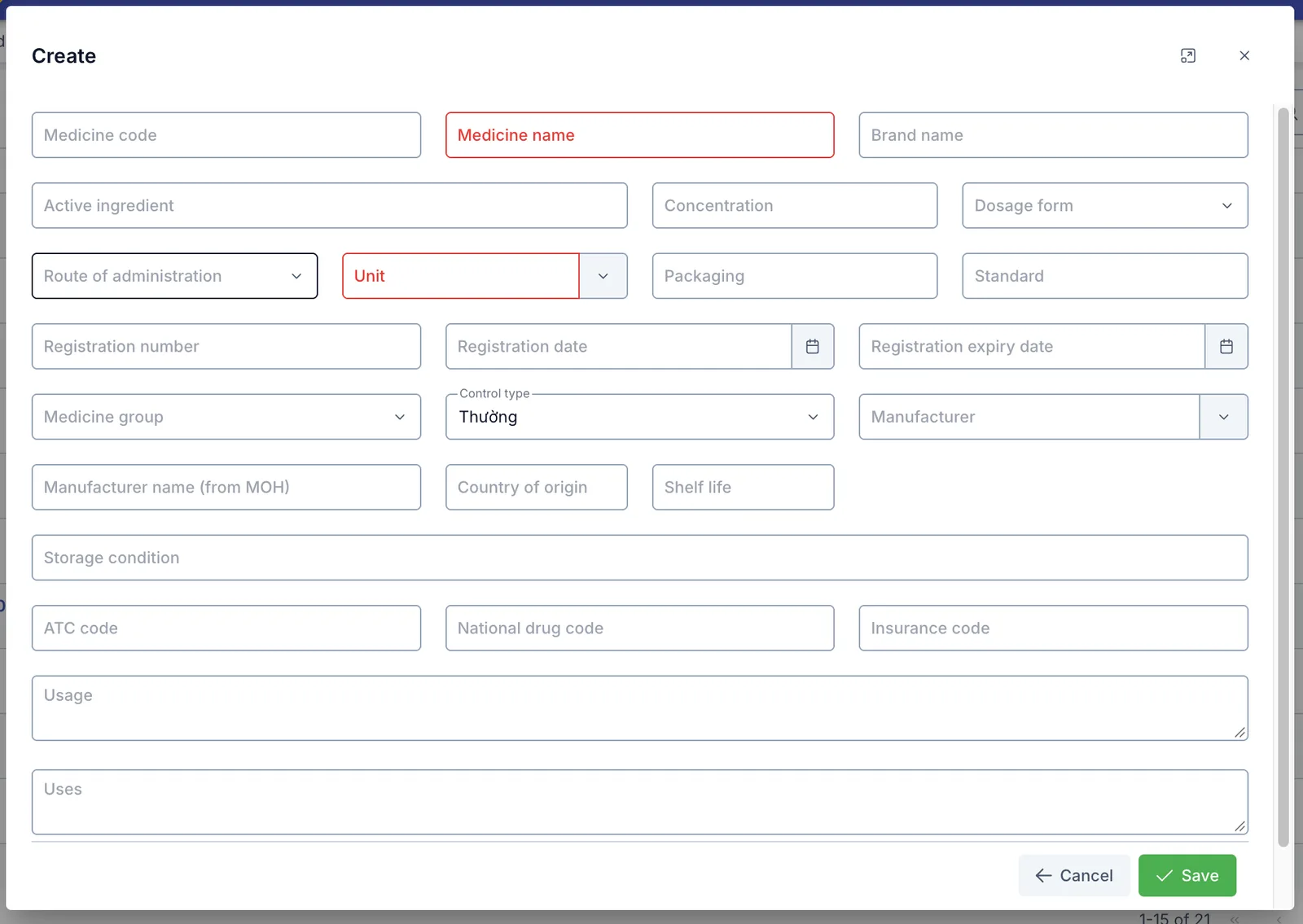
Screenshot of the Create Medicine dialog
Basic information
| Field | What to enter |
|---|---|
| Medicine code | Leave it blank and the software auto-generates a code in the format TH + 6 digits (e.g. TH000123); typing your own is capped at 20 characters. This is the code submitted to the National Prescription System. |
| Medicine name (required) | The name shown when searching/prescribing |
| Brand name | The commercial name, if different from the base name |
| Traditional medicine | Tick this if the item is a traditional medicine (YHCT) — with this on, Active ingredient and Concentration below stop being required. |
| Active ingredient (required unless Traditional medicine) | The main active ingredient. List more than one separated by + (e.g. Amoxicillin + Clavulanic acid). |
| Concentration (required unless Traditional medicine) | E.g. "500mg" |
| Dosage form | Tablet, solution, cream… |
| Route of administration | Oral, topical, injection… |
| Unit (required) | Pulled from the shared Unit catalog, showing only units tagged under the "Medicine unit" category |
| Packaging | E.g. "Box of 10 blister strips x 10 tablets" |
| Medicine group | Pick from the built-in group list (Antibiotics, Pain relief - Fever reducer, Cardiovascular…) |
Regulations on electronic prescriptions require a prescription to state the active ingredient together with its concentration — declaring both here from the start keeps prescriptions written later, and later submitted to the National Prescription System, correctly formed. Traditional medicine items don't need these two fields.
Registration & legal
| Field | What to enter |
|---|---|
| Registration number | The medicine's circulation registration number |
| Registration date / Registration expiry date | When the registration was issued and expires |
| Standard | The applicable quality standard |
| Control type | Normal / Narcotic / Psychotropic / Precursor |
| ATC code | The WHO ATC classification code |
| National drug code | The code in the national drug catalog |
| Insurance code | Used when exporting a BHYT insurance claim for a covered prescription |
Choosing Narcotic, Psychotropic or Precursor in Control type shows this warning right away: "Special controlled medicine: a prescription containing this medicine will be submitted as an N (narcotic) or H (psychotropic/precursor) prescription. Check carefully before saving." Double-check the choice before saving — a prescription containing this medicine will be classified accordingly when submitted.
Manufacturing & storage
| Field | What to enter |
|---|---|
| Manufacturer | Pick from the Manufacturer catalog (same Medicine & Prescriptions group) |
| Manufacturer name (from MOH) | The manufacturer name per Ministry of Health data, may differ from the picked manufacturer |
| Country of origin | The manufacturing country |
| Shelf life | The medicine's shelf life (e.g. "36 months") |
| Storage condition | E.g. "Store in a dry place, below 30°C" |
Usage instructions
| Field | What to enter |
|---|---|
| Usage | Reference usage instructions — see the note below |
| Uses | The medicine's indications/uses |
Where this catalog is used
- Writing prescriptions: the medicine picker on a prescription pulls directly from this catalog — a medicine just created here is immediately searchable when prescribing.
- Pharmacy stock: creating a medicine here does not create stock — stock is tracked separately per branch, so a newly created medicine shows 0 stock until a goods-receipt is recorded.
- Printed prescriptions: only the medicine name is automatically pulled from this catalog onto the printed prescription. The Usage line printed on each prescription is typed fresh by staff every time they prescribe — it is not auto-filled from the Usage/Uses fields declared here.
- BHYT insurance claim files: the Insurance code declared here is used when exporting a BHYT claim for a covered prescription.
- Submitting to the National Prescription System: when sending a prescription that contains this medicine to the national system, the software pulls exactly the Medicine code, Active ingredient and Concentration declared here — filling them in properly when the medicine is created keeps later submissions running smoothly.
Import / Export
- Export: downloads exactly the list currently filtered/searched on screen, either all columns or only the columns currently shown.
- Import: the import dialog has a template file download button — fill it in exactly and upload it.
Matching is done by exact Medicine name: any row whose name matches an existing medicine is skipped entirely — it does not overwrite/update that medicine's information. To edit an existing medicine, edit it manually; importing cannot be used for that.
Related
- Unit — the shared unit catalog; the Unit field on this page only shows units tagged under the "Medicine unit" category.
- Prescription template — pre-builds medicine sets from this catalog with usage instructions, for quick insertion into a real prescription.