Digital signature
Digital signature configures how a doctor signs off on an electronic medical record — digitally with a CA certificate (fast, meets the legal requirement) or the traditional handwritten way (print and sign on paper — still accepted, just more work). This configuration applies to the whole clinic (not per branch), and is the second condition for a doctor to be able to sign a record — the first condition is that the doctor must be on the allowed-signers list in Facility setup. Missing either one means signing won't work.
Opening Digital signature
- Go to the System configuration screen (see Configuration overview), group Utilities, click Digital signature.
- Faster way: type Digital signature into the quick search box at the top of the System configuration screen, then click the result.
2 ways to sign a medical record
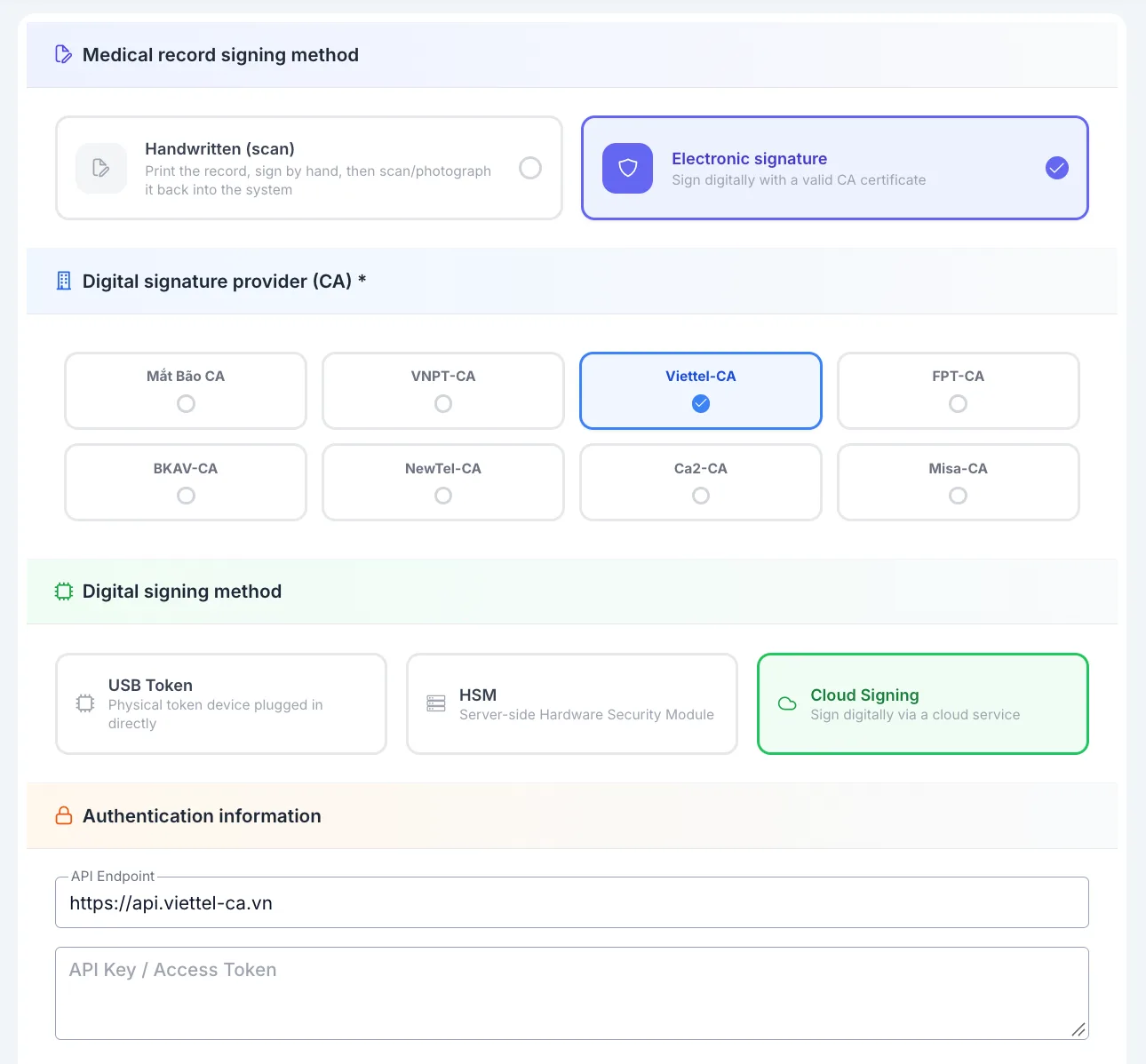
Screenshot of the Medical record signing method, CA provider, Digital signing method and Authentication information sections
- Handwritten (scan) — as the app itself states: "The record will be printed, signed by hand by the doctor, then scanned/photographed back into the system. No further configuration needed." This is the familiar way, and needs no setup on this page. Note: the software does not actually store the scanned file/photo — finalizing just tags the record as "handwritten" and stores a content hash proving it wasn't altered after signing. The signed paper copy is kept by the clinic itself, outside the software.
- Sign digitally — signs directly with a CA certificate, no printing needed. Needs the setup below.
To use Sign digitally, select this card, then do 2 more steps: pick a CA provider and turn on the activation switch at the bottom of the page (the "Enable digital signature" section below) — just picking "Sign digitally" here is not enough on its own; without also turning on that switch, doctors still can't sign digitally.
Choosing a digital signature provider (CA)
The screen supports 8 providers: Mắt Bão CA, VNPT-CA, Viettel-CA, FPT-CA, BKAV-CA, NewTel-CA, Ca2-CA, Misa-CA — pick whichever one the clinic's digital certificate is issued by.
Filling in authentication information
The fields under "Authentication information" change depending on the provider selected. For Mắt Bão CA:
| Field | What to enter |
|---|---|
| Business tax code | The tax code registered with Mắt Bão |
| Username | The clinic's Mắt Bão CA account |
| Password | The Mắt Bão CA account password (click the eye icon to show/hide) |
As shown in the screenshot above, picking a different provider changes these fields — e.g. Viettel-CA asks for an API Endpoint and API Key/Access Token instead of a username/password.
After saving, the password/API key show as masked when you reopen the page. To change it, clear the field and re-enter — leaving it untouched keeps the old value.
Digital signing method
3 options: USB Token (a physical token device plugged in directly), HSM (server-side Hardware Security Module), Cloud Signing (signing via a cloud service) — pick whichever way the clinic keeps its digital certificate.
Signature position on PDF
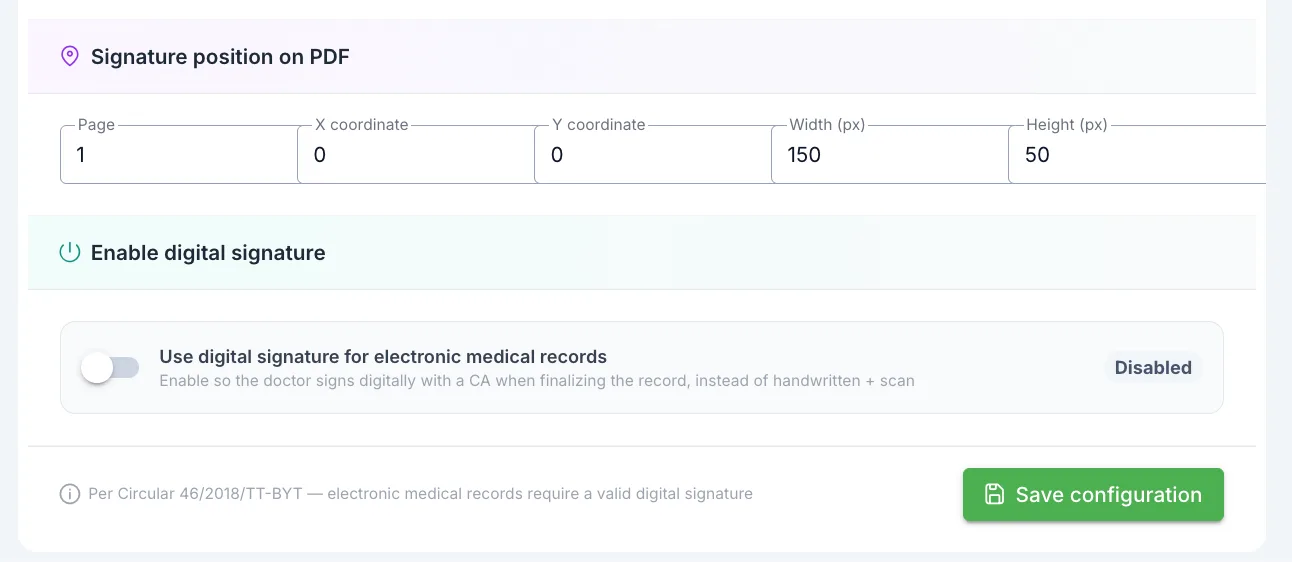
Screenshot of the Signature position on PDF and Enable digital signature sections
Declares where the signature stamp gets placed once signing completes and the file is returned:
| Field | What to enter |
|---|---|
| Page | The page number to stamp the signature on in the PDF |
| X coordinate / Y coordinate | Where to place the stamp, in pixels from the page corner |
| Width (px) / Height (px) | The signature stamp's size |
Enable digital signature
The "Use digital signature for electronic medical records" switch — as the app states: "Enable so the doctor signs digitally with a CA when finalizing the record, instead of handwritten + scan."
Turning this switch on allows doctors to sign digitally with a CA when finalizing a record. To require every record to be signed digitally, also turn on the switch just below.
If Sign digitally is selected at the top of the page but the Use digital signature for electronic medical records switch is still off, a doctor trying to sign will get the error "No digital signature provider configured, please contact the administrator." — both places need to be turned on for digital signing to actually work.
Scroll to the bottom of the page: right below the enable switch are the require-signature switch and the amendment policy section.
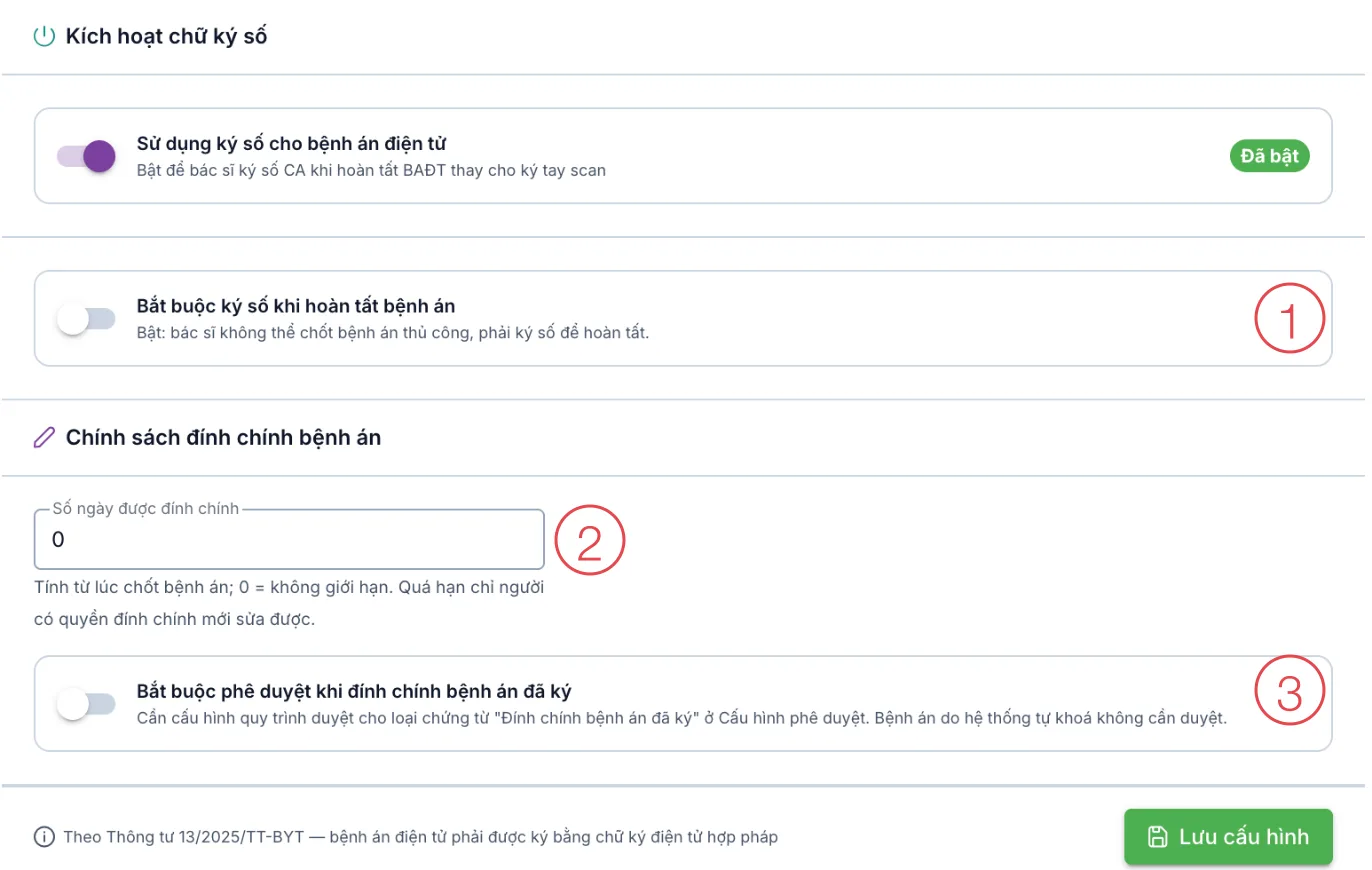
Illustration of the signing switches and the amendment policy (Vietnamese interface)
Require digital signature to complete medical record
The Require digital signature to complete medical record switch (number 1) — as the app states: "On: doctors cannot finalize a medical record manually; a digital signature is required to complete it."
| Switch | How doctors complete a record |
|---|---|
| Off | Sign digitally with a CA, or click Complete without digital signature in the signing dialog when they have no certificate. |
| On | Only by digital CA signature — the signing dialog no longer has Complete without digital signature. |
This switch only takes effect when the clinic uses Sign digitally and has turned on Use digital signature for electronic medical records.
Medical record amendment policy
This section governs changes to signed medical records and treatment visits. It applies to both amending a medical record and amending a treatment visit.
- Amendment period (days) (number 2) — counted from when the record is finalized; 0 means no limit. Within the period, the doctor who signed can amend on their own. After it, only users with the Medical record — Amend signed medical record permission can amend.
- Require approval to amend signed medical records (number 3) — when on, each amendment becomes a request awaiting approval; the record or visit only opens for editing once approved. Records locked automatically by the software (no signer) do not need approval.
Before turning it on, an administrator creates templates for the two document types Signed medical record amendment and Signed treatment visit amendment under System configuration › Approval workflow › Approval templates. Approvers receive and handle requests under Pending my approval.
A short period (a few days) gives doctors time to fix mistakes right after the visit; later changes go through the person in charge of clinical matters who holds the amendment permission. Every amendment keeps the earlier version, the editor and the reason in the history.
Saving the configuration
At the bottom of the page is a legal note: "Per Circular 13/2025/TT-BYT — electronic medical records must be signed with a valid electronic signature". Click Save configuration to apply.
Where this configuration takes effect
- Digital CA signing needs both conditions at once: (1) the doctor is on the "Doctors allowed to sign electronic medical records" list in Facility setup for the correct branch + brand, and (2) this Digital signature page has a CA provider selected, full authentication info entered, and the activation switch on. Missing either one blocks signing.
- If a doctor has their own CA username declared in Facility setup, the username typed at sign time must match it exactly, or signing is rejected.
Related
- Facility setup — declares the list of doctors allowed to sign electronic medical records, a required condition alongside this page.