AI Chat
AI Chat is a tab for asking an AI assistant about the customer currently open. Instead of reading through every order, payment and note yourself, you ask one question and get a summary.
Open AI Chat
Open the customer (patient) profile → Info tab → in the conversation tab row, choose 🤖 AI Chat.
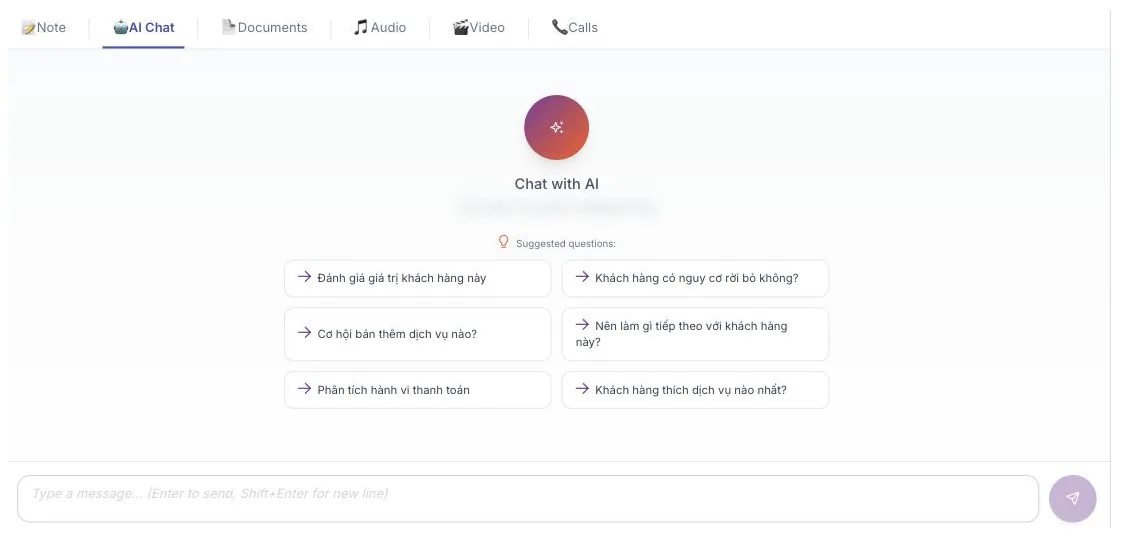
Illustration of the AI Chat tab on a customer profile
The six suggested questions
If you are not sure what to ask, click one of the six chips — they are also the six things the assistant does best:
| Suggested question | What it answers |
|---|---|
| Đánh giá giá trị khách hàng này | How valuable this customer is and which group they fall into. |
| Khách hàng có nguy cơ rời bỏ không? | Signs the customer is about to stop coming. |
| Cơ hội bán thêm dịch vụ nào? | Services worth suggesting to them. |
| Nên làm gì tiếp theo với khách hàng này? | The next action after the latest interaction. |
| Phân tích hành vi thanh toán | Whether they pay on time, in full or in instalments. |
| Khách hàng thích dịch vụ nào nhất? | The service groups they use most. |
These chips have not been translated yet, so they stay in Vietnamese even with the interface in English. You can type your own question in any language in the box below.
Press Enter to send, Shift + Enter for a new line.
Asking well
- Be specific — "Which services has this customer had in the last six months?" beats "Tell me about this customer".
- Keep asking in the same conversation — the assistant remembers the previous question.
- Ask to prepare a conversation, for example before an after-care call.
The assistant summarises the data in the software, but it can still misread or omit things. Amounts, appointment dates, service names — check them in the Order, Payment and Appointment tabs first. Never read an AI answer out to a customer verbatim.
When the assistant says it has no data
- New customer with no history — no orders, appointments or notes means nothing to summarise. That answer is correct, not a fault.
- The AI feature is not enabled — the assistant must be configured under the software Settings area. If it is off, this tab does nothing; ask your clinic administrator.
Related
- Customer Details — the data the assistant reads.
- CLV & Behaviour — figures the software calculates directly.
- Create a Care Record — turning a suggestion into an action.