CLV & Behavior
CLV (Customer (Patient) Lifetime Value) is the total amount a customer brings to the clinic over the whole time they stay with you. The CLV & Behavior panel shows how much they spend, how engaged they are, and whether they might stop coming back — so front-desk and consulting staff know how to follow up.
Open any customer's detail page, and the CLV & Behavior panel shows up in the top right.
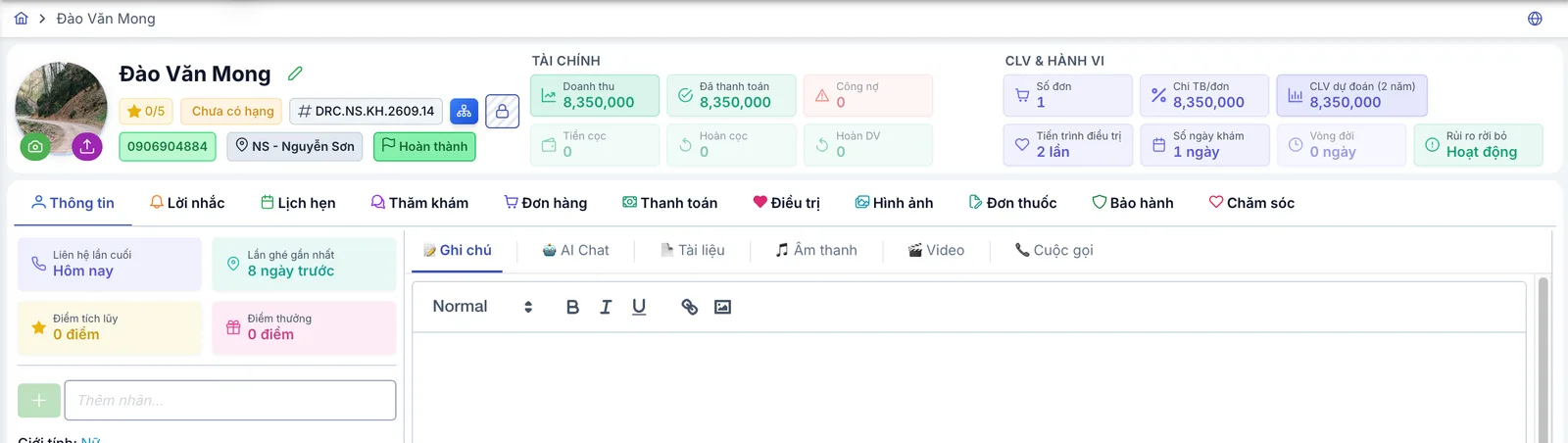
Screenshot of the customer's CLV & Behavior panel
All 7 metrics in this panel are recalculated automatically whenever the customer gets a new order, payment, appointment, or treatment session — you never need to compute or update them by hand.
Order Count
The total number of orders this customer has placed at the clinic, from their first order to today. A higher count means the customer keeps coming back, not just a one-time visitor.
Avg. Spend / Order
The average amount the customer spends per order. This figure excludes the consultation fee — it only counts actual service/treatment value — so it reflects real treatment spending instead of being diluted by orders that are just an initial consultation fee.
Predicted CLV (2 years)
An estimate of the total revenue this customer could generate over the next 2 years, based on how often they've historically returned (their average interval between orders) multiplied by their average spend per order.
For customers (patients) with only 1 order, or not enough history to compute a return interval, there isn't enough data to extrapolate yet, so the system falls back to their current revenue as the prediction — this number gets more accurate once the customer has more transaction history.
Treatment Progress
The total number of treatment courses this customer has gone through at the clinic, shown as "X times".
Visit Days
The number of distinct days the customer has come in for a visit or treatment — multiple sessions on the same day still count as one visit day. This is different from Order Count, which counts orders rather than calendar days.
Lifespan
The number of days from the customer's first order to today — how long they've been with the clinic. A customer whose first order was placed today will show a lifespan near 0 days; that's expected, not an error.
Churn Risk
An estimate of how likely the customer is to not come back, based on the number of days since their last visit or order:
| Level | Days since last visit | Meaning |
|---|---|---|
| 🟢 Active | ≤ 30 days | Still engaging regularly, nothing to worry about. |
| 🟡 Low | 31 – 90 days | Starting to slow down — consider a reminder or check-in. |
| 🟠 Medium | 91 – 180 days | Quite a while since their last visit, worth reaching out. |
| 🔴 High | 181 – 365 days | Clear churn risk, needs active follow-up soon. |
| ⚫ Lost | > 365 days | Over a year with no visit — effectively lost. |
Customers (Patients) who have never placed an order default to "Active" — there isn't enough transaction history yet to flag them as churning.
Customers (Patients) at Medium risk or above are the ones worth calling, messaging, or sending an offer to — before they slide into Lost.