Membership Tier
The membership tier is the loyalty level the software assigns from a customer's spending and accumulated points. Higher tiers usually carry clinic-specific perks: discounts, birthday gifts, priority booking.
Seeing a customer (patient)'s tier
Open the customer (patient) profile; the tier sits in the identity block at the top, next to the rating.
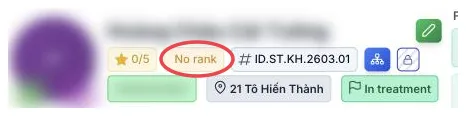
Illustration of the membership tier label on a customer profile
A customer who does not qualify yet shows No rank. That is the normal state for a new customer (patient), not missing data.
Loyalty points and reward points
Both boxes sit in the left column of the Info tab.

Illustration of the two points boxes on a customer profile
| Box | Meaning |
|---|---|
| Loyalty points | Earned by the customer through spending — the basis for the tier. |
| Reward points | Points the clinic grants on top: birthdays, referrals, promotions. |
Both are calculated by the software; the front desk cannot edit them.
Three common reasons:
- The clinic has not switched on the loyalty programme — with no tiers defined, nobody gets ranked.
- Below the lowest threshold — each tier has a minimum in points or spending.
- Orders not fully paid — many clinics only count money actually collected.
Where tiers are configured
The list of tiers, their thresholds and their perks live in the Loyalty module, not in CRM. The clinic administrator sets them there; the customer profile only displays the result.
Changing one customer's tier also happens in that module — on the CRM profile the label is read-only and clicking it does nothing.
Glance at the tier before quoting a price or an offer. Treating a top-tier customer (patient) like a first-timer costs goodwill, even when the software charges the right amount.
Related
- Customer Details — where the label and points sit.
- Financial Information — the spending behind the tier.
- Loyalty module — where tiers and perks are set up.
- Member rank (Configuration) — where ranks and the general discount % are created/edited.
- Rank Discount — configure a discount % specific to individual services for each rank.