Call History
The Calls tab records every call between the clinic and the customer through the phone system — who called, when, whether they answered, how long it lasted, and the recording to replay. The phone system logs all of it; nobody types it in.
Open the Calls tab
Open the customer (patient) profile → Info tab → in the conversation tab row, choose 📞 Calls.
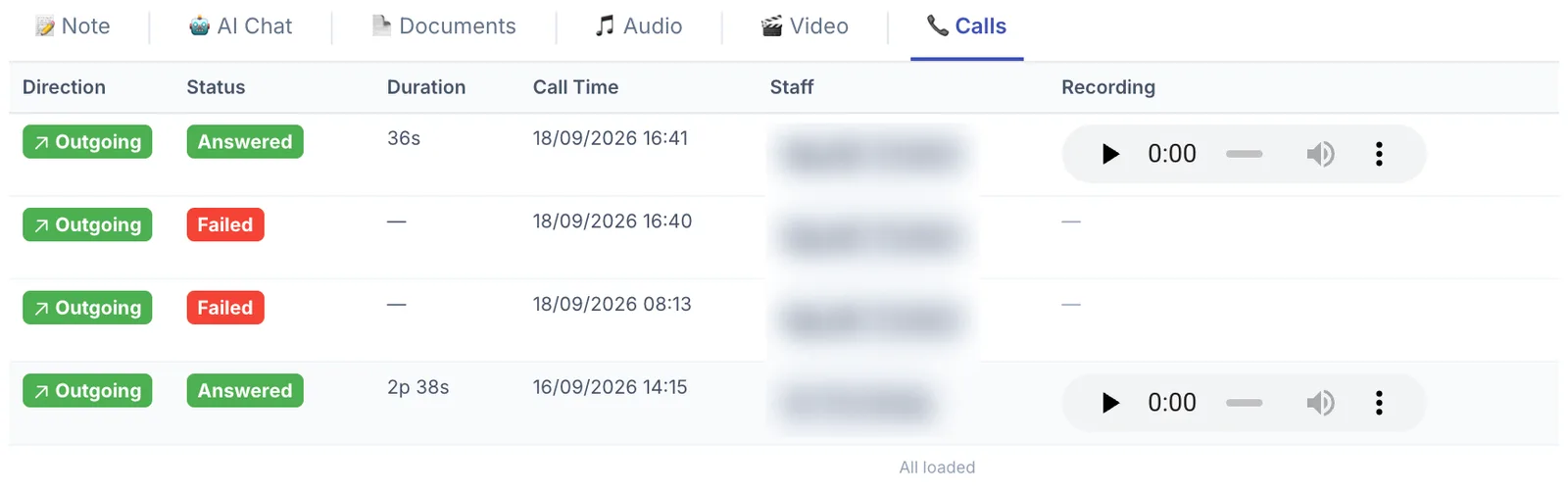
Illustration of the Calls tab on a customer profile
Reading the table
| Column | Meaning |
|---|---|
| Direction | Outgoing — a staff member called the customer. Incoming — the customer called the clinic. |
| Status | Answered (green) — the call connected. Failed (red) — no answer, busy, or unreachable. |
| Duration | How long the call lasted (36s, 2p 38s). Failed calls show —. |
| Call Time | Date and time of the call. |
| Staff | Who made the call. |
| Recording | A player to listen back. Failed calls have no recording and show —. |
At the end of the list you will see All loaded — there are no older calls.
What it is for
- Knowing who called and when — stops two people calling the same customer on the same day, and stops a customer being forgotten because everyone assumed someone else called.
- Seeing whether the customer actually answers — three Failed calls in a row is a sign to message them on Zalo or try a different time of day.
- Checking what was promised — when a customer says "you told me 20% off last week", the recording settles it.
- Training new staff — replay good consultation calls as examples.
Before an after-care call, glance at this table for the last call and who made it. Opening with "my colleague spoke with you last week about…" makes the clinic feel attentive, unlike a call that starts from nothing.
Empty table, or calls missing
- No phone system connected — this tab only fills once a PBX (Omicall or similar) is integrated under the software Settings area.
- Calls made from personal phones — anything that does not go through the phone system cannot be logged. This is by far the most common reason for missing calls.
- Number not on the profile — a call to a number that is not saved on the customer will not attach here.
Calls contain health and personal information. Listen only for a work reason, never download recordings to a personal machine, and never share them outside the clinic.
Related
- Audio Recordings — files staff upload themselves.
- Create a Care Record — scheduling the next call.
- Create a Note — writing down what was agreed on the phone.