Financial Information
The FINANCE block sits at the top of the customer (patient) profile and holds six money boxes. It is the fastest way to see whether a customer owes money or has money sitting with the clinic — one glance before they reach the desk is enough.
All six are recalculated by the software whenever an order, a payment or a refund changes. Nobody types into them.
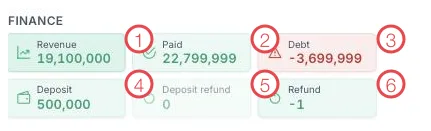
Illustration of the Finance block on a customer profile
| Box | Meaning |
|---|---|
| 1. Revenue | Total value of the services the customer has agreed to, from their orders. |
| 2. Paid | Total money actually collected, including deposits already used. |
| 3. Debt | What the customer still owes. Outlined in red so you cannot miss it. |
| 4. Deposit | Money paid up front that is not yet applied to any service. |
| 5. Deposit refund | Deposit money returned to the customer. |
| 6. Refund | Money refunded for services the customer no longer wants. |
Reading the numbers correctly
Debt = 0 — the customer has paid for everything done so far. Nothing to bring up.
Positive debt (e.g. 3,500,000) — the customer owes the clinic. Mentioning it
while they are at the desk is far easier than chasing it by phone later.
Negative debt (e.g. -3,699,999, shown in red above) — the customer has paid more
than the work completed so far. Usually they prepaid a long treatment plan, or cancelled
services after paying. This is not an error and does not mean they owe anything; the
clinic is holding their money.
Deposit above zero — the customer has credit at the clinic that can be applied to a new order instead of collecting cash again.
Open the profile → look at Debt → look at Deposit. Those two numbers decide your first sentence: a gentle reminder about a balance, or good news about credit they can use.
The six boxes cover one customer only. Clinic revenue, income and expense reports and reconciliation live in the Accounting module — never add up customer (patient) profiles by hand to get a monthly figure.
When a number looks wrong
Open the tabs in the customer profile and check:
- Order — the services agreed; they add up to Revenue (Create an Order).
- Payment — each collection; they add up to Paid (Create a Payment).
- Treatment — the work performed, which drives Debt (Record a Treatment).
If it still does not match, tell accounting rather than editing old orders yourself.
Related
- Customer Details — the full profile layout.
- CLV & Behaviour — the block just to the right.
- Membership Tier — how spending feeds the tier.