Treatment — Other Specialties
This is the screen for every specialty other than dental and rehabilitation — aesthetics, dermatology, internal medicine, paediatrics, ophthalmology, ENT — after clicking + Create on the Treatment tab.
What is distinctive here: customers (patients) usually buy multi-session packages and one visit may cover several services at once, so this screen lets you tick several services in a single session.
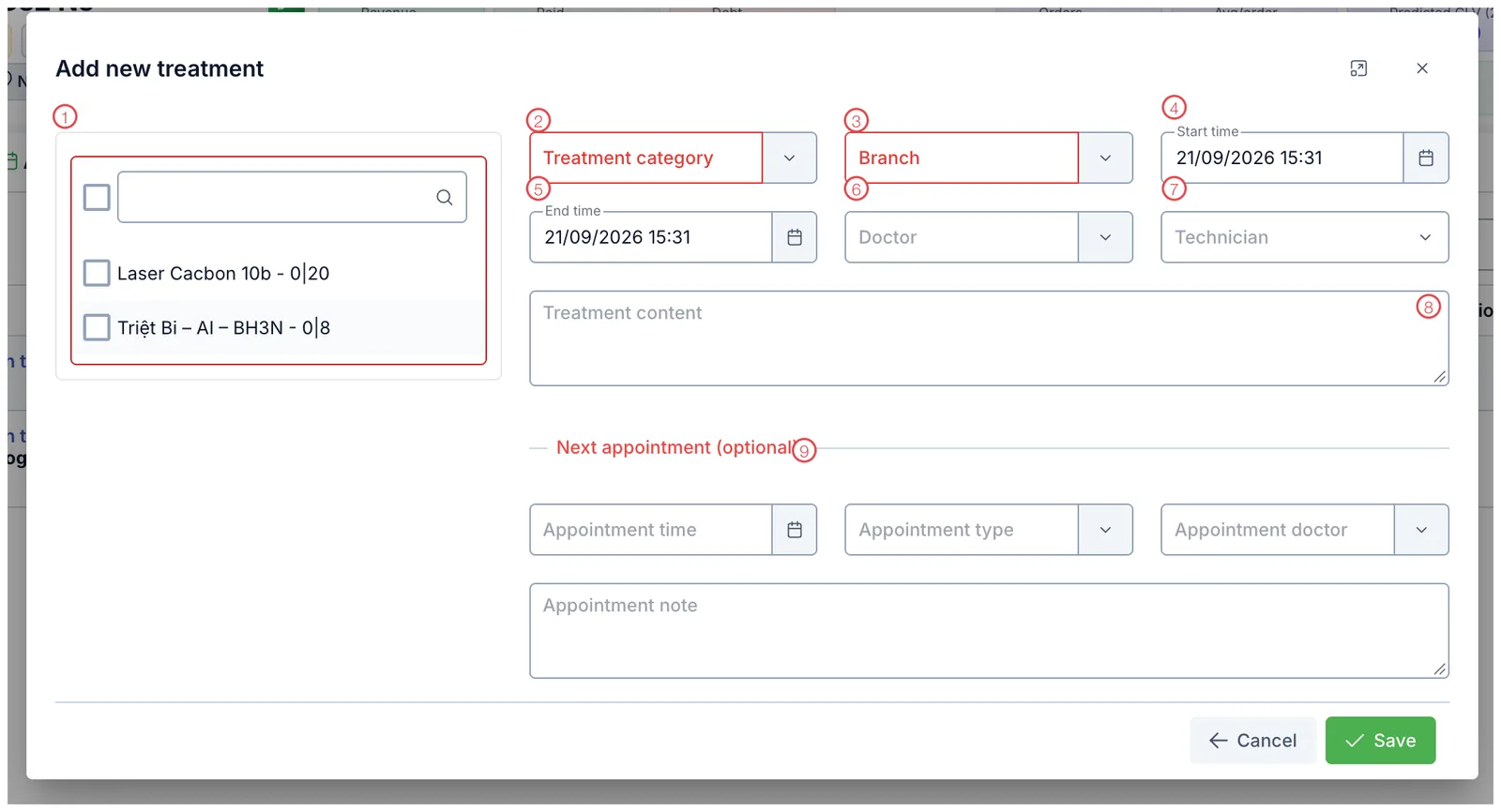
Illustration of the treatment screen for other specialties
| Mark | What it is | Worth knowing |
|---|---|---|
| 1. Service list | Services the customer bought, each with a tick box and a counter like 0|20. The box at the top selects or clears everything. | |
| 2. Treatment category ⭑ | The kind of work. | |
| 3. Branch ⭑ | Where it is performed. | |
| 4. Start time | Pre-filled with now. | |
| 5. End time | When the session finished. | |
| 6. Doctor | The doctor in charge. | |
| 7. Technician | Who actually performed it. | |
| 8. Treatment content | What was done, how the customer responded, notes for next time. | |
| 9. Next appointment (optional) | Book the follow-up straight away. |
⭑ = required (outlined in red in the picture).
Ticking several services in one session
If the customer has carbon laser and then hair removal in the same visit, tick both rows in area 1. Each ticked service has one session deducted from its package.
The 0|20 next to a service means 0 of the 20 purchased sessions used. After saving,
the ticked service shows 1|20.
Every tick deducts one session from a package. Ticking a service they did not actually have costs them a paid session — and it usually goes unnoticed until they count them up.
In a 20-session hair-removal package every visit looks alike. Record the area treated, the energy level and the skin reaction in Treatment content so whoever does the next session knows whether to adjust.
Related
- Record a Treatment — the shared steps and how to open the tab.
- Ways to View Treatments — reviewing sessions already done.
- Create an Order — selling the package before treating.