Dental Treatment
This is the screen a dental clinic sees after clicking + Create on the Treatment tab. In dentistry one service runs across many sessions (braces, implants), so this screen is built around progress: which stage the session belongs to and how far it pushes the service along.
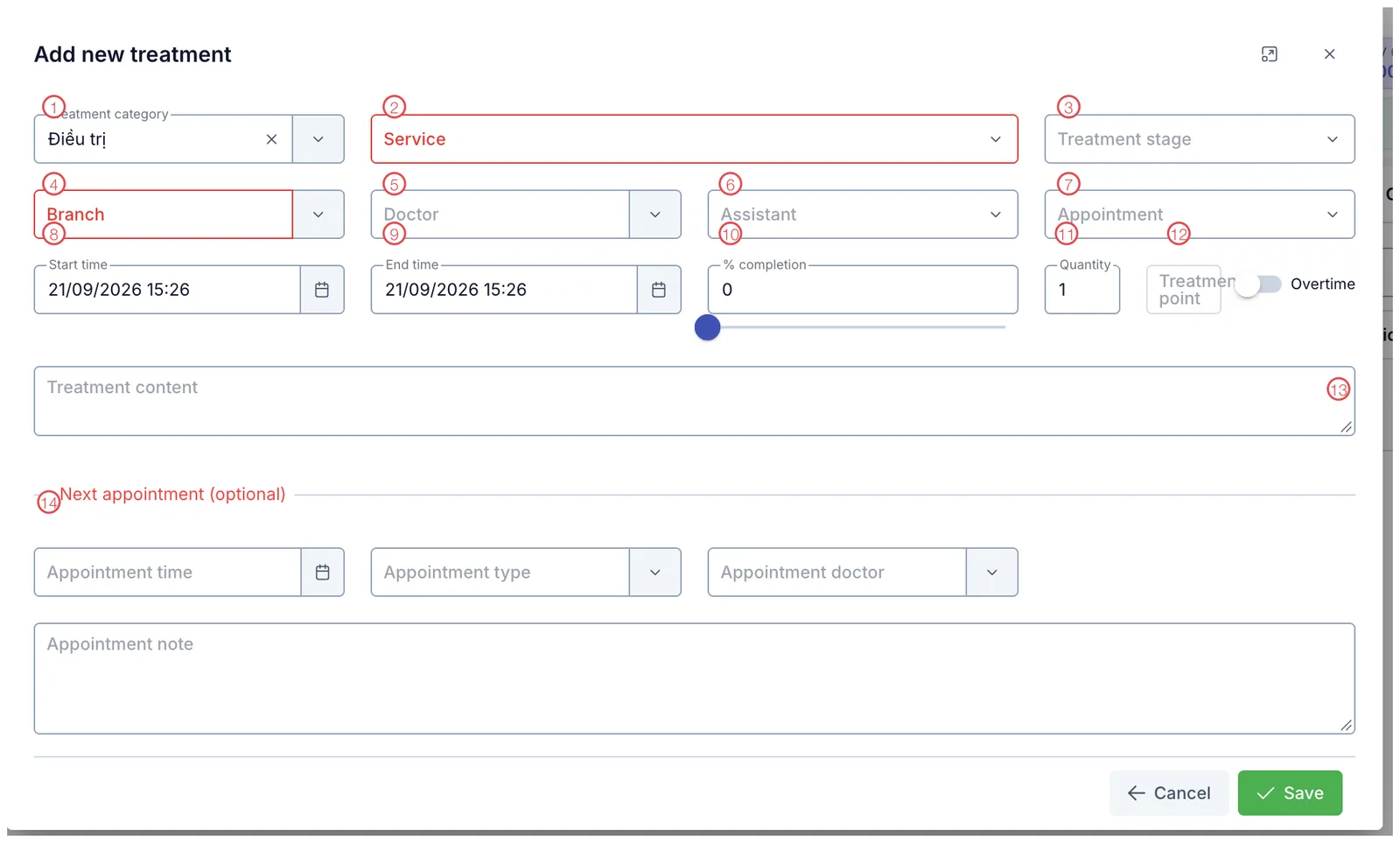
Illustration of the dental treatment screen
| Mark | What it is | Worth knowing |
|---|---|---|
| 1. Treatment category | The kind of work, defaulting to Điều trị (treatment). The list is configured by your clinic. | |
| 2. Service ⭑ | The service being treated. Only services the customer bought appear. | |
| 3. Treatment stage | Which stage of the plan this session belongs to. | |
| 4. Branch ⭑ | Where it is performed. | |
| 5. Doctor | The doctor doing the work. | |
| 6. Assistant | The assisting staff member, used for points and commission. | |
| 7. Appointment | Link the session to a booked appointment. | |
| 8. Start time | Pre-filled with now. | |
| 9. End time | When the session finished. | |
| 10. % completion | A slider — how much this session advances the service. | |
| 11. Quantity | Units performed in this session. | |
| 12. Treatment point and Overtime | Points for the performer; switch Overtime on for out-of-hours work. | |
| 13. Treatment content | What the doctor actually did. | |
| 14. Next appointment (optional) | Book the follow-up right away: time, appointment type, doctor and note. |
⭑ = required (outlined in red in the picture).
Three fields that drive the reports
% completion (10) — these add up across sessions into the Treatment progress figure shown on the Treatment tab and the customer profile. Leave it at 0 and the service looks untouched even after five visits.
Assistant (6) and Treatment point (12) — the basis for crediting staff. Left empty, nobody is credited for that session.
Overtime (12) — switch on for work outside normal hours, so overtime pay is calculated.
The Next appointment block at the bottom means the customer leaves the chair with a date already set. Braces patients come back monthly — booking while they are still sitting there beats phoning next week.
Field Service (2) decides which plan the session is deducted from. Picking a lookalike corrupts both the progress and the balance of two services at once.
Related
- Record a Treatment — the shared steps and how to open the tab.
- Ways to View Treatments — reviewing sessions already done.
- Record a Check-up — examinations and the tooth chart.