Create an Installment Plan
An installment splits one service's price into several terms. The plan itself is set up when the order is created; this page covers collecting each term as it falls due.
Step by step
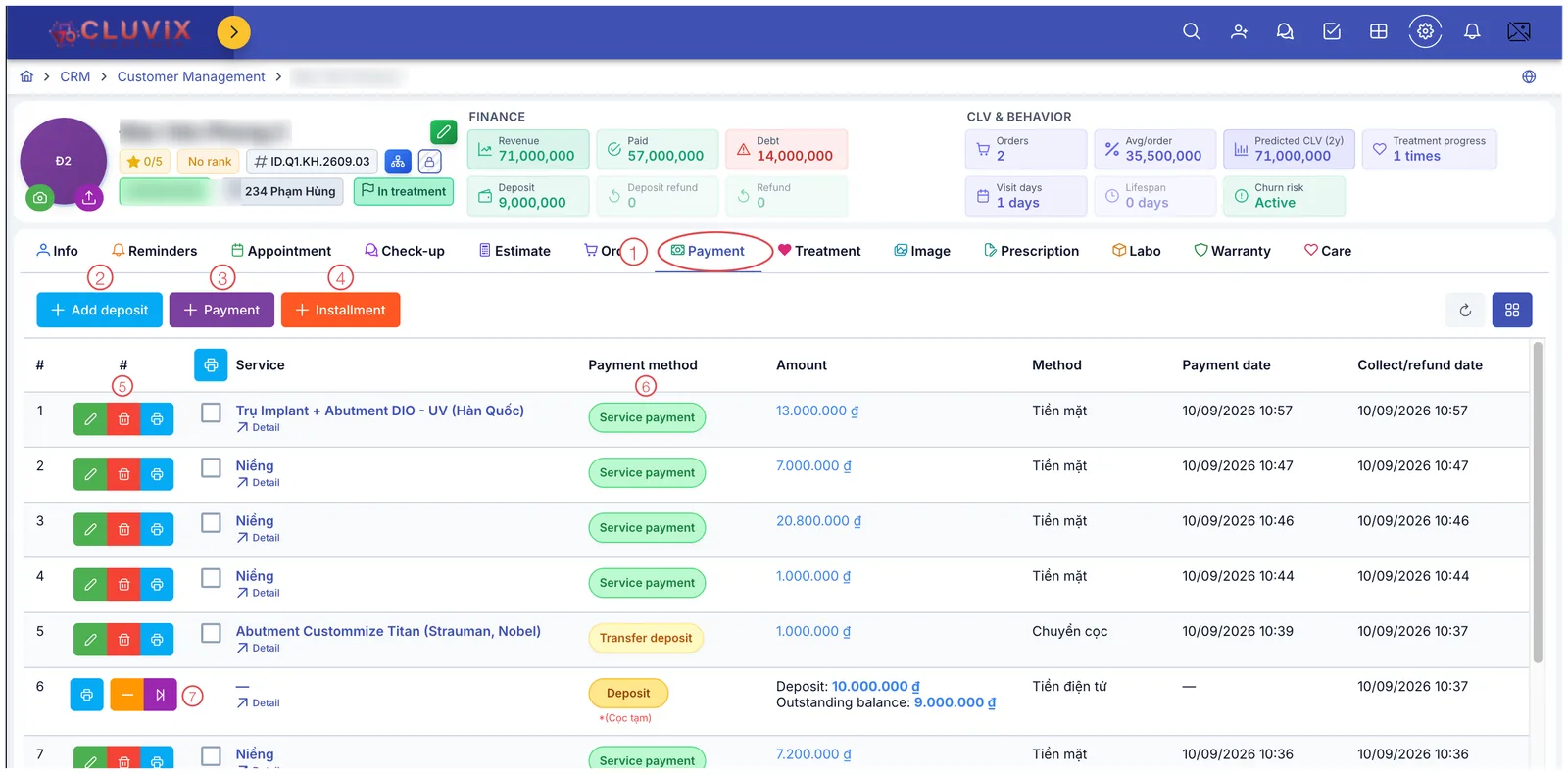
Illustration of where the Installment button sits
- Open the customer — go to CRM › Customer Management and click their name to open the customer (patient) profile.
- Choose the Payment tab (mark 1 in the picture).
- Click + Installment — the orange button, third of the three (mark 4).
- Find the term that is due in the list on the left — read the Hạn (due date) column and take the oldest one still Chưa thu (not collected).
- Tick that term. The Amount field on the right fills itself from the ticked terms.
- Compare that figure with the money in hand. A mismatch means one term too many or too few.
- Pick the Installment method (how they are paying) and the Installment type if your clinic uses one.
- Click Save. The collected term becomes a row in the payment table and drops out of the waiting list.
Every field in the window
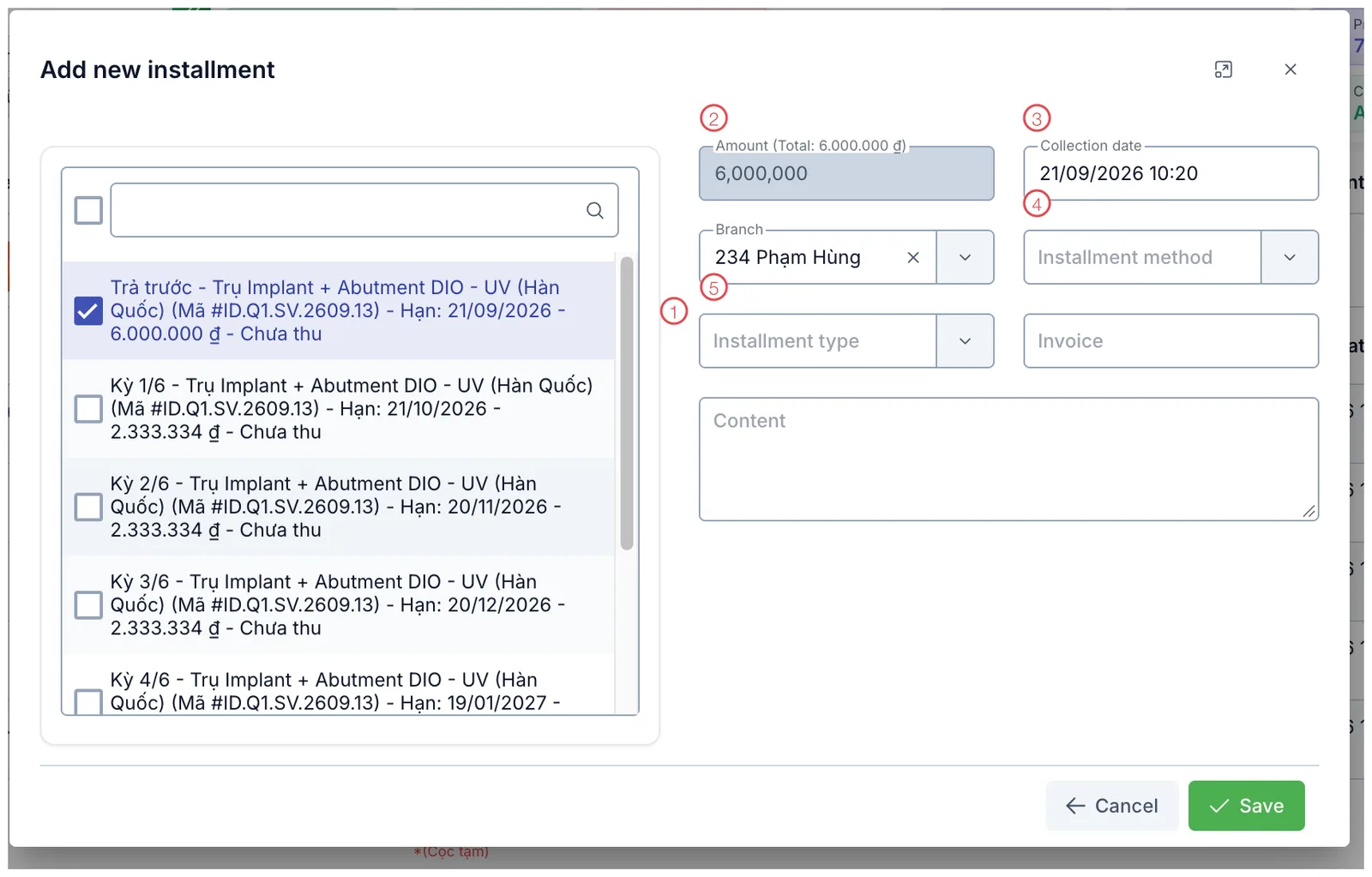
Illustration of the Add new installment window
| Mark | What it is |
|---|---|
| 1. Term list | Every term for this customer, with its due date, amount and the status Chưa thu (not collected). Tick the term being paid. |
| 2. Amount (Total) | The total of the ticked terms. Ticking a term fills this automatically — in the picture the first term is ticked and the amount has filled itself. |
| 3. Collection date | When the money is received; pre-filled with now. |
| 4. Installment method | How the customer is paying this term. |
| 5. Installment type | The clinic's own classification for the collection. |
There is also Branch (pre-filled from the order), Voucher No. and Content.
Reading the term list
Each line looks like:
Kỳ 1/6 — service name (Mã #ID.Q1.SV.2609.13) — Hạn: 21/10/2026 — 2,333,334 đ — Chưa thu
| Part | Meaning |
|---|---|
| Trả trước | The up-front payment agreed at signing; not one of the terms. |
| Kỳ n/N | Term n out of N. |
| Mã #ID… | The service code, so you can tell terms apart when a customer has several plans. |
| Hạn | The date that term is due. |
| Chưa thu | Status. Collected terms no longer wait here. |
The lines in this list have not been translated yet — Kỳ means term, Hạn means due date, and Chưa thu means not yet collected.
The amount adds up from the ticked terms, so if it does not match the money in hand you have almost certainly ticked one term too many or too few. Fix the ticks at mark 1 and look again.
Customers (Patients) say "I'm paying this month's", not which term number. Use the Hạn (due date) column to pick the oldest term still Chưa thu — ticking a later one leaves the earlier term permanently overdue.
After saving
The collected term appears as a row in the Payment table and disappears from the waiting list next time. Paid and Debt at the top of the profile are recalculated.
Related
- Create an Order — where the plan is configured.
- Create a Payment — collecting outside an installment plan.
- Financial Information — the remaining debt.