Medical Records Overview
Paper records have one flaw every clinic knows: they take an age to find, and only one person can hold one at a time. Electronic medical records replace that folder entirely — from the moment a patient reaches the reception desk, through the examination and diagnosis, the paraclinical orders and the prescription, to taking payment and digitally signing the record closed — all on one screen, and retrievable in seconds.
The module is for doctors, nurses, reception staff and cashiers.
How to open the EMR module
On the purple bar at the very top, click the grid icon (four small squares). A board of modules appears, each one an area of the clinic's work.
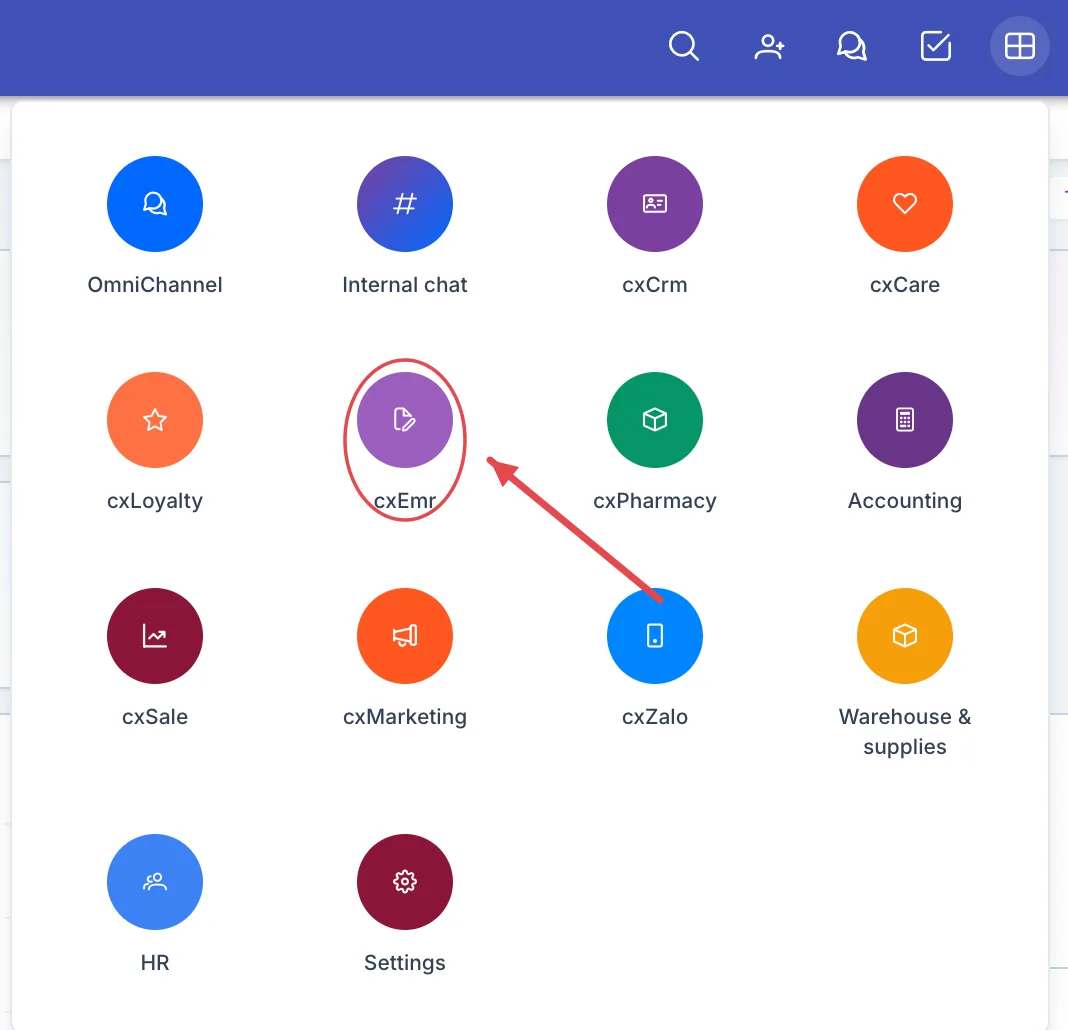
Illustration of the module board
Look for the cxEmr tile — a document-and-pen icon on a round purple background. Click it to open the module.
The board only shows the modules your account is allowed to use. Medical records are clinical data, so access usually goes to doctors, nurses and reception — ask your clinic administrator if you need it.
What's on the working screen
Opening the module lands you on the Dashboard — the day's whole clinic in one picture.
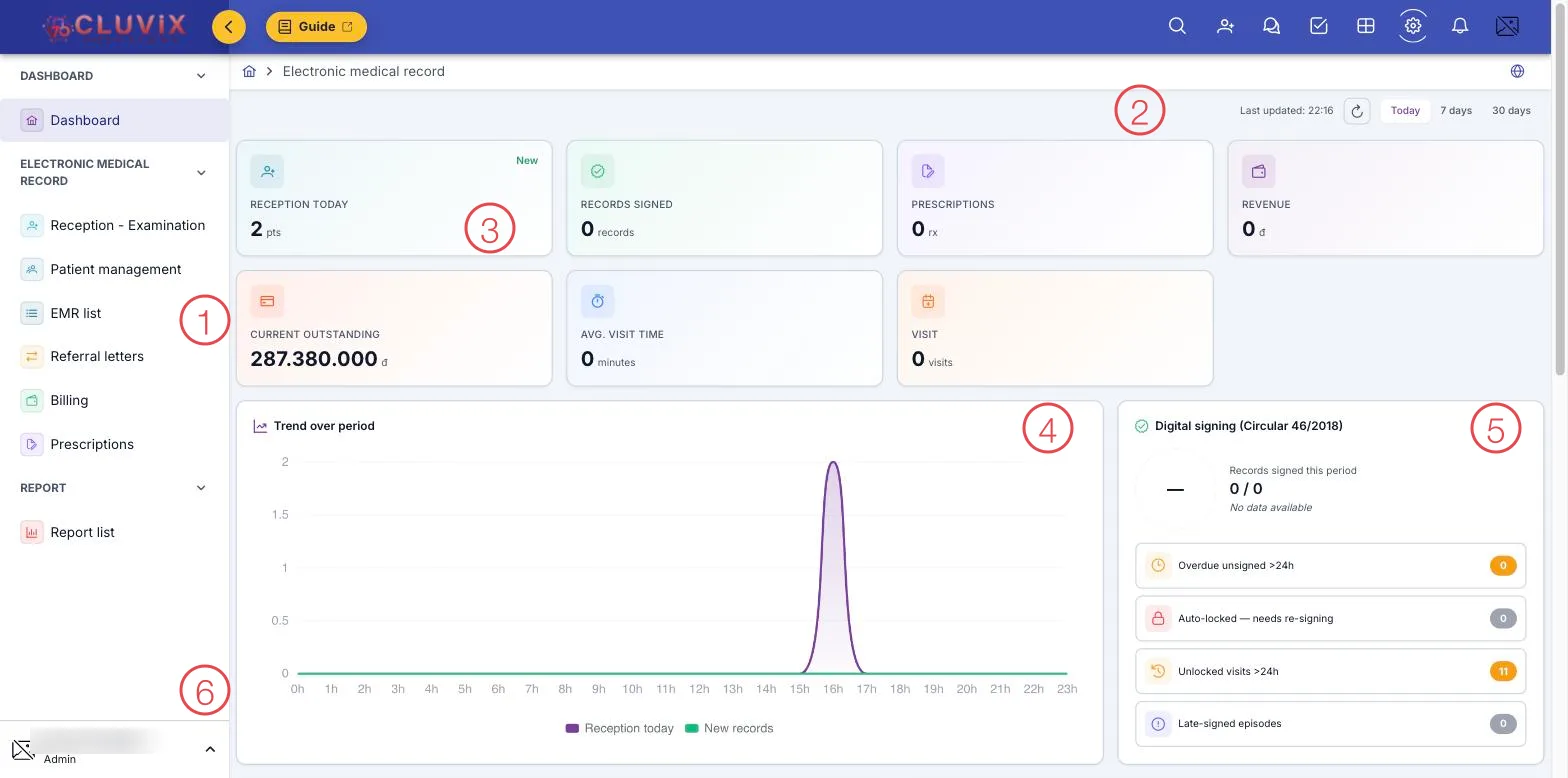
Illustration of the EMR working screen
| Area | What it is |
|---|---|
| 1. Left menu | The module's items, grouped: Dashboard, Electronic medical record, Report. |
| 2. Period picker | Today · 7 days · 30 days, with the last refresh time and a refresh button. |
| 3. Figure cards | Patients received, records signed, prescriptions issued, revenue, current outstanding, average visit time, visits. |
| 4. Trend over period | Receptions and new records hour by hour — it shows you the busy hours to staff for. |
| 5. Digital signing (Circular 13/2025 + internal policy) | Records signed this period, and those needing attention now: unsigned past 24 hours, visits unclosed past 24 hours, late-signed episodes. |
| 6. Account block | Your name and role, at the bottom of the left menu. |
Scroll down for two more panels: Patient flow (today's appointment statuses by time slot) and Distribution by department.
The path of a single visit
The whole module follows one journey, and each menu is a leg of it:
- Reception. Booked patients are already on the list; a walk-in only needs a phone number or a name typed into the quick-reception box to get a queue number.
- Patient arrives. The nurse records vitals — height, weight, blood pressure, pulse, temperature, respiratory rate, SpO₂ — along with the reason for the visit, symptoms and medical history.
- Examination. The doctor opens the exam screen: clinical examination on their own specialty's form (dentistry has its own tooth chart), orders services and paraclinical tests, and receives the results back.
- Conclusion. Diagnosis by ICD-10 code, prescription, and the treatment plan.
- Digital signature. The doctor signs the record under Circular 13/2025 — the record locks, with a permanent note of who signed it and when.
- Billing. Payment for the visit, the services and the paraclinical tests in the record.
If the patient needs another department mid-visit, a referral letter sends the record along with them.
What the module covers
Dashboard
| Menu | What it does |
|---|---|
| Dashboard | The period at a glance: receptions, records signed, revenue, busy hours and the signing position. |
Examination screen
The tabs inside the examination screen, opened when the doctor clicks the patient's name in Reception - Examination.
| Tab | What it does |
|---|---|
| Treatment Episode Timeline | Record and sign each visit of a multi-visit episode, amend a signed visit with a reason, review each visit's version history. |
| Forms & Records | Create consent forms, procedure notes and treatment follow-ups for the visit; complete them, reopen with a reason and attach them to the medical record. |
Electronic medical record
| Menu | What it does |
|---|---|
| Reception - Examination | The day's queue: take in walk-ins, record vitals on arrival, and open the exam screen for the doctor. |
| Patient management | The patient list and their administrative details — one record per person, carried through every visit. |
| EMR list | Every record created, searchable by patient, doctor, department or period, with its signing status. |
| Referral letters | Letters moving a patient from one department to another, with the reason and the signature on them. |
| Billing | Charges for visits: what is paid, what is outstanding, and taking the rest. |
| Prescriptions | Every prescription written, searchable by patient or by date. |
Report
| Menu | What it does |
|---|---|
| Report list | The way in to the module's reports: Top diagnoses, Doctor statistics, Patient flow. |
Why use it
- Records that meet the legal standard. Diagnoses from the ICD-10 catalogue and signing under Circular 13/2025: a signed record is locked, with who signed it and when kept on file — exactly the audit trail an electronic record has to carry.
- A form per specialty. Dentists get the tooth chart, other departments get the form that suits their work — nobody charts teeth on a general-medicine sheet.
- Ready-made exam templates. The examination and diagnosis sections fill from the clinic's own templates, so the doctor edits the differences instead of typing every case from scratch.
- Records lead straight to money. Services, paraclinical tests and medicines ordered during the visit flow into the invoice — the cashier adds nothing up by hand.
- The whole history in one place. A patient returning a year later opens with their earlier visits, past diagnoses, past prescriptions and the progress of each session.
Related
- The EMR module — the short introduction in Getting started.
- Adding a Staff Member — a doctor's department decides which treatment form they see.
- The Customer Journey — from first interest to treatment.