Referral Letters
A patient does not always finish where they walked in: dentistry sends a case to orthodontics, general medicine sends one to a specialist, a complex case goes up to a hospital. A referral letter records each of those moves, so the record travels with the patient instead of breaking off.
This screen is the lookup list of every letter written.
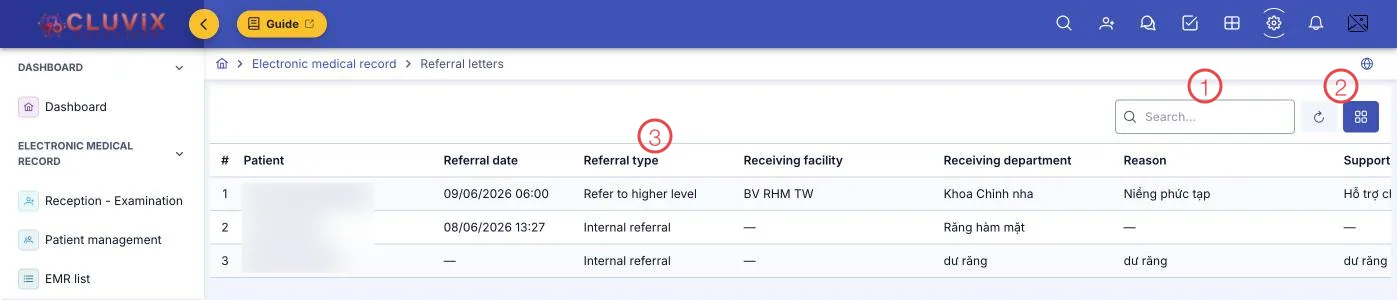
Illustration of the Referral letters screen
| Area | What it is |
|---|---|
| 1. Search box | Find a letter by patient name. |
| 2. Refresh and columns | Reload the list; the button beside it chooses which columns show. |
| 3. Referral type column | Where the patient is being sent — see below. |
The remaining columns complete the letter: Referral date, Receiving facility, Receiving department, Reason and what support is asked of the receiving side.
The three types
| Type | Used when |
|---|---|
| Internal referral | To another department of the same clinic, for example dentistry to orthodontics. |
| External referral | To another facility at the same level — another branch or a partner clinic. |
| Refer to higher level | Up to a hospital, when the case is beyond the clinic's scope. |
A letter's status
| Status | Meaning |
|---|---|
| Pending | Written; the patient has not gone yet. |
| Sent | The patient has been sent on. |
| Accepted | The receiving side confirms they have the patient. |
| Completed | The referral is finished and the patient has been dealt with. |
| Cancelled | The letter was not used. |
Where letters are written
A referral letter is written inside the visit: the doctor opens the examination screen and goes to the Linked tab. There they set the type, the receiving facility and department, the reason and the record summary to send along.
Because it is written from inside the visit, the letter is always attached to the right patient and the right record — the receiving side opens it with the full context, nothing to ask again.
Related
- Reception - Examination — the Linked tab on the examination screen.
- Medical Records List — the record behind a referred visit.
- Medical Records Overview — where referral sits in the whole journey.