Patient Management
Everyone who comes for treatment has one patient record, with its own patient code, and it follows them through every visit — a year later they are still the same record, not a new one.
This screen is where you look up and update the administrative and history side of that record: identity documents, insurance card, blood type, allergies, guardian.
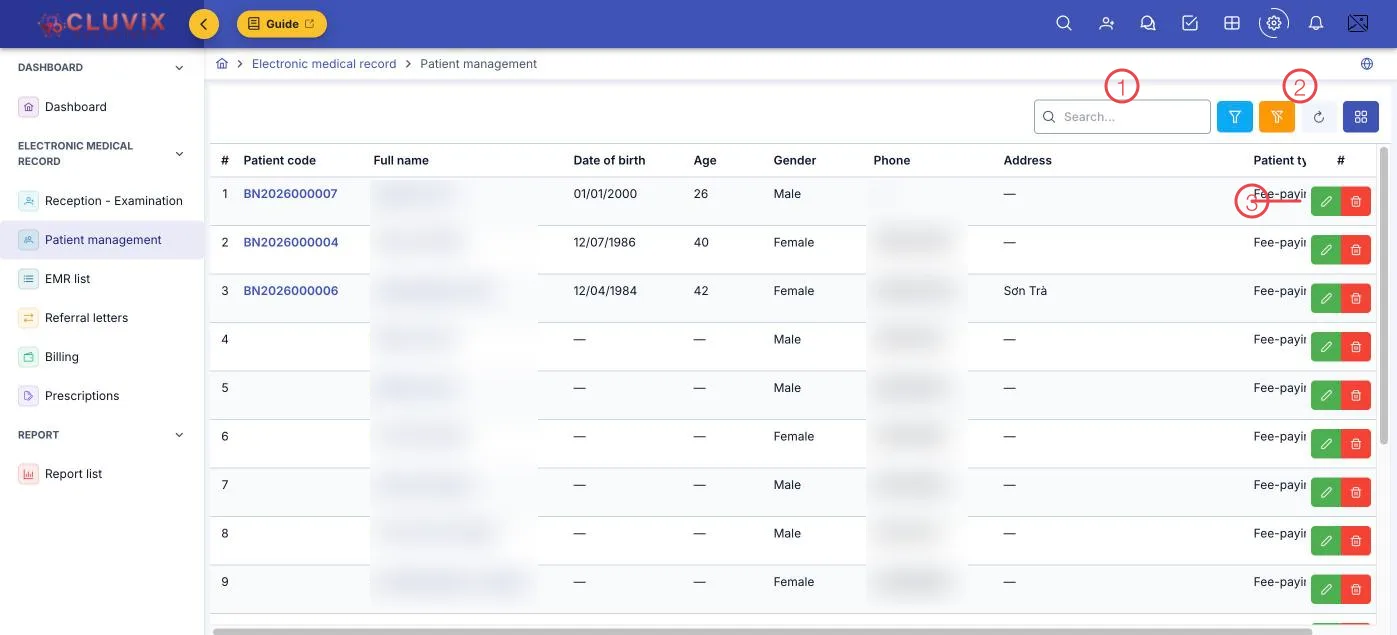
Illustration of the Patient management screen
| Area | What it is |
|---|---|
| 1. Search box | Search by name, patient code or phone number. |
| 2. Filter, clear, refresh, columns | The funnel filters by Gender and Patient type; the last button chooses which columns the table shows. |
| 3. Row buttons | Edit (pencil) opens the record, Delete (bin). |
The Patient code column holds a code the software generates (like BN2026000007) — give it
to the patient to keep and lookups later take seconds.
Patient types
The Patient type column says how this person's visits are charged:
| Type | Meaning |
|---|---|
| Fee-paying | The patient pays — the common case in a private clinic. |
| Health insurance | Covered by health insurance; the card number and benefit rate go in the record. |
| Free of charge | An exempt case, for example staff family or a community programme. |
| Other | Whatever else the clinic handles. |
What is in a patient record
Click Edit to open it. The fields are grouped:
- Administrative — full name, date of birth, gender, ID card or passport, ethnicity, nationality, occupation, permanent address per documents and current address.
- Health insurance — the card number and the benefit rate, used when creating the record and when taking payment.
- Medical — blood type, medical history, allergy history and important notes.
- Guardian / contact — name, relationship (father, mother, brother, sister…), phone and address. This matters for children and for elderly patients.
Allergy history and Important notes come back to the doctor during the examination and when prescribing. Ask once while creating the record, and it serves every visit afterwards.
Where patient records come from
A patient is the clinic's customer, seen from the clinical side. The record appears here when the customer is created in Customer management, or when reception takes in a walk-in — nothing is entered twice.
Because it is one shared record, the doctor opens a chart and sees the treatment history, while the care team sees the same person's full course of treatment and orders.
Related
- Reception - Examination — putting a patient into the queue.
- Customer Detail — the commercial view of the same person.
- Medical Records List — the visits already recorded.