Billing
This screen answers the one question the cashier's desk has: how much is still owed on this visit? Each row is a medical record, with the figures already added up from the services, paraclinical tests and medicines ordered during the examination.
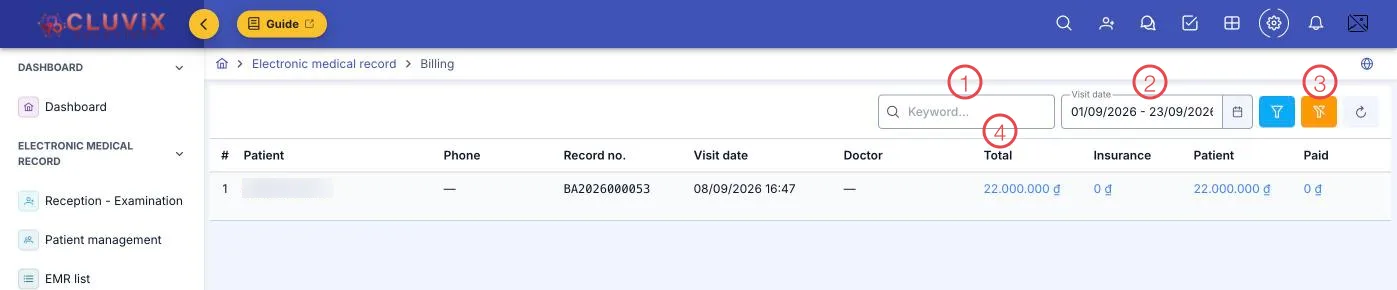
Illustration of the Billing screen
| Area | What it is |
|---|---|
| 1. Search box | Search by patient name, code or phone. |
| 2. Visit date | The period on screen; it opens on the start of the month through today. |
| 3. Filters and refresh | The funnel filters by doctor and payment status; the brush clears them. |
| 4. The money columns | Total · Insurance · Patient · Paid — see below. |
The four figures of a visit
| Column | What it is |
|---|---|
| Total | Everything the visit cost: services, paraclinical tests, medicines. |
| Insurance | The share health insurance covers, at the benefit rate in the patient's record. |
| Patient | What the patient owes — the number you read out at the desk. |
| Paid | What has been collected. Less than Patient means money is still outstanding. |
The figures appear as blue clickable text — click one to see the items behind it.
Taking payment
Scroll the table to the right (the horizontal bar at the bottom) to reach the Collect button at the end of each row. It opens the payment dialog for that record.
Each row's collection status has three levels: Unpaid, Partially paid, and paid in full. Filtering on Unpaid at the end of a shift gives you the list of people to call back or remind.
Set Visit date to today and read the Paid column — the day's takings and the records still short both sit on one screen.
Related
- Medical Records List — filter by payment status in the record list itself.
- Reception - Examination — the Payment tab on the examination screen, to collect while the patient is still there.
- Patient Management — where the insurance card number and benefit rate are kept.