HR Overview
The more people a clinic has, the more there is to keep track of: who is off today, who is on the evening shift, whose contract is about to expire, whether a doctor's practising certificate is still valid, and how this month's pay works out. HR brings all of that into one place — from hiring someone to closing the payroll at the end of the month.
The module is usually used by the owner, managers and whoever handles admin and HR.
How to open HR
On the purple bar at the very top, click the grid icon (four small squares). A board of modules appears, each one an area of the clinic's work.
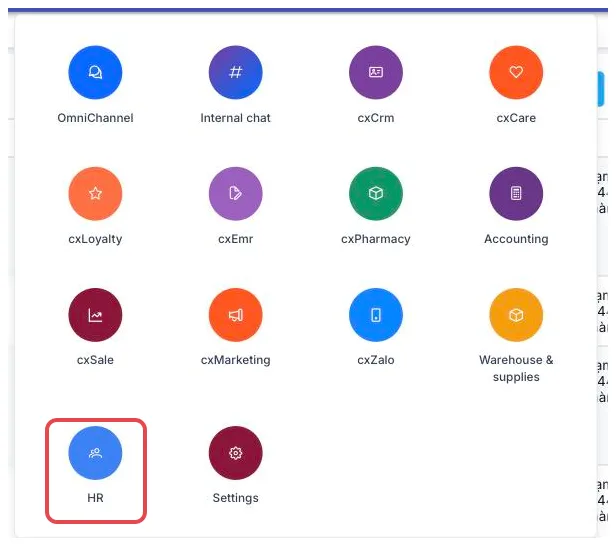
Illustration of the module board
Look for the HR tile — a two-people icon on a round blue background. Click it to open the module.
The board only shows the modules your account is allowed to use. HR holds pay and contract data, so access is usually given to only a few people — ask your clinic administrator if you need it.
What's on the working screen
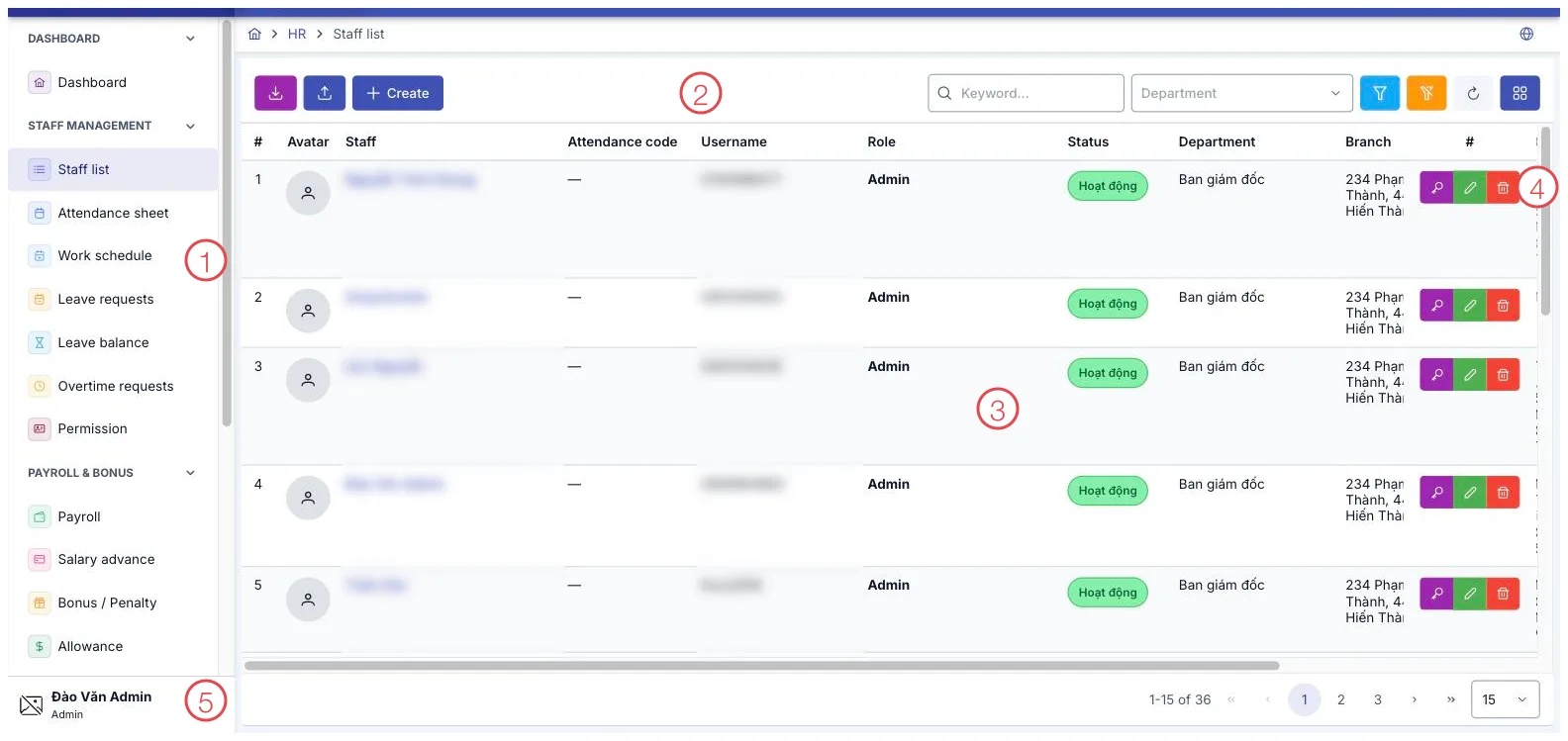
Illustration of the HR working screen
| Area | What it is |
|---|---|
| 1. Left menu | The module's items, grouped: Staff management, Payroll & bonus, Partner. |
| 2. Toolbar | Export, import from a file, Create, the search box and the department filter. |
| 3. Data table | The list for whichever item is open, with page numbers at the bottom. |
| 4. Row buttons | View details, edit and delete, for that row. |
| 5. Account block | Your name and role at the bottom of the left menu. |
What the module covers
Dashboard
- Dashboard — headcount, attendance, leave, payroll fund and expiring paperwork on one screen.
Staff management
The everyday part, touching the whole clinic:
- Staff list — each person's record: department, branch, role, attendance code, login account.
- Attendance sheet — hours worked, month by month.
- Work schedule — who is on which shift, and when.
- Leave requests — staff request time off, managers approve it.
- Leave balance — how many days each person has left.
- Overtime requests — registering and approving extra hours.
- Permission — which role can see and do what. The principles: Role-Based Permissions.
Payroll & bonus
Month-end work and everything attached to an individual:
- Payroll — the calculated result for a period.
- Salary advance — money paid out ahead of payday.
- Bonus / Penalty — amounts added or deducted.
- Allowance — meals, fuel, phone and the like.
- Labor contracts — contract type and term for each person.
- Practicing certificates — certificates held by doctors and technicians, with their validity.
- Salary and commission plans — how pay is worked out, for example a base salary plus a percentage of revenue.
- Assign a salary plan — who is paid on which plan.
- Salary and commission periods — closing a period so the figures can be used for payroll.
Partner
- Partner list — API access for outside systems integrating with the clinic: Client ID/Secret, IP restrictions, expiry.
Why use it
- Attendance feeds straight into pay. Hours, leave, overtime, allowances, bonuses and penalties all sit together, so payday does not mean gathering numbers from scattered files.
- Different groups, different maths. Receptionists on a flat salary, doctors on a share of revenue, part-timers by the shift — write each formula once and assign it to the right people.
- Contracts and certificates do not expire unnoticed. Either one lapsing mid-treatment is a legal problem, so both get their own place to be tracked.
- Tight permissions on sensitive data. Pay and contracts open only for those granted access, even though everyone shares the same software.
Related
- Role-Based Permissions — who can see and do what.
- The Mobile App — staff clocking in from their phones.
- Account Security — two-step verification and access logs.