Practicing Certificates
A clinic operates legally on the strength of its practitioners' certificates. This screen keeps the details of each one — and the expiry date, which must never be forgotten.

Illustration of the Practicing certificate screen
| Area | What it does |
|---|---|
| 1. Create | Records a certificate. |
| 2. Search employee | Filter by person. |
| 3. Branch filter | One site only. |
| 4. Type | Filter by certificate type. |
The table holds Type, Certificate number, Scope of practice, Issued by, Issue date and Expiration date.
Recording one
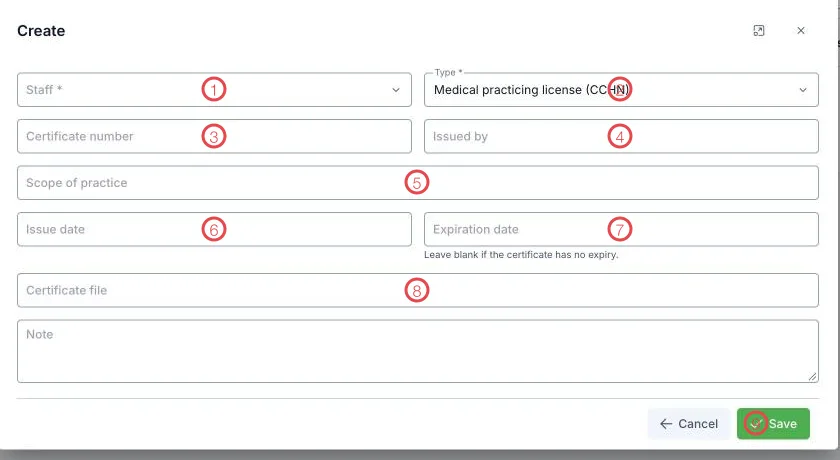
Illustration of the practicing certificate form
| Area | What goes in |
|---|---|
| 1. Staff (required) | Whose certificate it is. |
| 2. Type (required) | E.g. Medical practicing license (CCHN). |
| 3. Certificate number | As printed on the certificate. |
| 4. Issued by | The issuing authority. |
| 5. Scope of practice | The professional scope permitted — copy it exactly. |
| 6. Issue date | When it was issued. |
| 7. Expiration date | Leave blank if the certificate has no expiry. |
| 8. Certificate file | Attach the scan. |
| 9. Save | Records it. |
Scope of practice must match what people actually do
A doctor may only work within the scope on their certificate. Record it accurately so that the paperwork and the rota agree when an inspector asks.
Review expiries quarterly
Once a quarter, look down the Expiration date column and start renewals early rather than on the day one lapses.
Related
- Labor contracts — employment papers, also date-sensitive.
- Staff list — the person's main record.