Salary and Commission Plans
Reception on a flat salary, doctors on a percentage of revenue, telesales on tiers, technicians on points — every group is paid differently. This screen defines the plan once; you then assign it and settle it per period.

Illustration of the Salary/Commission Plan screen
| Area | What it does |
|---|---|
| 1. Create | Defines a plan. |
| 2. Search | Find a plan by name. |
| 3. Status | Filter active or switched-off plans. |
Defining a plan
A plan is made of components that add up. For example "Treating doctor" = a fixed component plus a tiered commission on revenue.
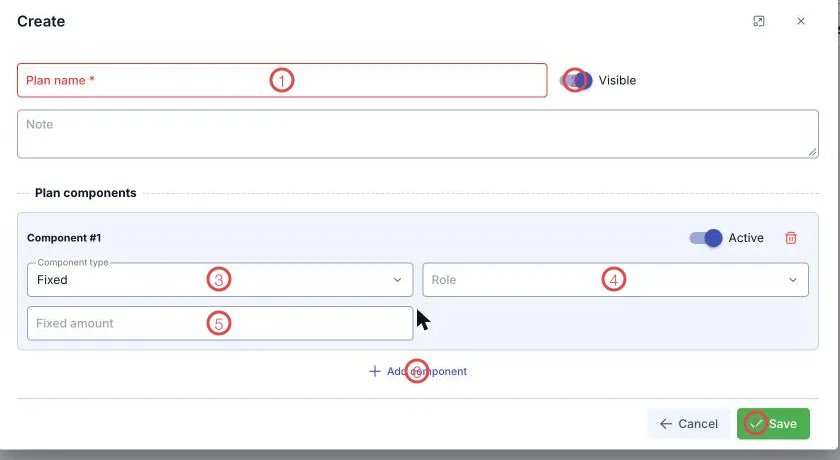
Illustration of the plan form
| Area | What goes in |
|---|---|
| 1. Plan name (required) | Name it after the group: Treating doctor, Telesales. |
| 2. Visible | Switch off when the plan is out of use. |
| 3. Component type | How this component is calculated — see below. |
| 4. Role | The role the component applies to, when a plan differs by role. |
| 5. The value field | Changes with the type: Fixed amount, the tiers, or the KPI criteria. |
| 6. Add component | Adds another component to the same plan. |
| 7. Save | Stores the plan. |
The five component types
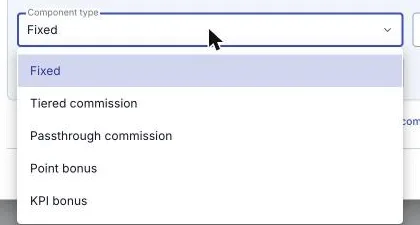
Illustration of the component types
| Type | How it works |
|---|---|
| Fixed | A set amount each period. |
| Tiered commission | Revenue is split into tiers, each with its own rate; the part falling in a tier earns that tier's rate. |
| Passthrough commission | A single rate across all revenue. |
| Point bonus | Based on points accumulated in the period. |
| KPI bonus | Based on how far the KPI criteria were met. |
Tiers must be continuous: the first starts at 0, they follow each other without overlapping, and leaving the last To empty means no upper limit. KPIs: the weights of the criteria within one component must total 100%.
Define plans by job type and assign them to whole departments. A plan per person means nobody dares change anything six months later.
Related
- Assign salary/commission plan — who is on which plan.
- Salary/commission periods — settling and reading each period.