Partner List
This screen is for the technical administrator. When the clinic integrates with an outside system — a booking app, a Zalo mini app, a partner's own software — that side needs an API access account. This is where you issue, restrict and revoke it.
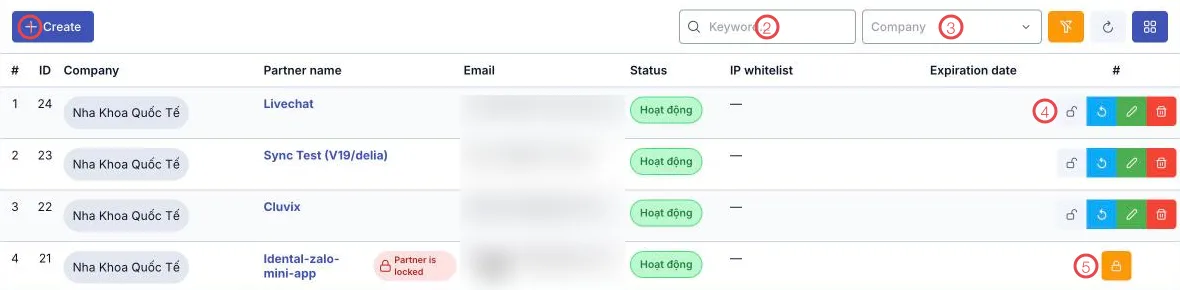
Illustration of the Partner list screen
| Area | What it does |
|---|---|
| 1. Create | Issues access to a new partner. |
| 2. Keyword | Search by partner name or email. |
| 3. Company | Filter by clinic brand. |
| 4. The row buttons | Regenerate credentials, edit, delete for that partner. |
| 5. The lock button | Locks or unlocks the partner. A locked row is tagged Partner is locked. |
The table holds Company, Partner name, Email, Status, IP whitelist and Expiration date.
Issuing access
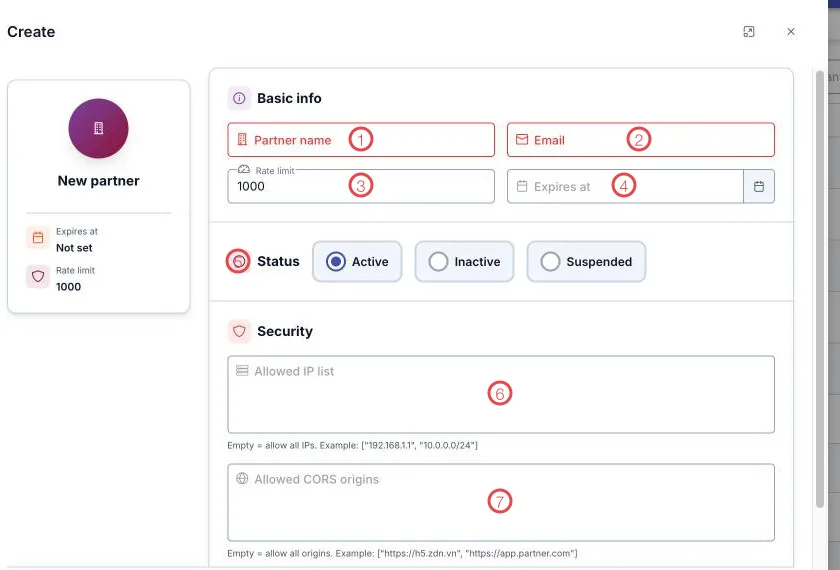
Illustration of the partner form
| Area | What goes in |
|---|---|
| 1. Partner name (required) | The integrating system, e.g. Booking app, Zalo mini app. |
| 2. Email (required) | Their technical contact. |
| 3. Rate limit | Permitted API calls; 1000 by default. |
| 4. Expires at | Leave blank for no expiry. |
| 5. Status | Active · Inactive · Suspended. |
| 6. Allowed IP list | Empty = allow all IPs. Give a list, e.g. ["192.168.1.1", "10.0.0.0/24"]. |
| 7. Allowed CORS origins | Empty = allow all origins. E.g. ["https://h5.zdn.vn", "https://app.partner.com"]. |
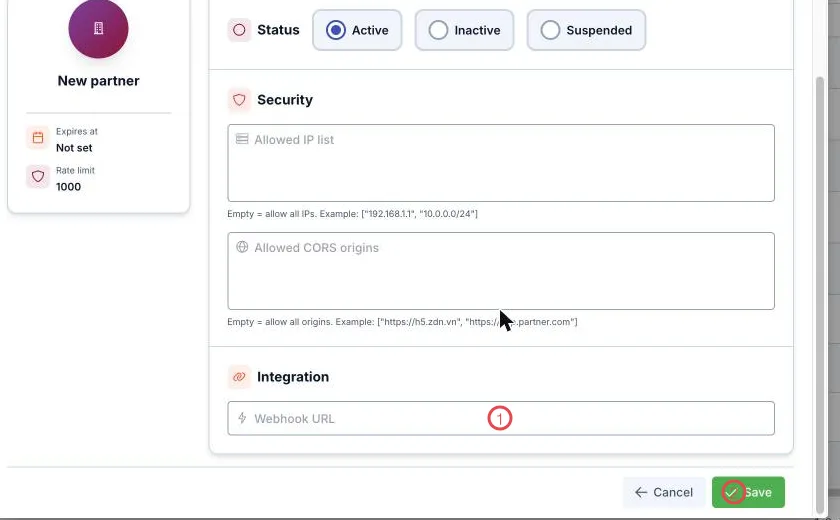
Illustration of the Integration section
| Area | What goes in |
|---|---|
| 1. Webhook URL | Where the software calls out when an event should reach the partner. |
| 2. Save | Creates the partner and issues the credentials. |
Client ID and Client Secret
On save, a Client secret dialog appears with the Client ID and Client Secret, with buttons to copy each and Copy all.
The software says it plainly: save the Client Secret now — you will not be able to see it again once this window closes. Send it to the partner's technical contact over a safe channel. If it is lost, use Regenerate credentials on the partner's row to issue a new secret — the old one stops working immediately.
Three ways to tighten access
| Control | When to use it |
|---|---|
| IP restriction | The partner calls from fixed servers — list those IPs and a stolen secret is useless elsewhere. |
| CORS origin restriction | The partner is a web app or mini app — allow only their domain. |
| Expiry date | A time-limited engagement: set the date and access switches itself off. |
To stop access immediately, hit Lock partner — access cuts out while the configuration stays for later.
Don't share one Client ID/Secret across systems. Keep them separate and you can lock exactly the one causing trouble, and the logs tell you who called.
Related
- Roles and permissions — permissions for people in the software, which is a different thing.
- HR overview — everything in the module.