Assign a Salary Plan
Once a plan exists, somebody has to be on it. This screen connects a plan to people, over a period of time.

Illustration of the Assign Salary/Commission Plan screen
| Area | What it does |
|---|---|
| 1. Create | Adds an assignment. |
| 2. Department filter | Assignments for one department. |
| 3. Employee filter | Assignments for one person. |
| 4. Salary/Commission Plan | Filter by plan. |
The table holds Plan, Assignment target, Effective from and Effective to.
Making an assignment
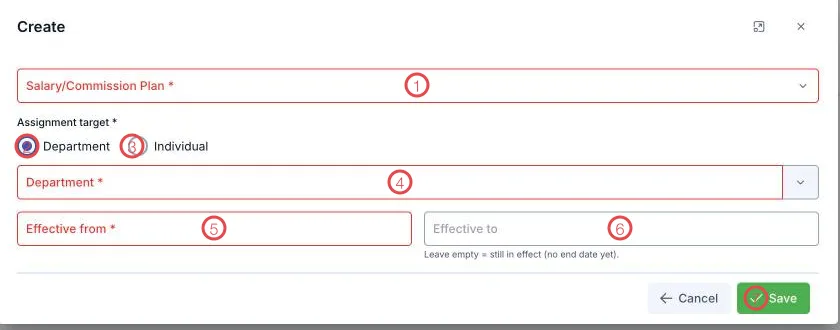
Illustration of the assignment form
| Area | What goes in |
|---|---|
| 1. Salary/Commission Plan (required) | The plan to apply. |
| 2. Department | Assign to a whole department — new joiners inherit it. |
| 3. Individual | Assign to one person, for special cases. |
| 4. The target picker | Pick the department or the person, per the choice above. |
| 5. Effective from (required) | When it starts applying. |
| 6. Effective to | Leave empty = still in effect, no end date yet. |
| 7. Save | Stores the assignment. |
Changing policy: set an end date, don't delete
When next year's commission changes, set Effective to on the old assignment and create a new one from the following day. Deleting the old one removes the basis for periods already settled.
Related
- Salary and commission plans — where the rules live.
- Salary/commission periods — settled against the assignments in effect.