Labor Contracts
The contract is where base salary is declared — the first figure payroll reads. It also holds the term, the insurance basis and the number of dependants for tax.

Illustration of the Labor contracts screen
| Area | What it does |
|---|---|
| 1. Create | Records a contract. |
| 2. Search employee | Filter by person. |
| 3. Status | Active, expired… |
The table holds Contract type, Effective date, End date, Base salary and Status — the End date column tells you which contracts need renewing.
Recording a contract
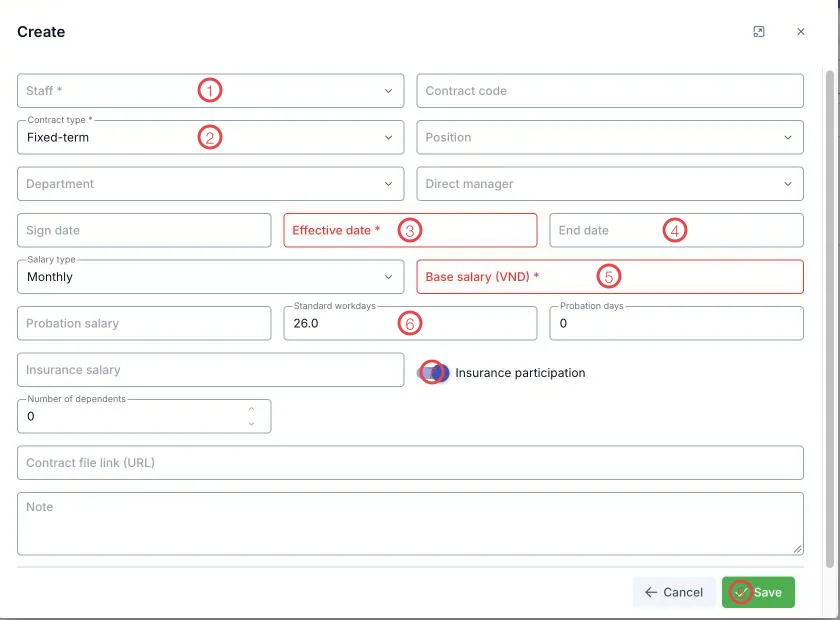
Illustration of the labor contract form
| Area | What goes in |
|---|---|
| 1. Staff (required) | Who is signing. |
| 2. Contract type (required) | Fixed-term, indefinite, probation… |
| 3. Effective date (required) | When the contract takes effect. |
| 4. End date | Leave blank for an indefinite contract. |
| 5. Base salary (VND) (required) | Feeds the Base sal. column in payroll. |
| 6. Standard workdays | 26 by default — the denominator when pay is pro-rated by day. |
| 7. Insurance participation | On or off; when on, fill in Insurance salary. |
| 8. Save | Records the contract. |
The remaining fields: Contract code, Position, Department, Direct manager, Sign date, Salary type (monthly or hourly), Probation salary and Probation days, Number of dependents (used for personal income tax), Contract file link (URL) for the scan, and Note.
Contract file link (URL) points at the scan in the clinic's storage. When someone needs to check a signature or a clause, it is on the record rather than in a filing cabinet.
An expired contract that hasn't been renewed is a legal risk. At the start of each month, sort by End date to see who needs an annex or a new contract.
Related
- Payroll — uses base salary and standard workdays from here.
- Practicing certificates — professional papers, also date-sensitive.
- Staff list — the person's main record.