Allowance
Lunch, fuel, phone, responsibility allowance — the amounts paid every month are declared here. Unlike a bonus, which is a one-off.

Illustration of the Allowance screen
| Area | What it does |
|---|---|
| 1. Create | Declares an allowance. |
| 2. Search employee | Filter by person. |
The table holds Allowance type, Amount, Month and Status.
Declaring one
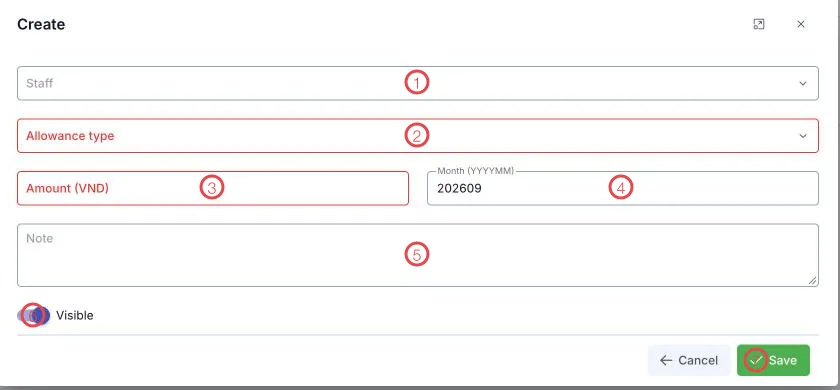
Illustration of the Allowance form
| Area | What goes in |
|---|---|
| 1. Staff | Who receives it. |
| 2. Allowance type (required) | Lunch, fuel, phone… |
| 3. Amount (VND) (required) | The amount for that month. |
| 4. Month (YYYYMM) | The pay period it applies to, e.g. 202609. |
| 5. Note | Anything extra. |
| 6. Visible | Switch off to pause it. |
| 7. Save | Records the allowance. |
Declare at the start of the month, for the month
Allowances are tied to a month, so declaring them in one pass at the start means the pay run at month end already has everything.
Related
- Payroll — the Allowance column comes from here.
- Bonus / Penalty — one-off additions and deductions.