Salary Advance
Staff needing money before payday is normal. Recorded here, the advance comes off the payroll of whichever period you choose — nobody has to remember to deduct it.

Illustration of the Salary advance screen
| Area | What it does |
|---|---|
| 1. Create | Records an advance. |
| 2. Search employee | Filter by person. |
| 3. Branch filter | One site only. |
| 4. Date picker | Filter by date. |
| 5. Status | Pending, approved… |
The table holds Deduction period, Amount, Reason, Status and Approved by.
Recording one
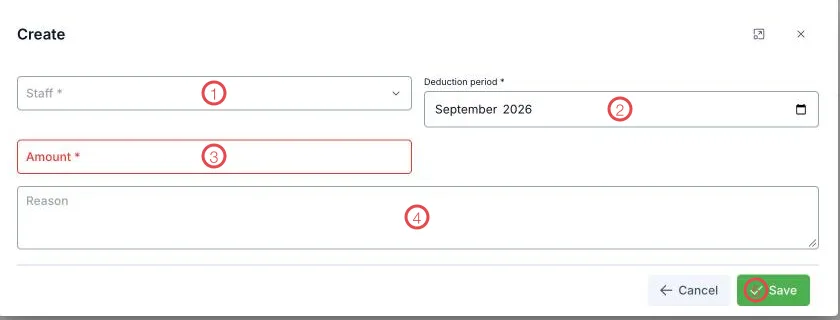
Illustration of the salary advance form
| Area | What goes in |
|---|---|
| 1. Staff (required) | Who receives the money. |
| 2. Deduction period (required) | The pay period this comes off. Advanced now but deducted next month? Pick next month. |
| 3. Amount (required) | How much. |
| 4. Reason | Write it down for later. |
| 5. Save | Records the advance. |
Get the deduction period right the first time
Deduction period decides which payroll this lands on. Put it on the wrong month and one pay run is short while the next is over — and somebody has to explain it.
Related
- Payroll — the Total advance column comes from here.
- Bonus / Penalty — the month's other additions and deductions.