Unified Messaging
A customer asks about prices on Facebook, books a time on Zalo, then follows up in the chat box on the website — three channels, three people on duty, and nobody knows what the others already answered. CluvixHealth brings every messaging channel into one shared inbox: consultants reply in a single place, every conversation has a clear owner, and the clinic can measure how fast it answers customers (patients).
The channels that come together here
| Channel | Where the customer writes from |
|---|---|
| Zalo OA | The clinic's official Zalo page |
| Personal Zalo | A consultant's own Zalo account |
| The clinic's Facebook page | |
| The clinic's Instagram account | |
| Telegram | The clinic's Telegram channel |
| Website chat | The chat box embedded on the clinic's website |
Messages appear immediately in the inbox — nobody has to refresh anything. An administrator connects each channel's page or account once, and from then on every message lands in the same list.
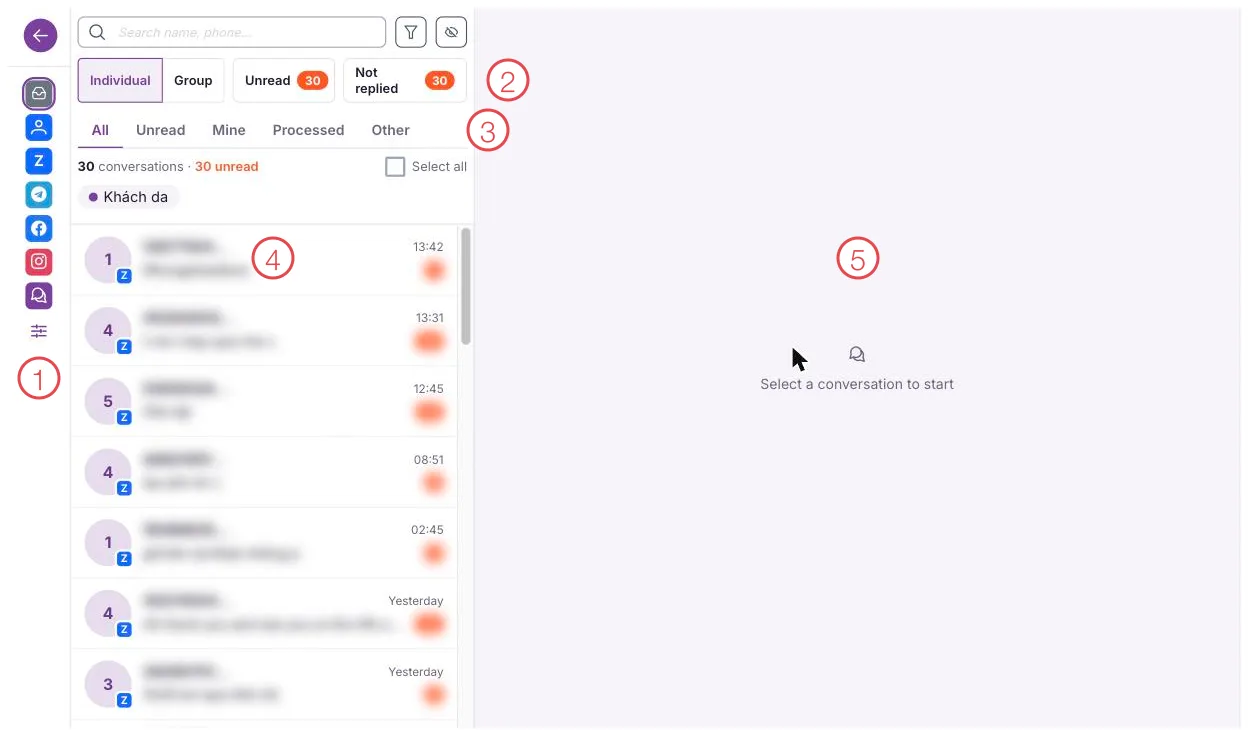
Illustration of the shared inbox
| Area | What it is |
|---|---|
| 1. Channel rail | One icon per channel. Click one to see only that channel's conversations. |
| 2. Quick filters | Individual / Group, with counts of unread and not replied — one glance tells you how many customers (patients) are waiting. |
| 3. Category tabs | All, Unread, Mine, Processed, Other. |
| 4. Conversation list | Customer name, latest message, time, and a red count of unread messages. Names and content are blurred in this illustration. |
| 5. Reply pane | Pick a conversation on the left and its messages and the compose box appear here. |
Every conversation has one owner
This is what changes daily work the most. The software hands out new conversations in two ways, whichever the clinic prefers:
- The software assigns them — only to someone who covers that channel, is marked available, and has not reached their own maximum workload. Among those, the person currently handling the fewest conversations gets it, so messages are shared evenly instead of piling onto whoever clicks fastest.
- Staff pick them up — conversations sit in a shared queue and whoever is free claims one. If two people claim at the same moment only one of them gets it, so two consultants never end up messaging the same customer.
Whoever replies to the customer first is recorded as the person who took that conversation, and if it has no owner yet they are assigned it automatically. At the end of the day managers know exactly who looked after which customer (patient).
Who can see which conversations
The clinic picks one of two viewing modes:
| Mode | What staff can see |
|---|---|
| Open | Every conversation in the clinic, handy when people cover for each other |
| Restricted | Only their own conversations plus those nobody has claimed yet |
Personal Zalo is always stricter: a personal Zalo account belongs to one specific staff member rather than being a shared mailbox, so only people given a role on that account can read its conversations. Managers granted the view-all permission see everything, in either mode.
Response time commitments
The clinic sets a response time commitment for customer (patient) messages, with two deadlines:
- Minutes to the first reply — measured from the customer's message to the moment someone genuinely answers.
- Minutes to resolution — measured up to the point the conversation is closed.
Both deadlines are calculated the moment a conversation opens. If one passes with no reply, the conversation is flagged as overdue, the person in charge is notified inside the software straight away, and the miss is recorded for managers to review later.
Yesterday's list of overdue conversations is the most useful thing to look at each morning: misses clustered in one time slot mean too few people on duty then, while misses clustered in one channel mean that channel needs more ready-made replies.
Customers (Patients) rate the conversation afterwards (Patient)
As soon as a conversation is marked resolved, the software sends the customer a short survey through the very channel they were chatting on, inviting a score from 1 to 5. The customer (patient) replies with the number, plus a comment if they want; that score is attached to the staff member who was handling the conversation at that moment.
The clinic switches this survey on or off as it likes. When it is on, you get an average satisfaction score and a response rate — evidence for rewarding consultants instead of going on impressions.
Shared ready-made replies
Price lists, opening hours, directions to the clinic — consultants retype them dozens of times a day. The software stores those passages as ready-made replies, inserted word for word with a single click.
Each staff member builds their own set; managers build a set shared across the whole clinic, so everyone answers in the same voice.
Messages tied straight to the customer (patient) record
When the phone number of the person chatting is known, the software looks it up in the customer (patient) list and links the conversation to the right record: the consultant chats while seeing that customer's treatment history, upcoming appointments and care notes.
- No record for that number → the software creates a new customer record for the consultant to follow up.
- Two records share the number → the software lets staff choose, so nobody is linked by mistake.
- You link one manually → next time that customer writes from the same account, the software remembers and links the same record again.
Related
- OmniChannel module — the screens of the unified inbox.
- Zalo Integration — Zalo OA, ZNS and the Zalo Mini App.
- Customer Care (Patient Care) module — following up after the conversation.