The Customer Journey (Patient)
Every customer in CluvixHealth is always at one specific stage of the road from first hearing about the clinic to finishing treatment. That stage is the customer journey, and the software moves it for you as you work — booking, checking in, raising an order, taking payment — instead of asking anyone to remember to update it by hand.
Where to see it
Open a customer's profile and the journey is the chip with the flag icon in the row of details at the top, next to the phone number and the branch.
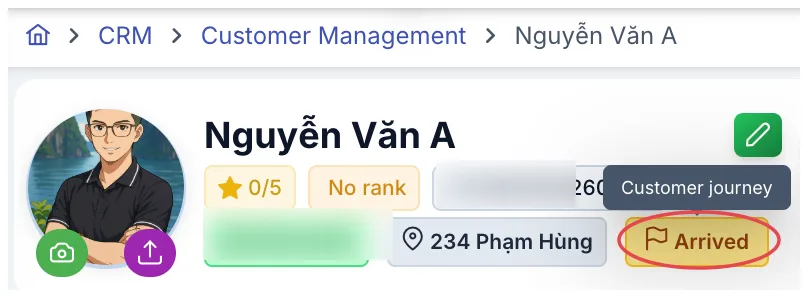
Illustration of the journey chip on a customer profile
In customer (patient) lists it is the Progress column. The colour tells you at a glance where someone is: amber means still being pursued, green means a real customer (patient), red needs attention, purple is a special role.
The stages
When a customer (patient) first appears
| Stage | What it means |
|---|---|
| Lead | A new prospect, not yet met in person. This is the default when sales, telesales or marketing create a customer. |
| Contact | Someone created by another team who needs to show up in the day-to-day care list rather than sitting in the sales pipeline. |
| Zalo customer | Someone who opened the clinic's Zalo Mini App and registered themselves. The software creates the profile so nobody who showed interest gets lost. |
| Ticket | A support request recorded as a profile. Sales turn it into a Lead when real follow-up begins. |
| Legacy system | A customer loaded in from an older data file. The marker separates historical customers (patients) from new ones so the figures stay honest. |
Once booked and seen
| Stage | Changes when |
|---|---|
| Appointment | An appointment has just been booked. |
| Cancelled appointment | The appointment was cancelled. The customer stays in view to be rebooked rather than disappearing. |
| Arrived | The customer checks in at the desk, or an order is raised for them. This is the "we have met" milestone. |
Closing, or not
| Stage | Changes when |
|---|---|
| Agreed | You record that the customer accepted the treatment plan after the consultation. |
| Disagreed | The customer heard the consultation but did not commit. From here they can go back to Lead for further care — someone who says no today is not someone lost. |
| Deposit | The customer puts down a deposit to hold a service. |
Treatment and afterwards
| Stage | Changes when |
|---|---|
| In treatment | The first treatment session is recorded. |
| Completed | At least one service is both finished across its whole course and paid in full. This is what the journey is aiming at. |
| Complaint | A complaint has been recorded for them, so anyone opening the profile handles it with more care. |
| Collaborator | The customer has been set up as a referral partner — from customer (patient) to someone bringing customers (patients) in. |
| Stopped care | Staff have deliberately stopped pursuing this person. The profile stays; it just leaves the list of people to chase. |
The journey follows what you do
This is the valuable part: nobody has to remember to update it. You work normally and the software keeps up:
| What you do | The stage becomes |
|---|---|
| Book an appointment | Appointment |
| The customer checks in | Arrived |
| Cancel the appointment | Cancelled appointment |
| Mark the customer as a no-show | Back to Appointment |
| Record that they agreed / did not agree after the consultation | Agreed / Disagreed |
| Raise an order | Arrived |
| Take a holding deposit | Deposit |
| Record a treatment session | In treatment |
| Finish the course and collect the full amount | Completed |
| Raise a complaint | Complaint |
| Set the customer up as a referral partner | Collaborator |
Someone at In treatment, Completed, Complaint or Collaborator will not be pulled back to an earlier stage by a new appointment or a new order. The software only updates the journey for customers (patients) still in the earlier phases — which is why the figures do not jump around when a long-standing customer (patient) books again.
Open the customer list and look at the Progress column: amber is sales work still to be chased, red needs dealing with today (cancellations, refusals, complaints), green is already closed. Filtering by stage is the quickest way to split up the day's work.
Can a stage go backwards
Yes, but only along routes that are laid out in advance. The software checks every move, so nothing jumps from Lead straight to Completed, and a customer already in treatment cannot be dropped back to Lead.
The backward routes used most often:
- Cancelled appointment → Appointment when the customer rebooks.
- Disagreed → Lead when sales decide to keep working on them.
- No-show → Appointment when the visit is rescheduled.
Three things people mix up
| What it is for | Who changes it | |
|---|---|---|
| Customer journey | Which stage of the road the customer is on | The software, following what you do |
| Membership tier | The benefits earned from accumulated points (VIP, Gold, Silver…) | The clinic defines its own tiers in Settings |
| Customer source | Which channel brought them in (Facebook, Zalo, a referral…) | Set once when the customer is created, rarely changed |
All three appear on the profile as coloured chips, so they are easy to confuse. The quick test: the journey carries a flag icon, the membership tier sits next to the points star, and the source lives in the detailed information.
A customer sitting at Complaint tells you nothing about how far the complaint itself has got. Each complaint carries its own status — raised, doctor assigned, resolved, closed — over in Complaints.
Related
- Customer Details — where the journey chip appears.
- Membership Tier — benefits by points, quite separate from the journey.
- Complaints — the handling status of each individual complaint.