Warehouse Overview
Gloves, needles, dental materials, dressings — nobody mentions them until the shelf is empty at exactly the wrong moment. Warehouse & Supplies manages all of it: buying it in, using it on each treatment, moving it between stores, counting it, and warning you before it runs out.
The module is for storekeepers, nurses, clinic managers and whoever does the buying.
This module covers medical supplies and equipment. Medicines and the drug store have their own module — Pharmacy & drug store.
How to open Warehouse & Supplies
On the purple bar at the very top, click the grid icon (four small squares). A board of modules appears, each one an area of the clinic's work.
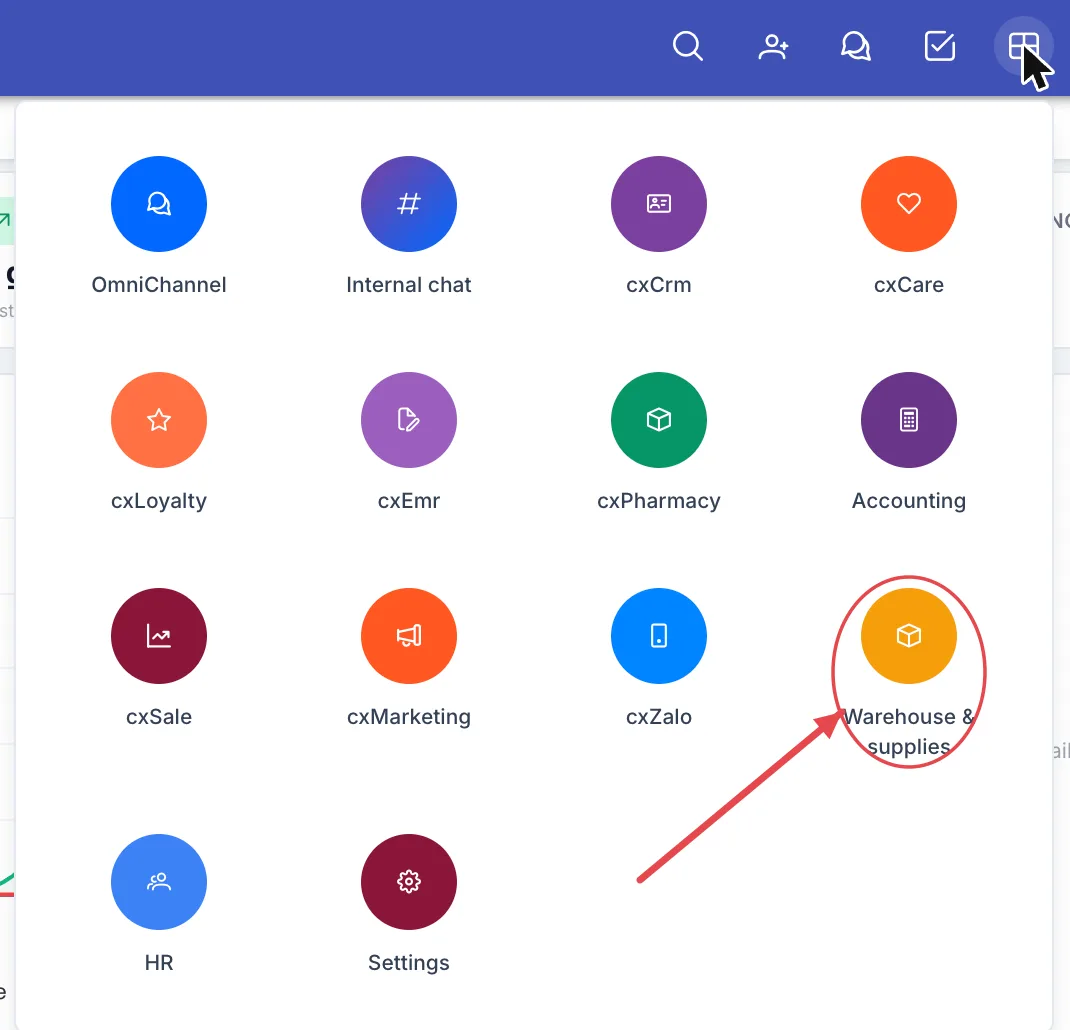
Illustration of the module board
Look for the Warehouse & supplies tile — a box icon on a round amber background. Click it to open the module.
What's on the working screen
Opening the module lands you on the Dashboard, which answers the storekeeper's two questions: where is the money sitting and what is about to run short.
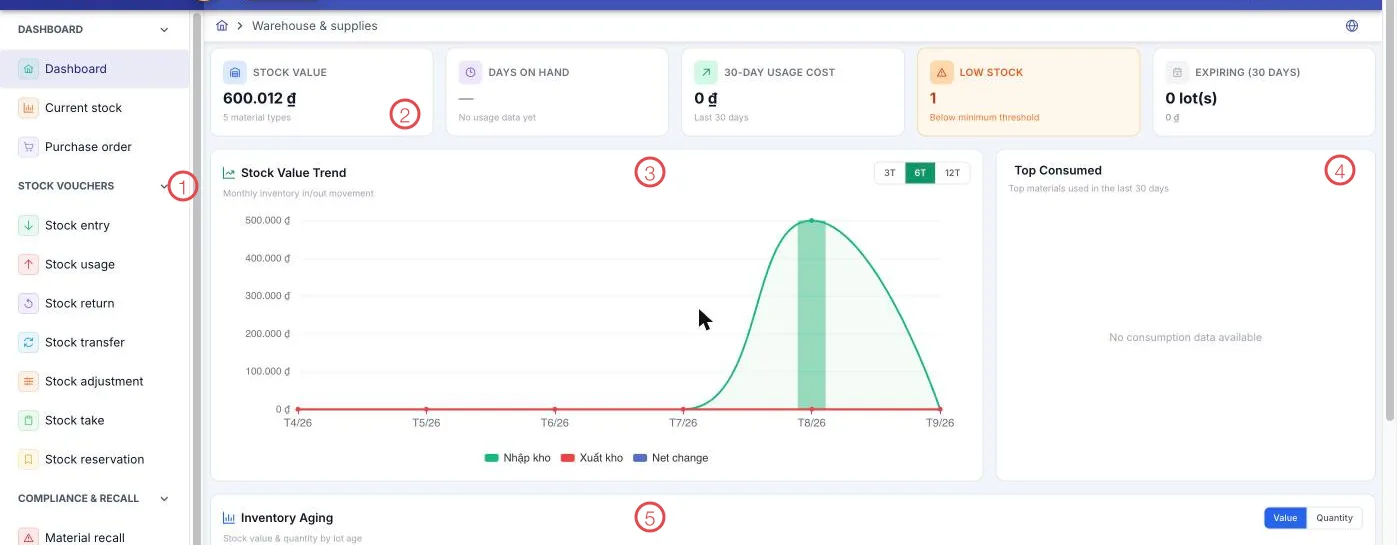
Illustration of the Warehouse working screen
| Area | What it is |
|---|---|
| 1. Left menu | The module's items, grouped: Stock vouchers, Compliance & recall, Report. |
| 2. Figure cards | Stock value (with the number of material types), Days on hand, 30-day usage cost, Low stock (below the minimum threshold) and Expiring (30 days). |
| 3. Stock value trend | The store's value month by month, over 3, 6 or 12 months. |
| 4. Top consumed | The materials used most in the last 30 days. |
| 5. Inventory aging | Stock value and quantity by lot age — viewed by Value or Quantity. |
The Low stock card has its own amber background for a reason: it is a list of things to do now, not a number to admire.
The path of a roll of cotton
The life of a supply item runs through six steps, and each one is an item on the menu:
- Keep supplier prices. Hold the service price list for labs and outsourced work, so the price is known the moment work goes out.
- Receive. When it arrives, create a stock entry, with lot number and expiry where they apply.
- Use in treatment. A stock usage voucher records what was used; whatever comes back unused goes through stock return.
- Move between stores. Stock transfer when one branch is short and another has spare.
- Keep the figures honest. Stock takes on a schedule, and a stock adjustment with a stated reason whenever the count differs.
- Reserve ahead. Stock reservation holds materials for a booked treatment so they are still there on the day.
When a manufacturer announces a recall, Material recall handles the rest: find the lot, bring it back, record the outcome.
What the module covers
Overview
| Menu | What it does |
|---|---|
| Dashboard | Stock value, turnover, consumption, low-stock and expiry warnings. |
| Current stock | What is left of each material, by store and branch. |
| Purchase order | Suppliers' service price lists: labs and outsourced work, priced per unit. |
Stock vouchers
| Menu | What it does |
|---|---|
| Stock entry | Record materials arriving, with quantity and cost. |
| Stock usage | Issue materials for treatment or for other purposes. |
| Stock return | Take back what was issued but not used. |
| Stock transfer | Move materials between stores and branches. |
| Stock adjustment | Correct the figures to match reality, with a reason. |
| Stock take | Count physically and compare with the software. |
| Stock reservation | Hold materials for an upcoming treatment. |
Compliance & recall
| Menu | What it does |
|---|---|
| Material recall | Raise and follow a recall when a lot has to come back. |
| Controlled substance log | A separate register for materials that need tight control. |
Report
| Menu | What it does |
|---|---|
| Report list | The way in to the reports: Stock card, Stock aging, Slow-moving stock, Stock valuation, Stock entry history, Stock usage history. |
Why use it
- Know before you run out. Set the minimum once and the software counts for you and puts it on the dashboard — no more discovering the gloves are gone once the patient is in the chair.
- See the money on the shelf. Stock value, turnover and inventory aging show where capital is tied up and what has not moved in a long time.
- Reserve for booked treatments. Materials for next week's implant are held aside instead of being used by another case.
- Transfer instead of buying again. Short at one branch and spare at another is a transfer — cheaper and faster than a new order.
- Registers ready for inspection. The stock card, the controlled substance log and the entry and usage histories all come from live data.
Related
- Pharmacy & drug store — the separate module for medicines.
- The Warehouse & Supplies module — the short introduction in Getting started.
- Medical Records Overview — where materials get used, treatment by treatment.