Stock Transfer
Branch A is out of gloves while branch B has a whole box — that is what stock transfer is for. The voucher records where the goods leave from, where they go, what they are, and follows them until the receiving side confirms.
The list screen shows Form code, Source → Destination, Status, Shipped at, Received at and Created at.
Creating a transfer
Click Create:
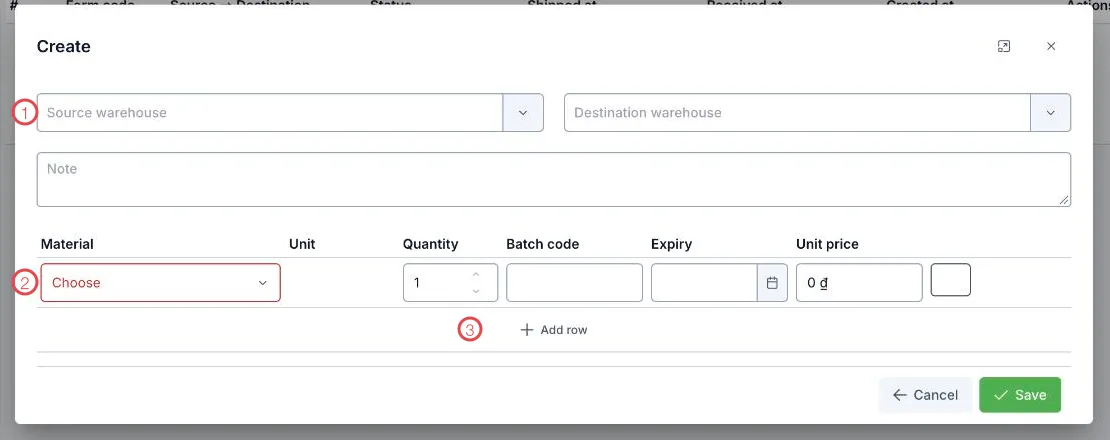
Illustration of the stock transfer form
| Area | What to enter |
|---|---|
| 1. Source warehouse and Destination warehouse | Where the goods leave from and where they go. |
| 2. The material line | Material (required), Unit, Quantity, Batch code, Expiry and Unit price. |
| 3. Add row | Add another material to the same transfer. |
The Note box is for who is carrying it or when it is expected.
Transfer statuses
| Status | Meaning |
|---|---|
| Draft | Being written; nothing has left the store. |
| In transit | The source has shipped; the goods are on their way. |
| Received | The destination confirms receipt — both warehouses' stock updates. |
| Cancelled | Dropped. |
In transit is the valuable one: the goods have left one store and not yet reached the other, and both sides can see that rather than the stock appearing to vanish.
Transfer by lot to keep the expiry with it
Filling in Batch code and Expiry means the receiving warehouse gets the expiry date too, so its own expiry warnings keep working.
Related
- Current Stock — seeing who has spare and who is short.
- Stock Entry — buying new from a supplier instead.
- Warehouse Overview — the whole life of a supply item.