Material Recall
The manufacturer announces a recall on certain lots — the clinic's job is to find how much it still holds, who it was used on, and get it back. Material recall keeps all of that in one form, with a severity and a clear status.
The list screen shows Form code, Manufacturer recall code, Batch code, Severity, Status and Created at.
Raising a recall
Click Create form:
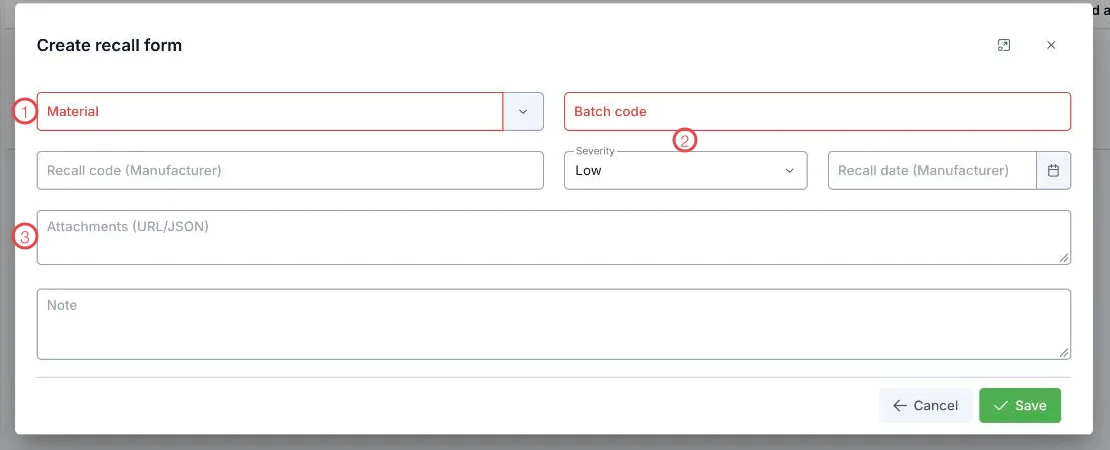
Illustration of the create recall form
| Area | What to enter |
|---|---|
| 1. Material and Batch code (required) | What is being recalled and which lot — exactly as the manufacturer states. |
| 2. Severity | Low, Medium or High, according to how serious the manufacturer says it is. |
| 3. Attachments | Paste a link to the recall notice so it is filed with the record. |
Two more fields: Recall code (Manufacturer) and Recall date (Manufacturer) — copy them from the notice so they can be quoted back to the supplier.
Recall statuses
| Status | Meaning |
|---|---|
| Draft | Just raised, collection not started. |
| In progress | Being worked: finding stock, contacting patients where needed. |
| Completed | Everything collected and dealt with. |
| Cancelled | Dropped, for example if the manufacturer withdraws the notice. |
Why recording the batch on arrival matters here
A recall filters by batch code. If the stock entry recorded the batch, you know immediately what is left and where the rest went. That is why a field that looks like paperwork on delivery day decides how fast you move when something goes wrong.
For High severity, get the goods out of the stores and treatment rooms first; the form can be completed afterwards. What matters is the trail: who collected, when, and how much.
Related
- Controlled Material Log — every use of the specially controlled items.
- Stock Entry — where batch codes are recorded.
- Current Stock — checking what is still on the shelf.