Used Coupons
Used Coupons records the history of every time a code was applied to a treatment order — both referral partner (CTV) coupons and promotion codes. Use this page to reconcile revenue, discount amounts, and commissions for each use, instead of opening every order to add them up by hand.
The screen is laid out like this:
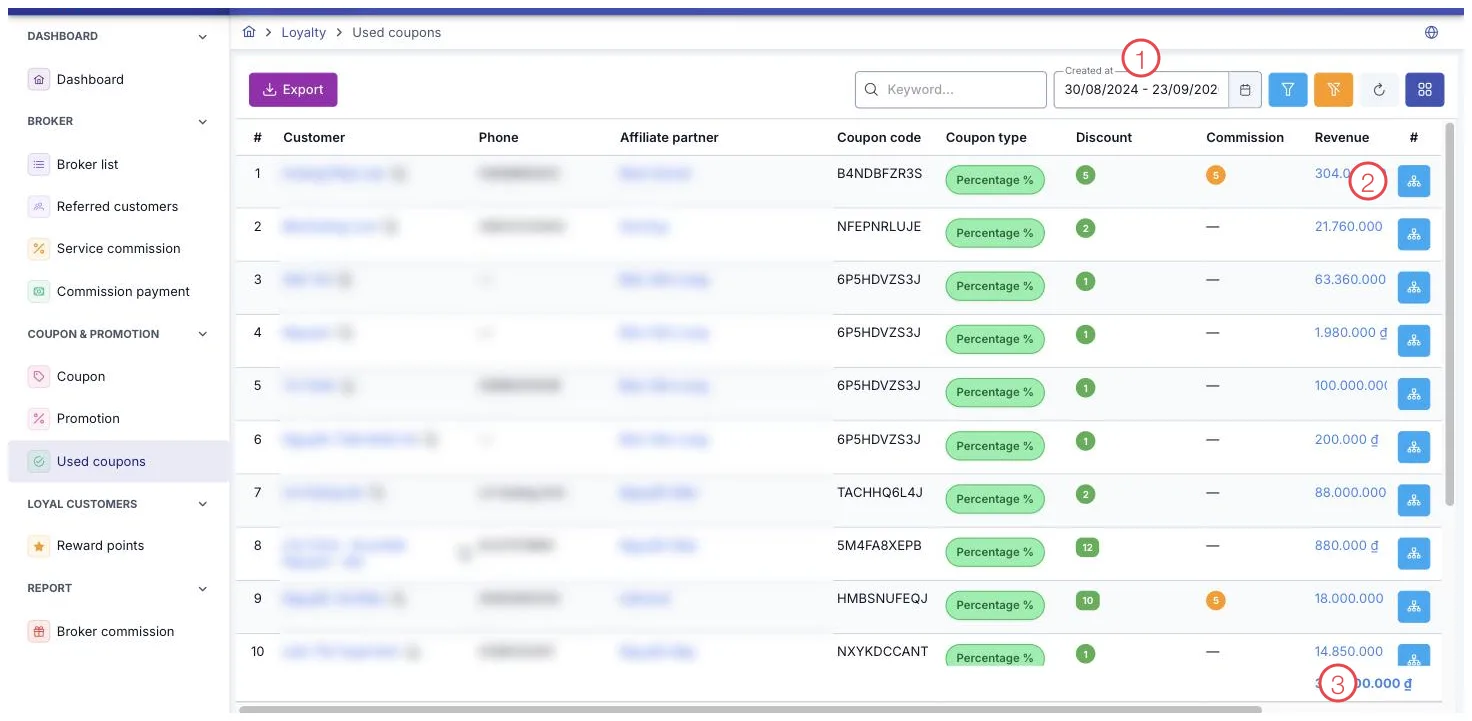
Illustration of the Used Coupons screen
| Area | What it is |
|---|---|
| 1. Created at filter | Defaults to this month so far — widen it to see older redemptions. |
| 2. Row button | Opens the customer timeline with that customer's full interaction history. |
| 3. Total row at the bottom | Adds up revenue and discount across every filtered row. |
Filters
Filter by Branch and a Creation Date range, which defaults to the start of the month through today. To look up older uses, widen the date range.
When a record is created
A record is created the moment you save a treatment order with a code applied, not at payment time. Each order can only have one code applied. To change or remove an applied code, do it from the order form in CRM — Create Order — and the history here updates automatically.
This is a view-only screen: the toolbar has an Export button, and each row has exactly one button, View Customer Timeline, to reopen that customer's full history. There's no edit or delete button — this is a history the software records automatically.
What the columns mean
| Column | Meaning |
|---|---|
| Coupon Type | A colored chip for the code's type: By % or Fixed Value. |
| Category | Whether the code is a partner coupon or a shared promotion. |
| Discount / Commission | Two colored badges: the discount percentage for the customer and the commission percentage for the partner, recorded exactly as they were at the moment the code was applied. |
| Revenue / Coupon Discount | Pulled from the related treatment order. |
The Discount and Commission columns record the exact percentages at the moment the customer (patient) used the code. If the original code is later edited or deleted, the figures here stay exactly as they were — so reconciling past orders always stays accurate, unaffected by later changes.
The total row at the bottom of the table adds up the revenue and discount amount for the entire filtered result, not just the page you're viewing — use this row to get the total for the whole filtered date range at a glance.
Related
- Coupons — manage coupon codes tied to each referral partner.
- Promotions — manage shared promotion codes for every customer.
- Create Order — where a code is applied to or changed on an order.