Reward Points
Reward Points is a history log of every time a customer earns points. Each row is one time a customer was credited with points, so you can trace exactly why a customer's point balance is what it is.
The screen is laid out like this:
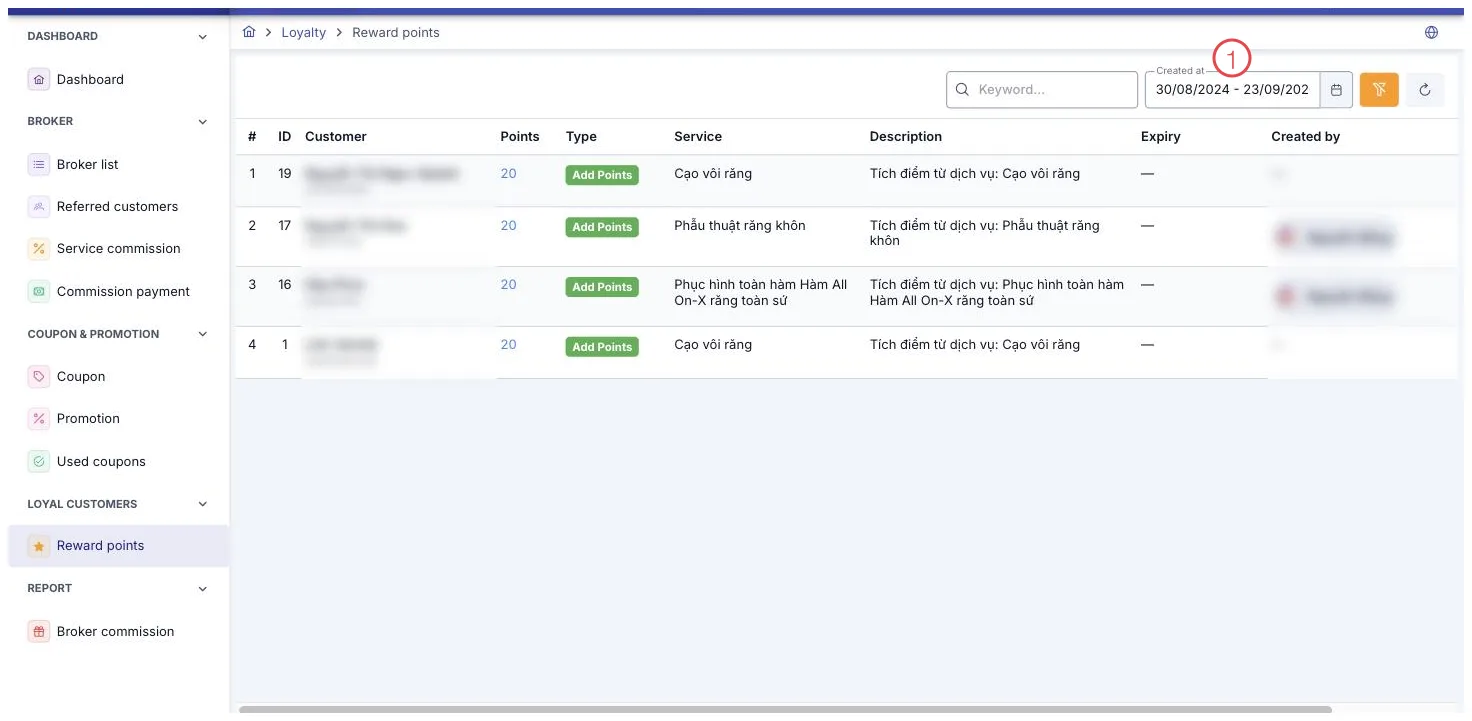
Illustration of the Reward Points screen
| Area | What it is |
|---|---|
| 1. Created at filter | Defaults to this month so far. Widen the range to see older point history. |
Filters
Filter by Keyword (customer name) and a Creation Date range, which defaults to the start of the month through today. To look up older history, widen the date range.
This is a view-only screen: there's no creating, editing, or deleting, and no action button on any row. The toolbar only has a clear-filter and a refresh button.
When points are earned
- Treatment services: points are earned when the treatment session's status changes to Completed — that is, when the service is done, not when the customer pays.
- Products and consultation fees: points are earned when the order is paid in full.
If a completed session is later un-completed, or a paid order is later un-paid, the software automatically reclaims the exact points it credited for that instance — so the points log always matches reality, with no manual adjustment needed.
The points earned for a service is a fixed number set in the service catalog, not scaled to the amount the customer pays. Two customers (patients) using the same service always earn the same number of points. To change how many points a service earns, edit it in the service catalog.
What the columns mean
| Column | Meaning |
|---|---|
| Type | A green Points Earned badge, marking this as an instance where the customer was credited with points. |
The remaining columns — customer (patient), points, date — are self-explanatory from their names.
Related
- Customer Details — view a customer's current total points.
- Used Coupons — history of discount codes applied to orders.
- Create Payment — where an order gets marked as paid in full.