Service Commission
Service Commission is the detailed record of every commission earned, where each row is a service the customer has paid for, referred by a broker (CTV). This is where accounting and clinic owners reconcile exactly how much each broker is owed before paying them.
From the left menu, open Broker > Service Commission to reach this screen.
The screen is laid out like this:
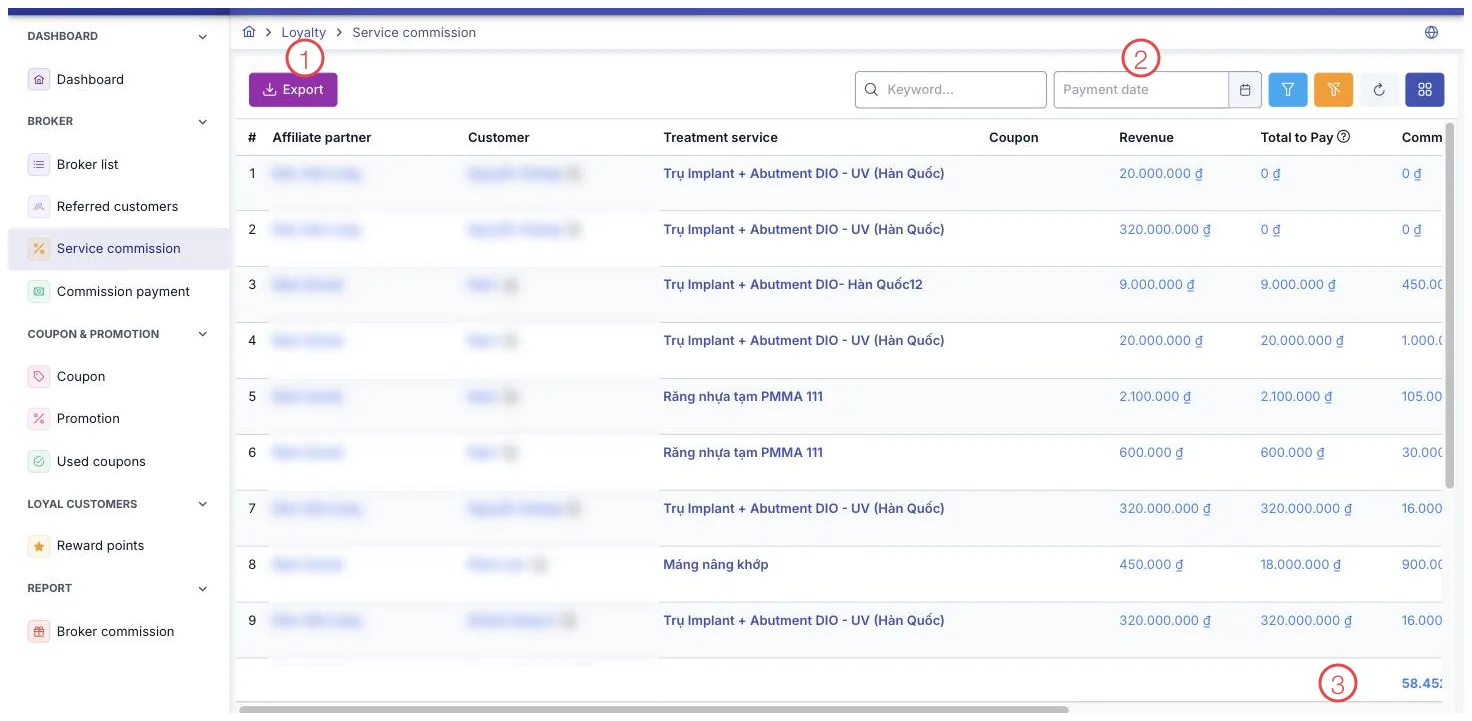
Illustration of the Service Commission screen
| Area | What it is |
|---|---|
| 1. Export button | Sends every filtered row to Excel for reconciliation. |
| 2. Payment date filter | Filters by the day the money actually arrived, not the day the row was written. |
| 3. Total row at the bottom | Adds up the commission across every filtered row, not just the page on screen. |
This screen is for viewing and reconciling
The toolbar only has an Export button, and there are no buttons at the end of any row. To pay a commission, go to that broker's detail page, open the Commission tab, and tap the credit card button on the exact service row you want to pay. That button is only enabled once the customer has paid the service in full and the commission still has an unpaid balance; otherwise the button is greyed out with a note explaining why, right there on the row.
Search and filter
The filters are: Brand, Broker Type, Broker Category, Branch, and Payment Date — this filters by the actual date the money came in, not the date the service or order was created.
How commission is calculated
Commission is locked in every time the customer makes a new payment for that service, following 3 cases:
- Order uses this broker's own percentage-type coupon — commission equals the amount just paid multiplied by the commission percentage printed on the coupon.
- Order uses a fixed-value coupon — commission is split proportionally to the share of the service's total price that was just paid.
- Order uses no coupon — the software takes the broker's commission rate at the moment they were assigned to the service and multiplies it by the amount just paid.
Because commission is locked in per payment, a customer paying in several installments means the broker's commission also builds up gradually with each installment, not all at once when the order is created.
What some columns mean
| Column | Meaning |
|---|---|
| Treatment % | The treatment service's completion level; shows "—" if not applicable. |
| Commission enabled | "Yes" or "No" — whether this service earns commission or has it turned off. |
| Commission / Remaining | Both show 0 on a row where commission is turned off. |
| Orange warning icon | The broker on this service has since been changed to someone else — the figures shown stay as they were originally recorded, matching real history. |
The total row at the bottom of the table adds up commission for the entire filtered result, not just the rows on the current page.
Filter by one broker and a Payment Date range, then check the total row to know the exact commission generated in that period before moving to Commission Payment to compare against what's already been paid.
Related
- Broker List — each broker's default commission rate.
- Commission Payment — the actual payment rounds made to brokers.
- New Payment — where a customer's payment is recorded.