Creating a Promotion
A promotion is an open voucher: printed on a leaflet, slipped into an order, handed out at an event, given to someone to try the clinic. Whoever holds the code can use it — they do not have to be an existing customer, and it is not tied to anybody.
Because each run of leaflets carries its own codes, the clinic can tell which run brought people in — 500 leaflets in neighbourhood A against 500 in neighbourhood B, and at the end of the month the usage figures say where to keep spending.
How a promotion differs from a coupon
The two look alike — both are discount codes — but they do quite different jobs.
| Promotion | Coupon | |
|---|---|---|
| Who gets it | Anyone — leaflets, events, passers-by | Tied to one referral partner |
| Who earns commission | Nobody; this is marketing spend | The partner who owns the code |
| Created where | Right on the Promotion screen, which has a Create button | From a partner's row on Broker List |
| Batch creation | Yes — a whole run of codes at once | One at a time |
| Scope | Can be limited by brand, branch and service group | Applies generally |
| What it measures | How well a campaign or area performed | How well a referrer performed |
Put simply: a coupon answers "who brought this customer in", a promotion answers "which way of reaching people works".
Opening the form
Go to Promotions and click Create on the toolbar.
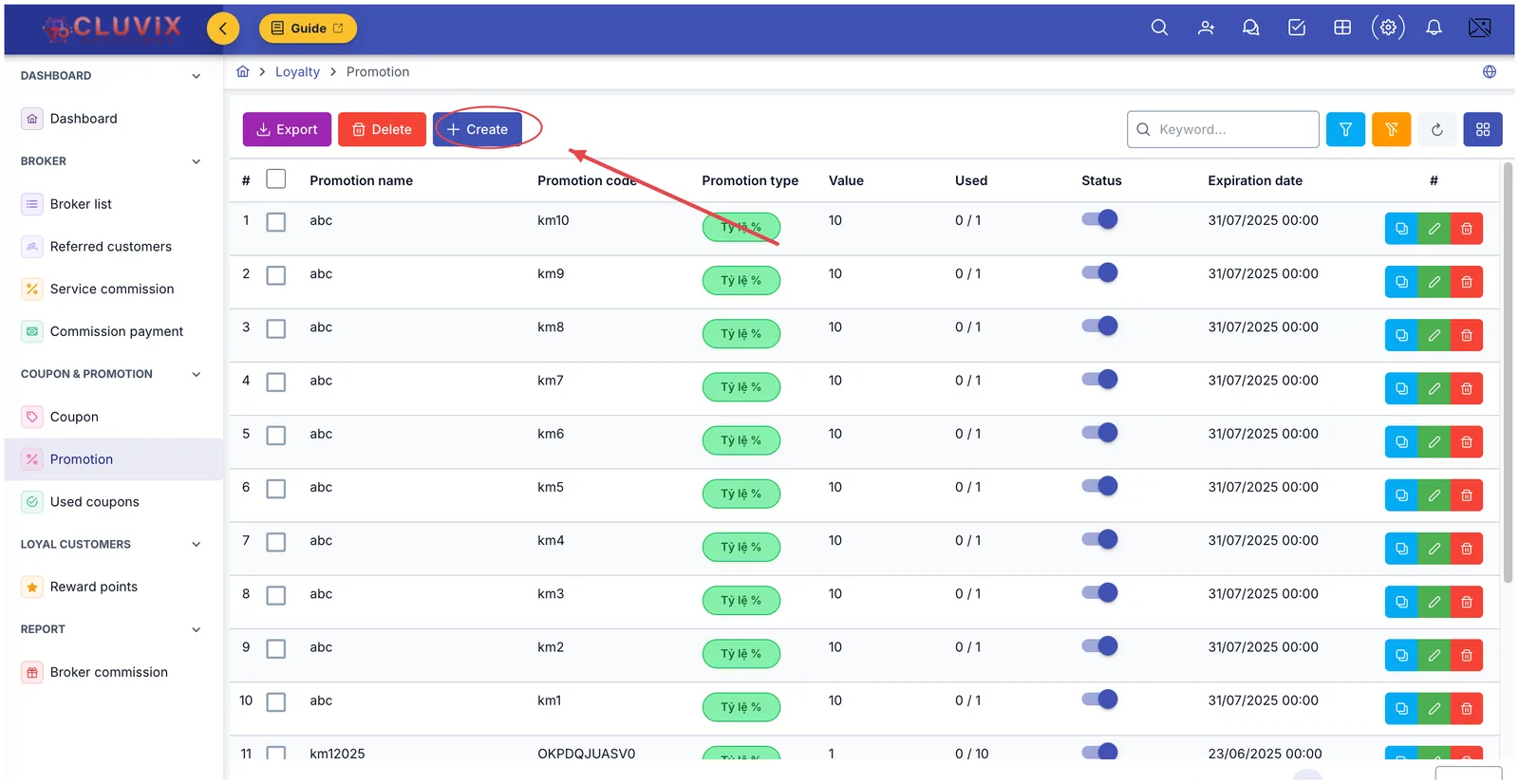
Illustration of the Create button on the Promotion screen
Filling in the form
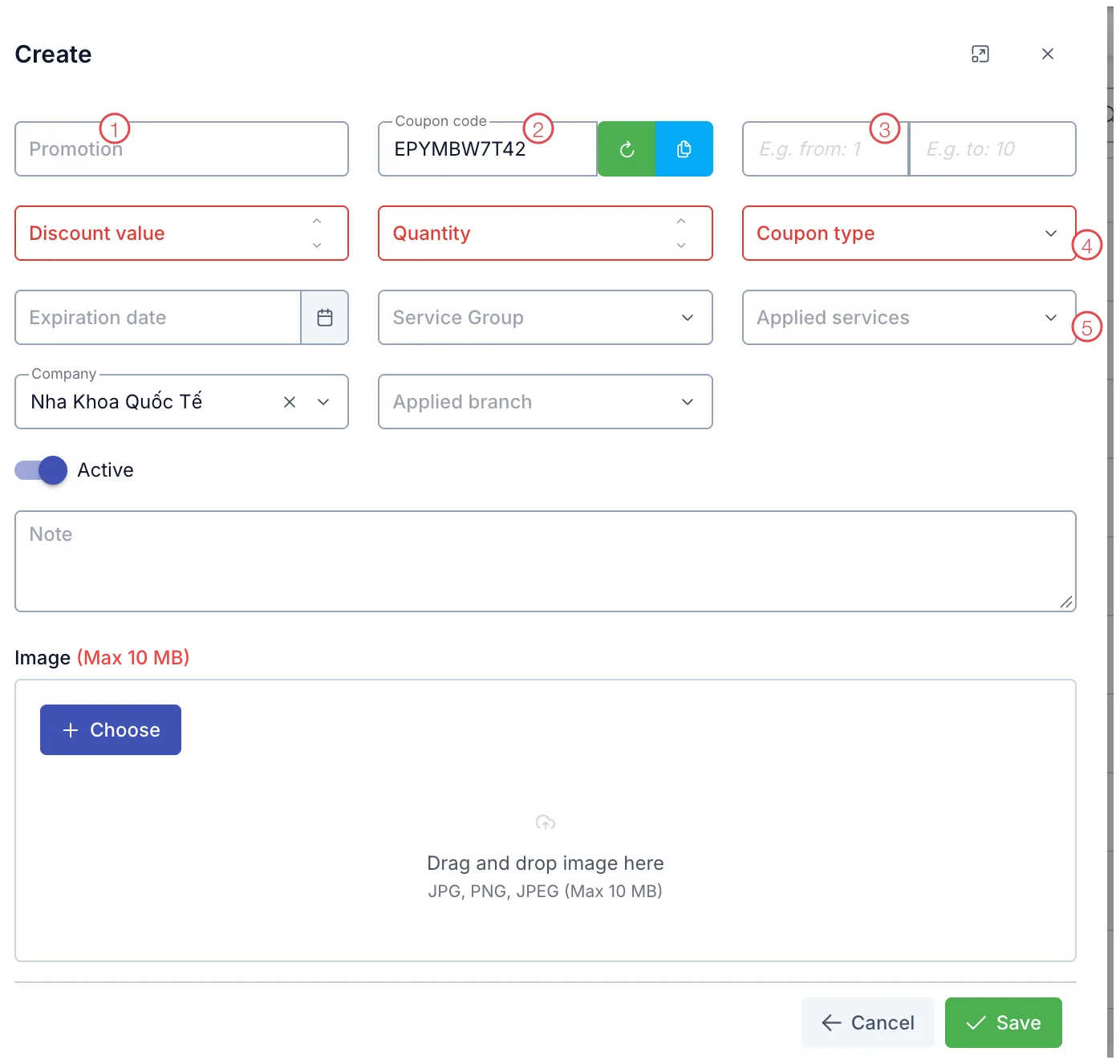
Illustration of the Create promotion form
| Area | What to enter |
|---|---|
| 1. Promotion | The name of the run, for example "Cau Giay leaflets, October". This is what you will search for later, so make it memorable. |
| 2. Coupon code | The software generates one. The green button generates another, the blue one copies it. Type your own if you want something easy to read on a leaflet. |
| 3. E.g. from · E.g. to | The number range used to generate a whole batch at once — see below. |
| 4. The three red fields (required) | Discount value, Quantity (how many uses the code allows), Coupon type (percentage or fixed amount). |
| 5. Scope | Service group and Applied services restrict the code to certain treatments; Company and Applied branch restrict it by site. Leave them empty to allow everything. |
The rest: Expiration date (empty means no time limit), the Active switch, a Note box, and an Image up to 10 MB to use as the background when the code is printed or sent.
Click Save and the code joins the list, ready to use.
Set the codes up at the start of the month with Active switched off, and turn it on the day the campaign opens. Nobody applies a code early, and you still have time to get the leaflets printed.
Generating a batch from a number range
This is what makes promotions suit leaflet campaigns. Instead of creating a hundred codes by hand, set E.g. from: 1 and E.g. to: 100 — the software produces a hundred codes differing only in their final digits, sharing one image and the same discount terms.
One code per customer buys you two things:
- Each leaflet works exactly once, so nobody screenshots it for the whole group chat.
- You know precisely how many leaflets came back — count the used codes in that batch.
One batch for neighbourhood A, another for neighbourhood B, another for codes slipped into orders — and name each run clearly. Comparing usage across batches at the end of the month tells you which channel is worth repeating and which to drop.
Measuring a campaign
On the Promotions screen, the Used column shows used / total allowed — one line tells you how many customers (patients) a code has brought in.
For the detail, open Used Coupons: every redemption with the customer, the date, what the order was worth and how much was discounted. That is where the most expensive question about any campaign gets answered — what the discount actually bought in revenue.
This is deliberate: changing a live code's value would distort the orders that already claimed it. To change the terms, duplicate the old code and edit the copy — the duplicate button is in the row's button group.
Related
- Promotions — the list, its filters and row actions.
- Coupons — partner-linked codes that pay commission.
- Used Coupons — every redemption, for reconciliation.