The Zalo Mini App for Partners
Referral partners who have sent someone to the clinic usually end up messaging to ask: "has my customer (patient) been in yet?", "did they go ahead?", "how much am I owed this month?". CluvixHealth ships a Zalo Mini App just for partners so they can answer all of that themselves — and add customers and book appointments without ringing the front desk.
Partners only need to open Zalo; there is no separate app to install.
The screenshots below are the Vietnamese version. The management software your own staff use is available in English like every other screen.
Home: the whole picture at a glance
Opening the Mini App shows three figures that belong to that partner alone, along with their personal referral code.
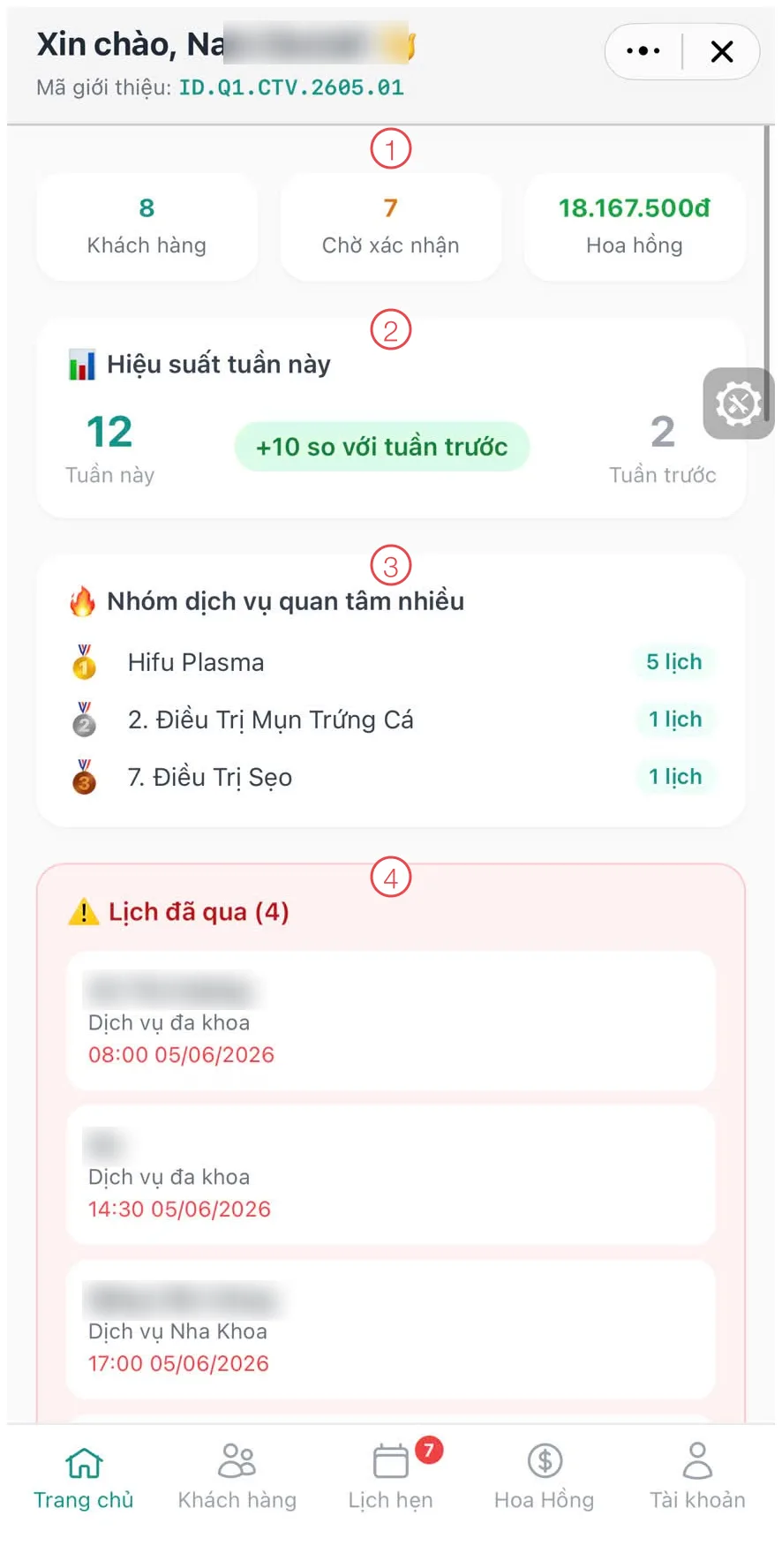
Illustration of the partner's home screen
| Area | What it is |
|---|---|
| 1. Three figures | Customers (Patients) referred, appointments awaiting confirmation, and total commission. |
| 2. This week's performance | Appointments this week against last week, with the difference shown so they can see the trend. |
| 3. Most requested service groups | What their customers ask about most — a hint about what to introduce next. |
| 4. Past appointments | Bookings whose time has passed without the customer arriving, so the partner can chase them. |
The bar along the bottom has five sections: Home · Customers (Patients) · Appointments · Commission · Account.
Customers (Patients): adding their own (Patient)
Partners enter their own customers into the software rather than sending a name over and waiting for someone else to type it in.
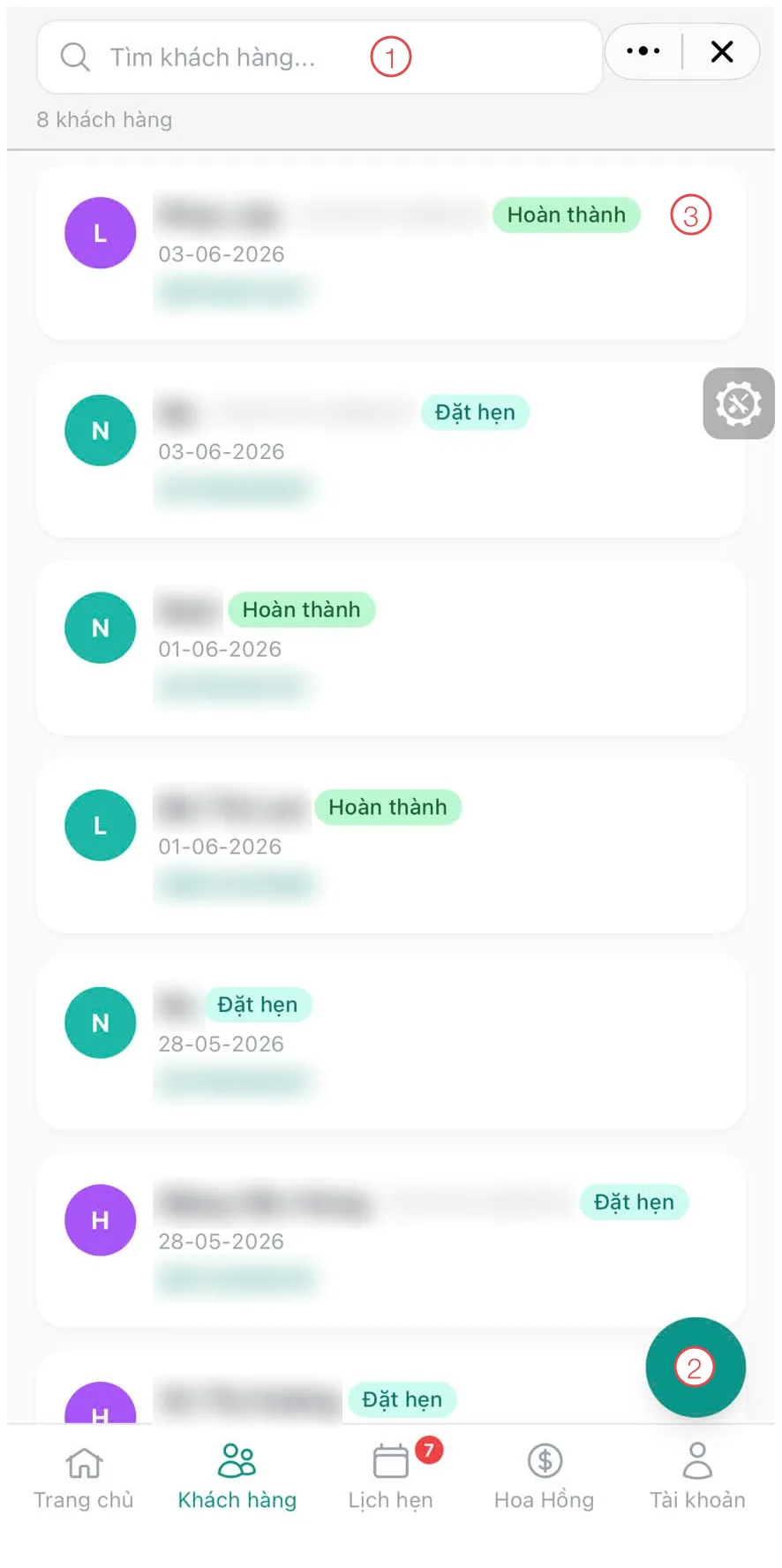
Illustration of the partner's customer (patient) list
| Area | What it is |
|---|---|
| 1. Search box | Find someone quickly within their own list. |
| 2. Round + button | Add a new customer, automatically credited to this partner. |
| 3. Status chip | Which stage the customer is at — Appointment, Completed… This is the same customer journey your staff see, shown to the partner exactly as it is. |
Each row shows the customer's name, code, referral date and phone number. The list contains only the customers that partner brought in — never anybody else's.
Appointments: booking for their own customers (Patients) (Patient)
This is where the most time is saved on both sides: the partner books straight from their phone, and reception does not have to take the call and type it up.
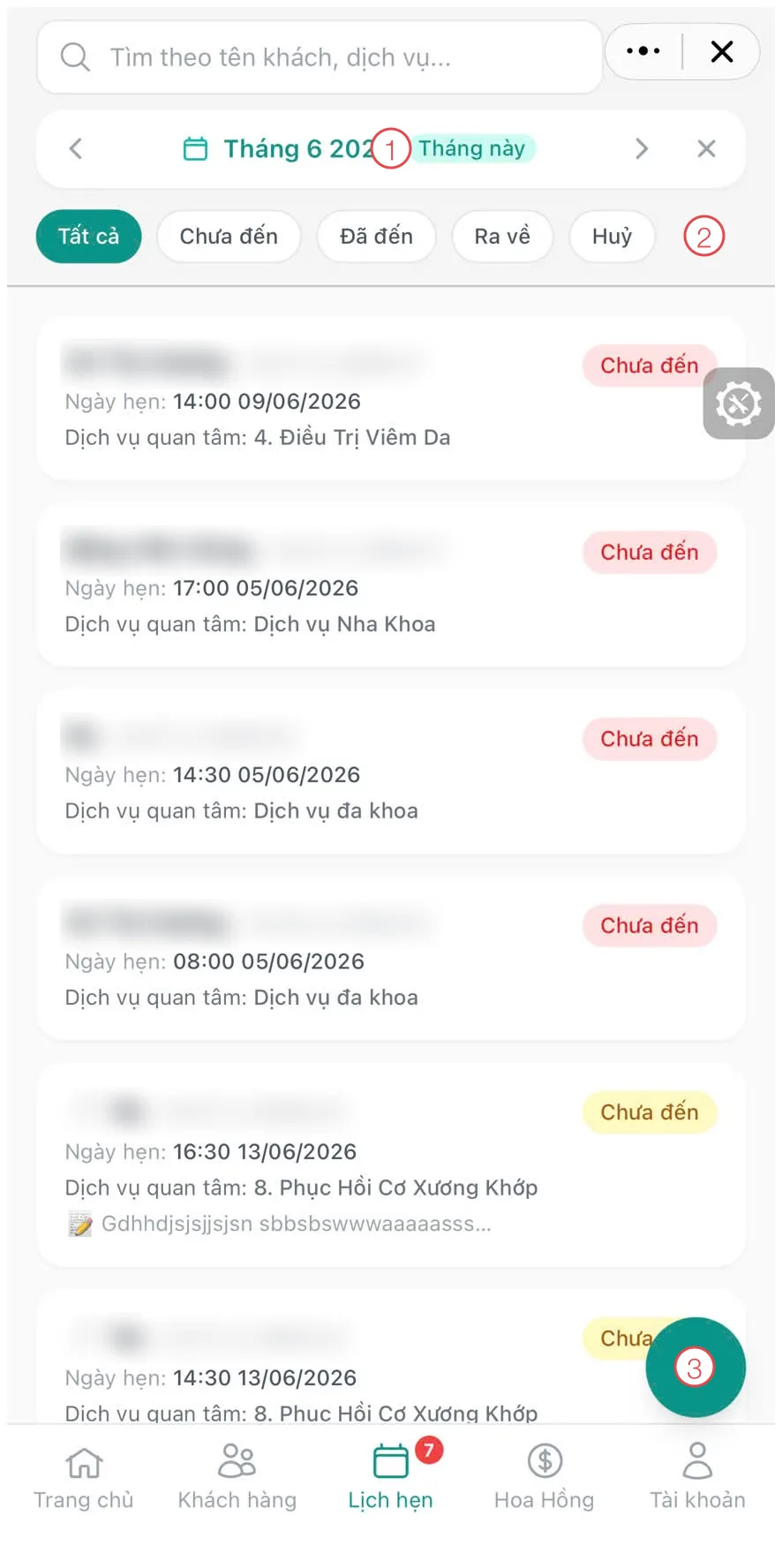
Illustration of the partner's appointment list
| Area | What it is |
|---|---|
| 1. Month selector | Browse month by month, with a This month button to jump back. |
| 2. Status filters | All · Not arrived · Arrived · Left · Cancelled — instantly showing who turned up and who missed their slot. |
| 3. Round + button | Book a new appointment for one of their customers. |
While booking, the Mini App offers the clinic's available time slots, so double-booking does not happen.
The status chip on each appointment follows what reception does at the desk. The moment a customer (patient) checks in, the partner sees it change to Arrived — no more back-and-forth messages.
Commission: what they closed, and what it earns
This is every partner's biggest question, and the Mini App answers it across three tabs.
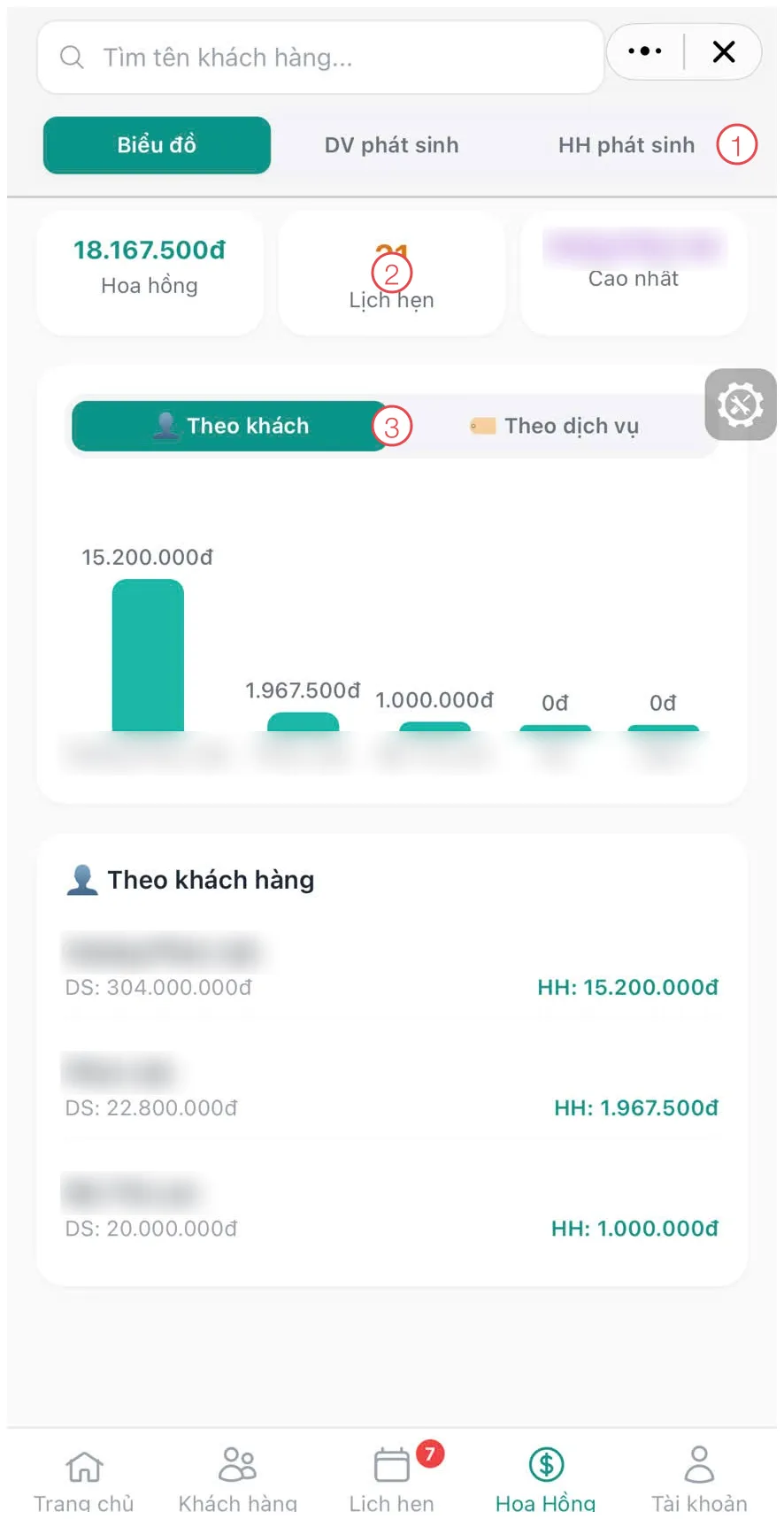
Illustration of the Commission section
| Area | What it is |
|---|---|
| 1. Three tabs | Chart (the overview), Services (each service the customer had, with the amount), Commission (each commission entry credited to them). |
| 2. Three figures | Total commission, number of appointments, and the customer who earned them the most. |
| 3. By customer / By service | Switch the chart between where the commission came from: which customer (patient), or which service. |
Below the chart is a list of customers (patients) with DS (what that customer spent) and HH (the commission the partner earned from them). One line tells them the value of the treatment and their share of it.
A partner can send a customer to any of the clinic's locations and the commission still lands with the right person — the Mini App's figures cover every branch together.
Account: referral code, balance and coupons
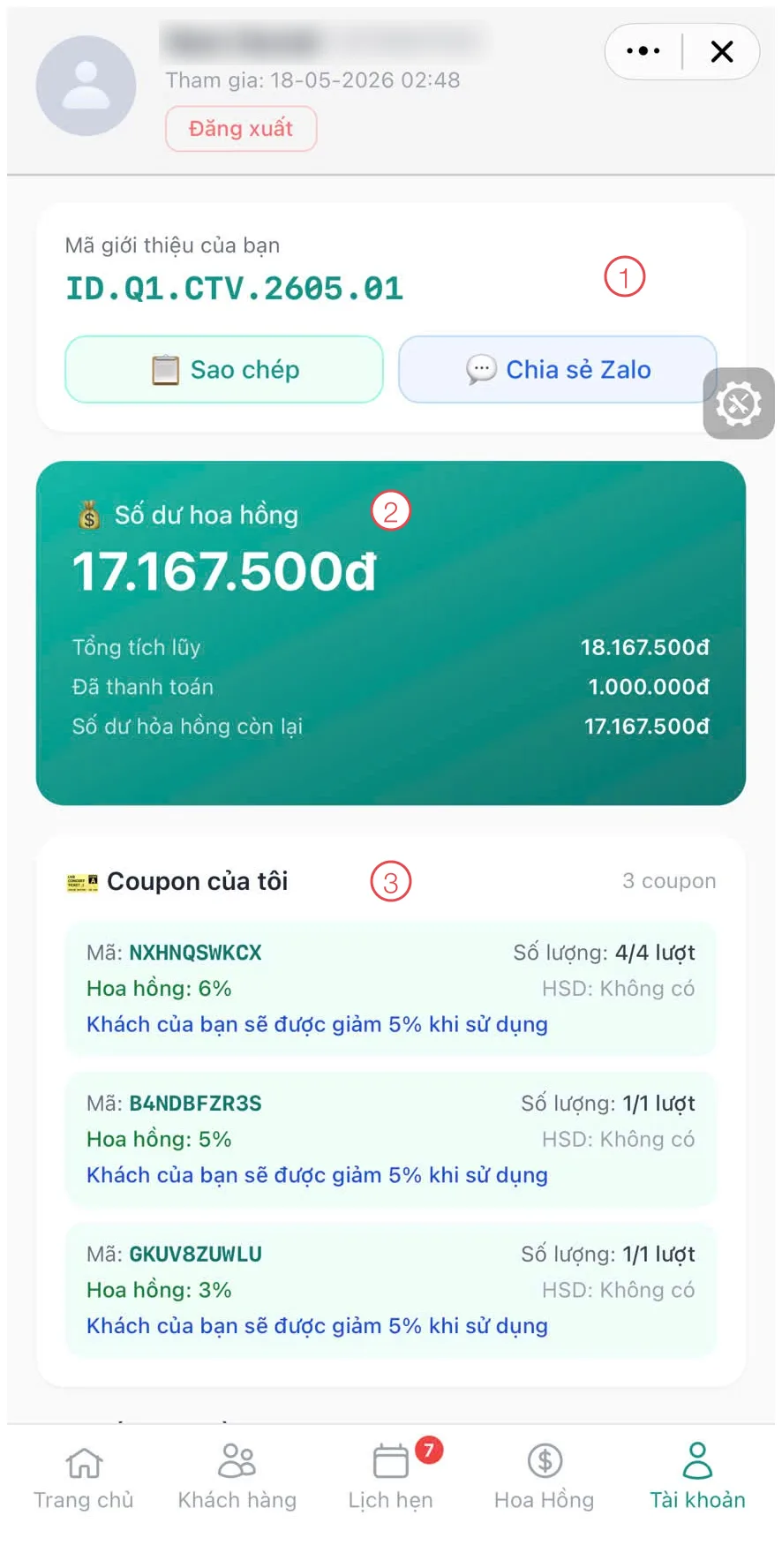
Illustration of the Account section
| Area | What it is |
|---|---|
| 1. Referral code | The partner's own code, with Copy and Share on Zalo buttons for sending it straight to a customer. |
| 2. Commission balance | Total earned, already paid and outstanding — three clear lines, no need to ask accounts. |
| 3. My coupons | The coupon codes the clinic issued them: uses remaining, their own commission percentage, and the discount the customer gets. |
The already paid figure matches what your accounts team records on Commission Payment in the management software — both sides look at the same number, so payout day needs no reconciliation.
What the clinic gets out of it
- Less work at reception. Partners add their own customers (patients) and book their own slots instead of dictating them over the phone to be re-typed.
- No more calls about commission. Balance, amount paid and every individual entry are already on screen, straight from the clinic's own data.
- More initiative from partners. Past appointments tells them who missed a slot to chase; most requested service groups tells them what to introduce next.
- Figures both sides trust. Partners see exactly what the clinic recorded, so there is nothing to argue about when it is time to pay.
Related
- Adding a Referral Partner — creating the profile and issuing coupon codes.
- Service Commission — the commission ledger on the clinic's side.
- Commission Payment — recording what has been paid out.