Retail Sale
Not everyone at the pharmacy counter has just been examined. Someone drops in for painkillers, a patient's relative comes back for more of what was prescribed — those go through Retail sale: a quick order that takes the medicines out of stock and prints an instruction slip to take home.
The list screen

Illustration of the Retail order screen
| Area | What it is |
|---|---|
| 1. Create | Opens the form for one retail order. |
| 2. Search box | Search by the retail customer (patient)'s details. |
| 3. Filter, clear, refresh | Narrow the list and reload it. |
The table keeps every order sold: Retail customer info, Status, Instruction, Created by and Created at — who sold what, to whom, with what advice.
Filling in a retail order
Click Create and the form opens:
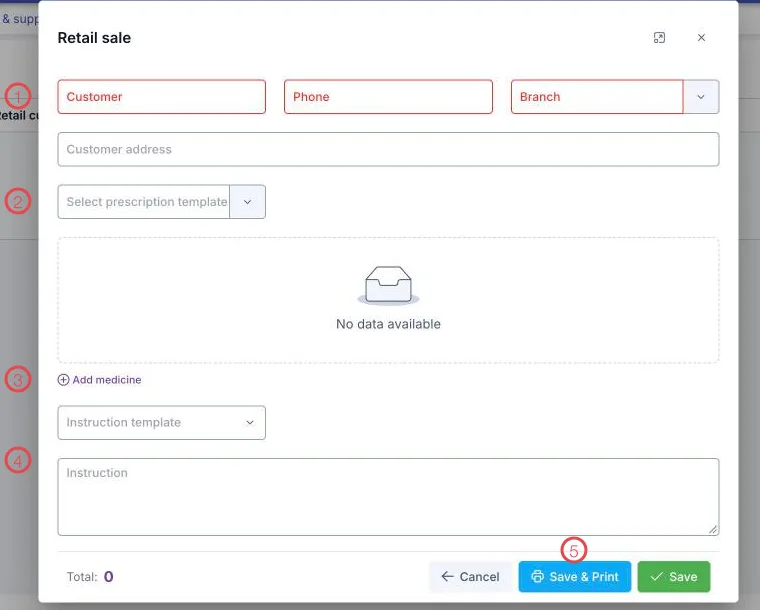
Illustration of the Retail sale form
| Area | What to enter |
|---|---|
| 1. The three red fields (required) | Customer, Phone and the Branch selling. Patient address below it is optional. |
| 2. Select prescription template | Pull in a ready-made set of medicines — faster than picking each item for orders you repeat. |
| 3. Add medicine | Add each item to the order: name, quantity, dose. |
| 4. Instruction template and Instruction | Pick a ready-made set of instructions and adjust it, or type your own. |
| 5. Save & Print | Saves and prints the instruction slip. Save only saves. |
Bottom left is the Total, added up from the sale price of the medicines chosen.
Orders that repeat — painkillers after an extraction, prophylactic antibiotics — are worth building as a prescription template. At the counter you then pick the template, adjust the quantity and save.
Medicines sold here come off the right batch, so Inventory and the stock reports always match what is actually on the shelf.
Prescription basis — when selling a prescription-only medicine
Add a medicine that is marked prescription-only to the cart, and the software automatically opens a Prescription basis block right below, with a reminder:
This order contains a prescription-only medicine — a prescription basis is required for: (medicine name)
This block makes you declare which prescription the sale is based on, so a prescription-only medicine is never sold without a valid basis.
Basis type
| Basis type | When to use |
|---|---|
| National prescription code | The customer already has a prescription written and submitted to the National Prescription System — type the exact code into Prescription / order number. |
| Paper prescription from another facility | The customer brings a paper prescription written by another clinic or hospital. |
Fields required per type
| Field | Required when |
|---|---|
| Prescription / order number | Both basis types. |
| Date written | Both basis types. |
| Facility that wrote it | Only for Paper prescription from another facility. |
| Prescriber | Only for Paper prescription from another facility. |
Date written must be within 5 days of the sale date, and cannot be a future date. Past that, the software shows "The prescription is more than 5 days past its date" and blocks saving the retail order until you switch to a still-valid prescription basis.
If the cart still has a prescription-only medicine without a complete basis, the software blocks saving and names exactly which medicine is missing one, so you know what to fill in.
Related
- Prescriptions — medicines dispensed against a doctor's prescription.
- Prescription — a prescription written by this clinic, rather than one from elsewhere.
- Inventory — what is left after each sale.
- Pharmacy Overview — the whole life of medicine in the clinic.